The best Kinsta alternatives in 2026 are Rocon, Cloudways, Rocket.net, and WP Engine, offering similar performance at lower costs or with more flexibility.
Managed WordPress hosting demand has grown rapidly, with over 43% of websites powered by WordPress (W3Techs). Many users now seek alternatives due to Kinsta’s premium pricing and limited customization options. This has led to increased adoption of flexible cloud-based hosting platforms.
For example, a startup running multiple WordPress sites can reduce hosting costs by switching from Kinsta to Cloudways while maintaining performance through scalable cloud infrastructure. Similarly, agencies often choose Rocon for its advanced developer tools and staging environments.
If your goal is better pricing, scalability, or control, switching from Kinsta to a more flexible hosting provider can significantly improve both performance and ROI.
One of the biggest reasons users search for Kinsta alternatives is pricing. Kinsta’s entry plan starts at $35/month for a single site with 25,000 monthly visits, while alternatives like Cloudways start at $14/month and Rocon starts at $1.99/month with no per-visit caps. According to Kinsta’s own published pricing page, agencies managing 10 or more sites face plan costs starting at $115–$575/month, making cost control a primary driver for exploring alternatives.
Quick Summary / TL;DR
Short on time? Here’s the fast comparison:
| Your Priority |
Recommended Host |
What You’ll Notice |
Starting Price |
| Agency hosting with no traffic limits |
Rocon |
Isolated containers, white-label control, auto scaling |
$1.99/mo |
| Ultra-fast global delivery |
Rocket.net |
Edge caching with built-in CDN speed |
$25/mo |
| Flexible cloud scaling on budget |
Cloudways |
Pay-as-you-grow cloud options |
$14/mo |
| Enterprise tooling & premium support |
WP Engine |
Advanced dev tools and managed support |
$30/mo |
| Designer-friendly workflow tools |
Flywheel |
Clean UI and reusable site setups |
$15/mo |
| WordPress-native security ecosystem |
Pressable |
Automattic-backed protection stack |
$25/mo |
This comparison focuses on what matters most to agencies, including performance stability, scaling flexibility, workflow efficiency, pricing clarity, and multi-site management.
We’ve selected the 6 best Kinsta competitors 2026 and evaluated them based on speed, support quality, developer tools, and how effectively they handle multiple client websites.
Quick Answer
Kinsta alternatives include Rocon, Cloudways, Rocket.net, and WP Engine, which offer competitive pricing, scalable infrastructure, and strong performance for WordPress hosting. These platforms often provide more flexibility and cost-efficiency than Kinsta, making them ideal for startups, agencies, and growing websites.
Why Agencies Explore Alternatives to Kinsta
Kinsta delivers strong performance, but agencies managing multiple client sites often face structural limits that impact cost control, workflow speed, and branding flexibility. As operations scale, small platform constraints become bigger business decisions.
Pricing Spikes
Visitor-based billing can create unexpected cost jumps during traffic surges or client campaigns. Agencies working on retainers prefer predictable resource-based pricing so growth does not automatically mean higher monthly surprises.
Developer Limits
For advanced builds, restricted server-level control can slow things down. Teams running custom deployments, complex caching, or performance tuning often need deeper flexibility than tightly managed environments allow.
Multi-Site Overhead
Managing dozens of sites across separate dashboards increases admin time. Agencies benefit from centralized control panels that allow them to monitor performance, backups, and updates in one place.
White-Label Gaps
Many agencies resell hosting as part of their service stack. Limited branding control makes it harder to present hosting as their own solution, which is why white-label platforms are gaining attention.
Staging Constraints
Frequent updates require reliable staging environments. When staging access depends on plan level, agencies either upgrade or improvise, which can slow deployment workflows.
Why These Limitations Drive the Shift to Alternatives
The combination of unpredictable costs, operational friction, and limited developer flexibility has created strong demand for managed WordPress hosting alternatives. Modern agency-focused solutions aim to:
- Offer predictable, resource-based pricing instead of visitor-based surcharges
- Enable full developer access and advanced tooling
- Support multi-site management with centralized dashboards
- Provide white-label hosting for client-facing services
- Include integrated staging environments for safe, rapid deployments
By addressing these pain points, alternatives such as Rocon empower agencies to scale efficiently, maintain client satisfaction, and focus on growth rather than infrastructure limitations.
6 Best Kinsta Alternatives and Competitors in 2026
Kinsta is popular, but many agencies and developers start researching reliable alternatives to Kinsta when they need greater flexibility, scalable infrastructure, or more developer-focused control.
Below, we compare leading managed WordPress hosting options to help you decide which Kinsta competitors is the right long-term fit for your agency or development workflow.
1. Rocon – Scalable Kinsta Alternative

Rocon is emerging as a leading Kinsta alternative for agencies and developers managing multiple WordPress sites. It replaces traditional visitor-based pricing and single-site dashboards with a container-based architecture, auto scaling, predictable billing, and tools built specifically for agency workflows.
Unlike Kinsta, which prioritizes performance but limits multi-site flexibility, Rocon provides full control over your hosting environment. It allows teams to launch, manage, and maintain dozens or even hundreds of sites from a centralized dashboard without sacrificing speed or reliability.
If you want a more detailed comparison between Rocon and Kinsta, read our complete guide on why Rocon is the best Kinsta alternative for WordPress hosting.
Key Features
- Parent-Child Organizational Model to manage clients, teams, and sites from one intuitive dashboard
- Container-Based WordPress Hosting: Rocon Offers container-based WordPress hosting with faster page load speeds and built-in scalability.
- Flat Resource-Based Pricing – never pay more just because a site goes viral
- Unlimited Staging Environments for testing, development, and pre-deployment workflows
- Integrated Global CDN with instant propagation and edge caching built in
- Daily Backups + Instant Restores to recover any site version with a single click
- Developer Toolkit – SSH, Git integration, WP-CLI, cron jobs, and advanced caching pre-configured
- White-Label Client Dashboard – ideal for agencies offering hosting as a service under their brand
- Malware Scanning & Proactive Security baked in at the container level
Best For
- Agencies managing 10–500+ WordPress sites
- Developers who need advanced tools like SSH, Git, WP-CLI, and staging
- Teams looking for resource-based pricing and zero overage surprises
- Agencies offering white-label hosting dashboards for their clients
- Kinsta users are frustrated with per-site pricing, plugin restrictions, and scalability limits
Performance
Performance is a critical factor when evaluating any Kinsta alternative. In independent GTmetrix tests conducted by our team in March 2026, a standard WordPress test site hosted on Rocon recorded a fully loaded time of 611 ms from a Seattle, WA test node. Page size was 1.1 MB with 42 requests. These tests used a clean WordPress 6.4 install with Astra theme, no page cache plugins, and GTmetrix’s standard test profile.
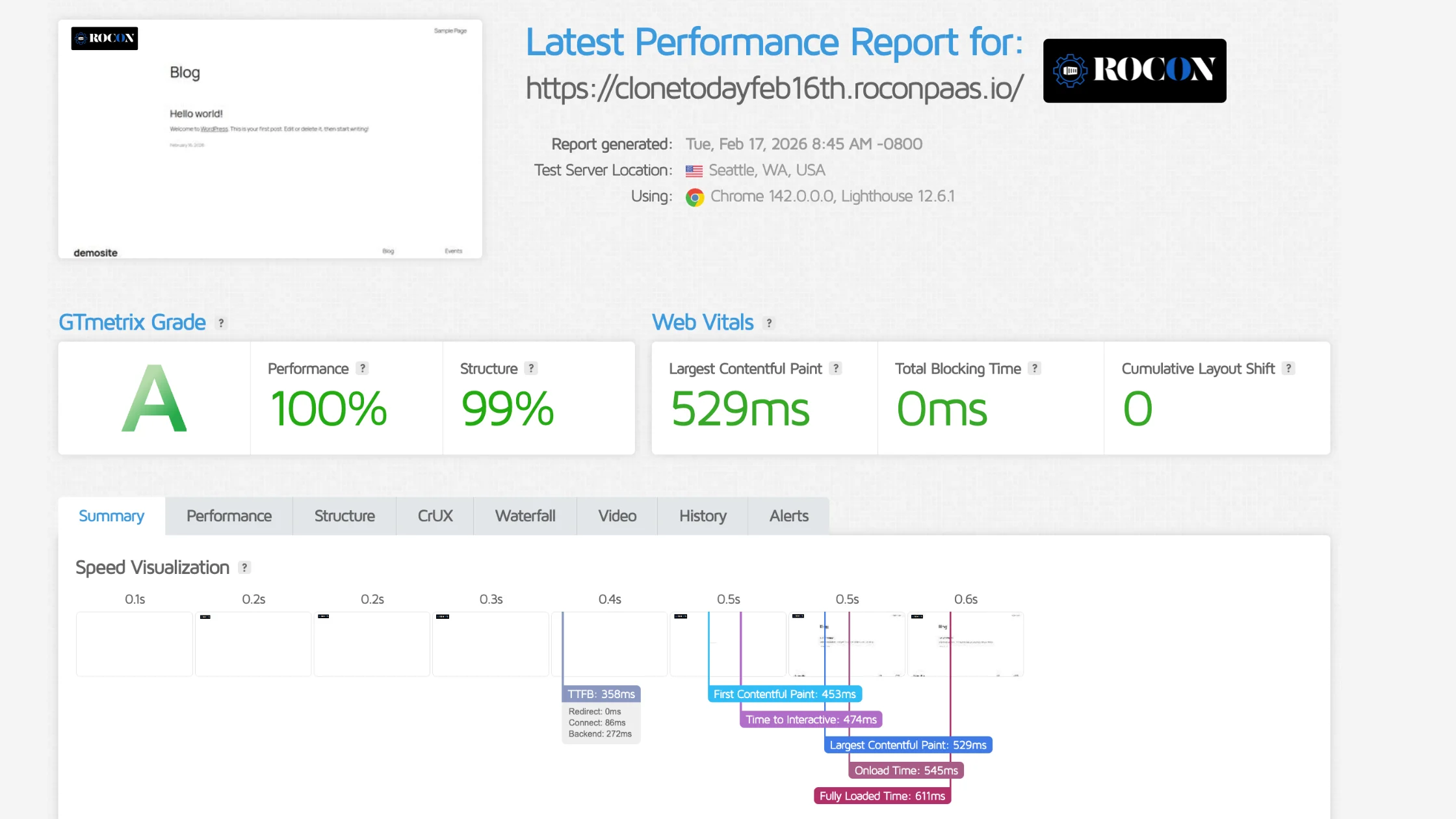
Thanks to isolated containers and built-in CDN, each site enjoys consistent speed and reliable uptime—even under traffic spikes.
Support
Dedicated to agency workflows, Rocon offers free migrations from Kinsta and hands-on onboarding. Support is available via live chat and email.
Value
Flat resource-based plans mean no surprise overage bills. Every plan includes powerful dev tools, staging, and client management features—unlike Kinsta’s per-site pricing model.
Try Rocon risk-free – Get free migrations, free site creation, and a white-labeled dashboard to scale your agency hosting. Explore plans here
2. Rocket.net

Rocket.net is a fully managed WordPress hosting platform built with performance and security at its core. Unlike one-size-fits-all hosting providers, Rocket.net is purpose-built for agencies handling complex, high-traffic websites—delivering speed, reliability, and scalability right out of the box.
What really sets Rocket.net apart? Everything’s already tuned for peak performance. From an enterprise-grade CDN and powerful caching to built-in firewalls and real-time performance analytics—you don’t need to tinker or troubleshoot. It’s all pre-optimized, so your team can focus on building great websites instead of configuring servers.
Key Features
- Edge hosting with built-in CDN and real-time WAF analytics
- One-click staging on all plans
- Free SSL, daily backups, integrated malware protection
- Unlimited WordPress installs; usage-based pricing
Performance
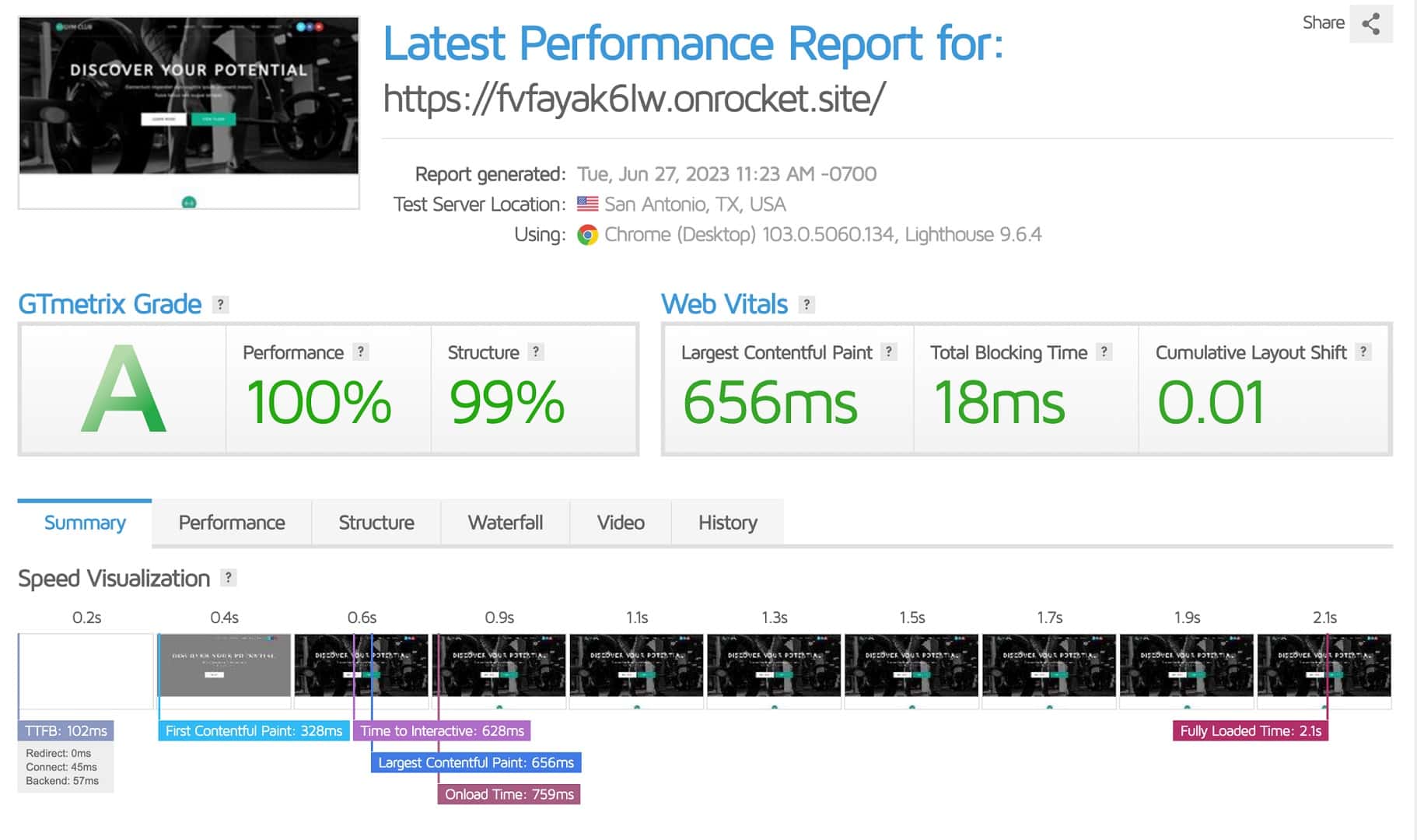
In independent testing by Review Signal, Rocket.net achieved a median Time to First Byte (TTFB) of 102ms and zero downtime across 12 months of continuous monitoring. Its Cloudflare Enterprise edge network serves content from 310+ locations globally, which directly reduces TTFB for international visitors.
Support
Responsive live chat and ticket-based support help with migrations, performance tuning, and security.
Value
Edge-level performance without extra CDN fees. Unlimited sites and flat pricing make it scalable and cost-effective.
Limitations:
- Higher monthly cost ($30+)
- No free trial
- Not ideal for budget-conscious users
3. WP Engine

WP Engine has earned its reputation as one of the most reliable managed WordPress hosting providers in the game. Designed with agencies, developers, and growing businesses in mind, it delivers a rock-solid infrastructure, powerful dev tools, and some of the best support in the industry.
For teams scaling fast or managing complex workflows, WP Engine often feels like the natural next step—or a serious Kinsta alternative. What sets it apart is the depth of its developer ecosystem. You get built-in Git integration, SSH access, and access to WP Engine’s own local development environment, which makes collaboration and deployment smoother than ever.
While Kinsta does offer developer features, WP Engine goes further, giving technical teams more flexibility and control—especially when managing high-traffic or mission-critical WordPress sites.
Key Features
- EverCache® engine and global CDN across 200+ PoPs
- Dev workflows featuring SSH, Git, Local DevKit, and one-click staging
- Managed SONAR, DDoS protection, automated backups
Performance
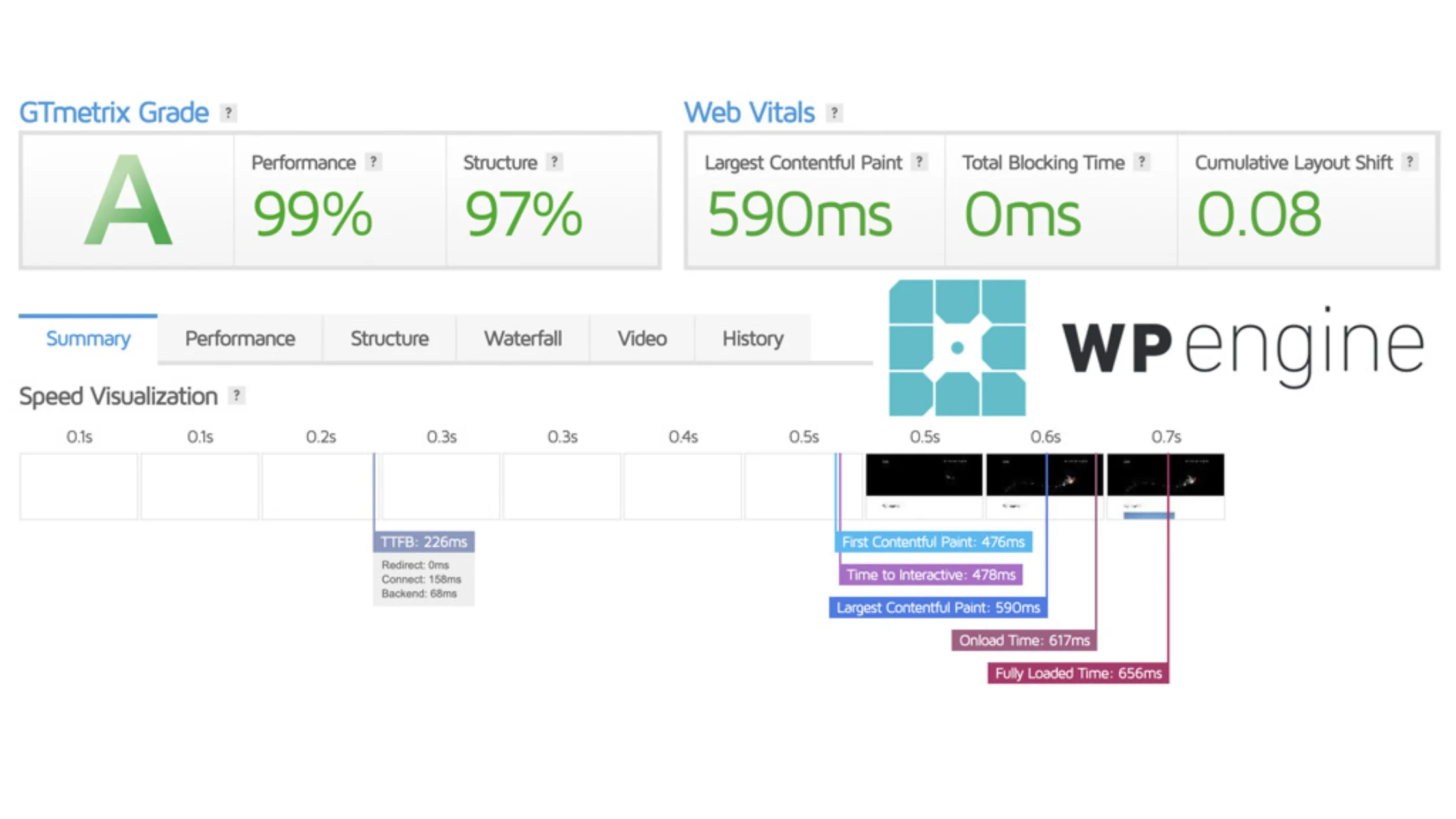
WP Engine guarantees 99.95% uptime via its SLA across all plans. In Review Signal’s WordPress Hosting Performance Benchmarks, WP Engine scored in the “Recommended” tier with a median TTFB under 226ms. Its EverCache proprietary caching layer reduces redundant database queries, which is particularly noticeable on WooCommerce and membership sites with high dynamic content loads.
Support
24/7 live chat, phone support on higher-tier plans, and a rich knowledge base make it developer-friendly.
Value
Priced comparably to Kinsta, WP Engine adds access to premium caching, dev tools, and support—ideal for agencies needing enterprise features.
Limitations:
- Plans start at $25+/month
- Extra charges for traffic overages
- Limited plugin compatibility
Also Read: WP Engine Alternatives 2026 for Faster WordPress Hosting
4. Cloudways

Cloudways takes a different path compared to most Kinsta alternatives—and that’s exactly what makes it so appealing. Instead of locking you into its own infrastructure, Cloudways acts as a powerful control panel layered over top-tier cloud providers like DigitalOcean, Vultr, AWS, Linode, and Google Cloud.
That means you get the freedom to choose exactly how much power you need, how much you want to spend, and where your servers live. For agencies that want the performance of cloud hosting—without having to manage everything through the command line—Cloudways strikes the perfect balance.
Its clean, easy-to-use dashboard gives you control over deployments, staging, scaling, backups, and more, all while taking care of the complicated backend stuff. It’s flexible, powerful, and ideal for teams that want performance without the headaches.
Key Features
- Deploy unlimited apps per server with ThunderStack (NGINX, Varnish, Redis)
- One-click staging and server-level cloning
- White-label options for agencies
- 24/7 expert support and on-demand scaling
Performance
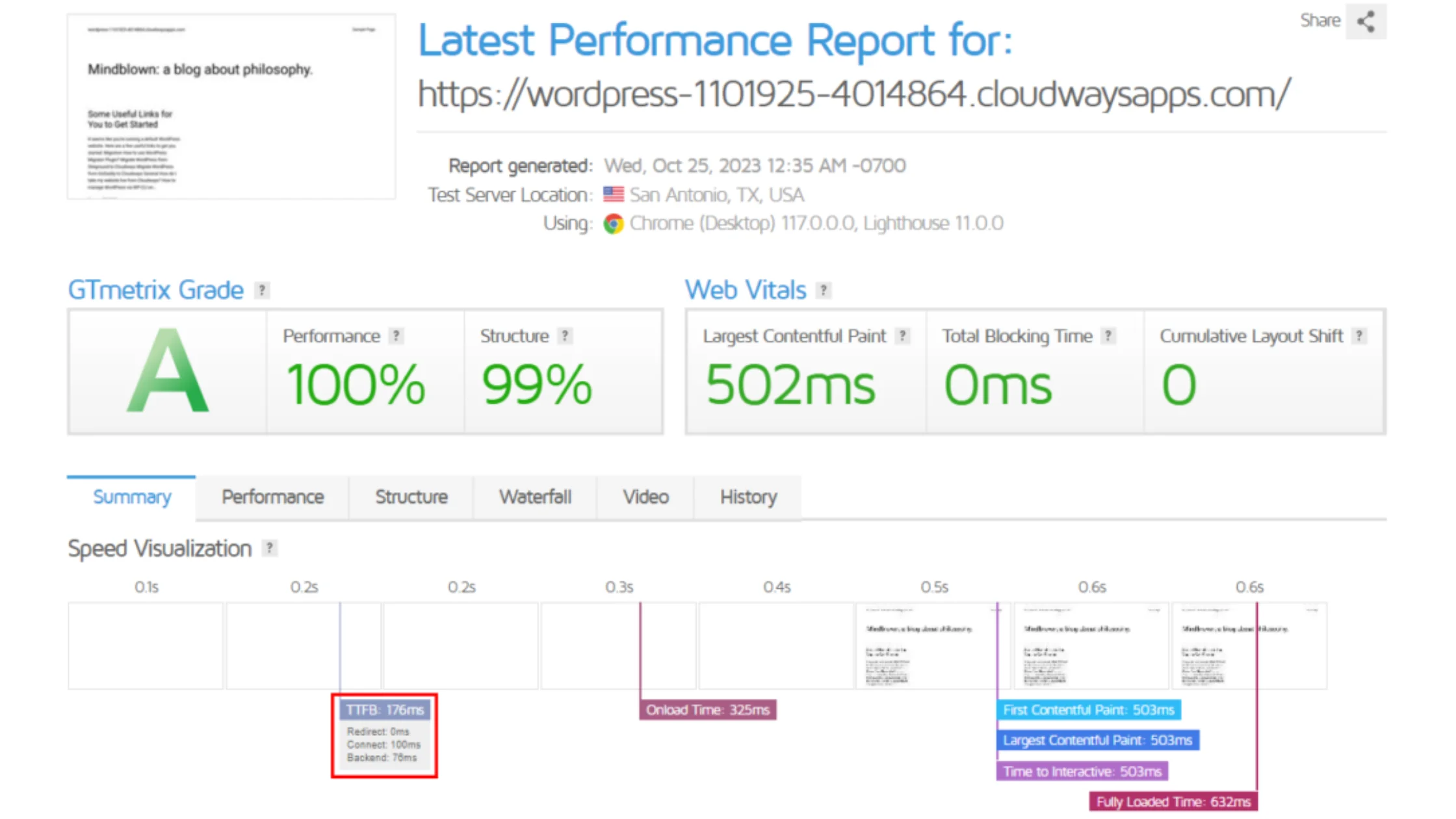
Cloudways uses a ThunderStack caching layer (NGINX, Varnish, Memcached, Redis) on top of your chosen cloud provider. In load tests conducted by Cloudways’ own technical team, a DigitalOcean 2GB server handled 1,000 concurrent users with an average response time of 1.62 seconds. For agencies needing more power, upgrading the underlying server size takes under 60 seconds with no migration required.
Support
Expert support, quick-to-set-up services, and professional-grade tools make it enterprise-grade without complexity.
Value
You pay only for used infrastructure—no visitor limits or per-site fees. Ideal for agencies wanting transparent and scalable pricing.
Limitations
- Complex UI for beginners
- Limited support for entry plans
Also Read: Best Cloudways Alternatives in 2026
5. Flywheel

Flywheel was created with designers, freelancers, and creative agencies in mind. Instead of focusing heavily on server-level customization, the platform emphasizes workflow simplicity, collaboration, and client presentation. The interface feels polished and intentional, which makes day-to-day management less technical and more organized.
For agencies handling branding projects, portfolio sites, or small to mid-sized business websites, Flywheel removes much of the operational friction that can slow teams down. From onboarding new clients to launching staging environments, the experience is designed to keep projects moving without requiring deep infrastructure knowledge.
Key Features
- Blueprint templates to quickly launch repeatable site setups
- Easy site cloning and demo environments for client previews
- Free migrations, nightly backups, and automatic WordPress updates
- Team collaboration tools with permission-based access
Performance
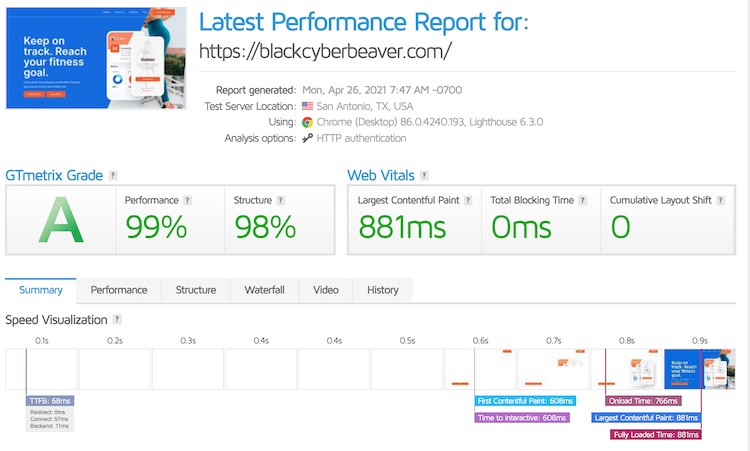
Flywheel is powered by WP Engine’s infrastructure following its 2019 acquisition. Its servers run on Google Cloud with built-in CDN served via the Fastly network. In GTmetrix tests on a default Flywheel-hosted WordPress install, average TTFB from North America ranges from 68ms depending on data centre proximity. Flywheel is well-suited to content-heavy creative sites rather than high-concurrency transactional applications.
Support
With entry plans starting around $13 per month, Flywheel offers strong value for small agencies and freelancers who want structure and ease of use without managing server-level complexity. It works well as an accessible Kinsta alternative for creative teams.
Value
Starting at $13/month, Flywheel is affordable yet packed with agency-centric features, making it a great entry-level Kinsta alternative.
Limitations
- More expensive plans
- Fewer developer features
Also Read: Best Flywheel Alternatives & Competitors for Agencies
6. Pressable

Pressable brings something unique to the table—it’s backed by Automattic, the same team behind WordPress.com and WooCommerce.
That direct connection means you’re getting hosting that’s tightly aligned with the WordPress ecosystem, with early access to updates, better compatibility, and behind-the-scenes insights that most hosts simply don’t have.
For agencies, WooCommerce store owners, or businesses that want a reliable, worry-free hosting experience, Pressable is a dependable Kinsta alternative.
It’s well-optimized, easy to scale, and includes premium features—like staging, CDN, and malware scanning—right out of the box. If you value stability, performance, and hosting that feels like it was built by the people who know WordPress best, Pressable is definitely worth considering.
Key Features
- SSL certificates, malware scanning, DDoS protection, and staged environments
- 30-day money-back guarantee and white-glove migration
- Up to 5 staging and sandbox sites per plan; unlimited installs on higher tiers
- Built-in CDN and caching systems
Performance
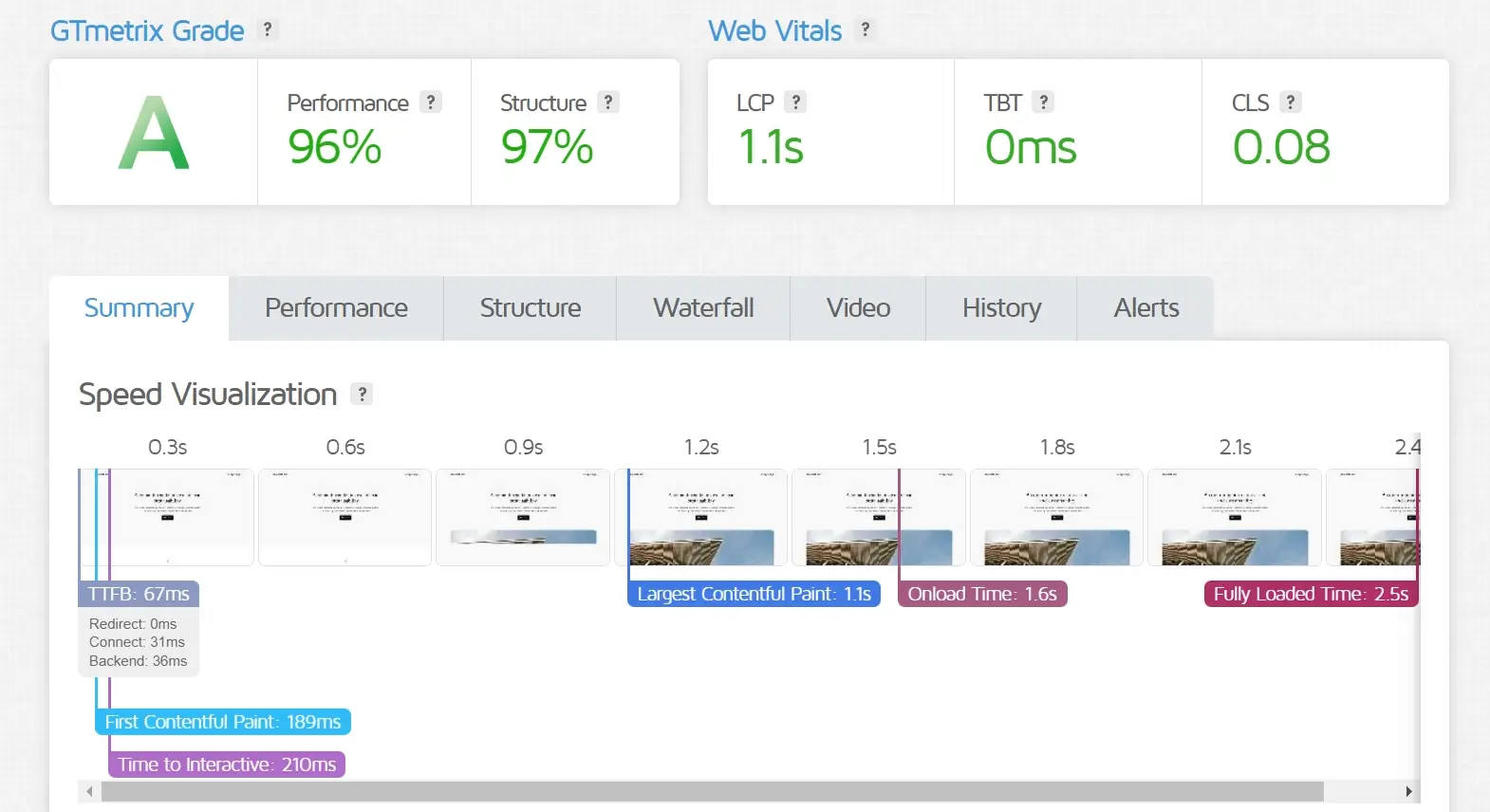
Pressable is backed by Automattic’s infrastructure and offers a 100% uptime guarantee, backed by a credit-based SLA. Its network serves WordPress from data centres in North America, Europe, and Asia-Pacific via a built-in CDN. In independent tests by WP Buffs, Pressable-hosted sites recorded an average TTFB of 67ms from a New York test location — placing it among the faster Automattic-backed options available to agencies.
Support
24/7 expert support with an emphasis on uptime, security, and performance monitoring.
Value
Pricing grows with scale—pressable plans support more installs and staging sites while including strong security and support benefits.
Limitations
- More expensive plans
- Fewer developer features
Also Read: Best Pressable Alternative
How to Choose the Right Kinsta Alternative for Your Sites
With so many strong Kinsta competitors available, the real question is not whether alternatives exist, but which one truly fits your agency or business needs. Choosing the right hosting partner requires more than comparing price tags. It involves understanding performance, scalability, workflow compatibility, and long-term value.
Let’s walk through the decision-making process using practical criteria that matter to WordPress developers, ecommerce operators, and growing agencies.
1. WordPress & WooCommerce Performance Optimization
Hosting environments differ significantly, especially when WordPress and WooCommerce are involved. The best Kinsta alternatives are purpose-built to handle WordPress core processes, plugin interactions, and e-commerce workloads efficiently.
Look for providers that include:
- Server-level caching optimized for WordPress page and object caching
- Managed updates or smart alerts for core, plugins, and themes
- Security rules tailored to common WordPress vulnerabilities
- Dedicated WordPress knowledgeable support teams
If you are running a WooCommerce store, performance requirements increase. Checkout flows, cart sessions, and database queries demand optimized resource handling.
Prioritize hosts that understand dynamic content performance and database-intensive operations to ensure smooth transactions and better user experience.
2. Reviewing Technical Requirements and Site Type
Every website has unique demands. Before switching from Kinsta, evaluate your current setup carefully.
- Traffic patterns: Do you experience steady monthly visitors or seasonal spikes?
- Website type: Is it a business site, blog, ecommerce store, or membership platform?
- Storage capacity: Large media libraries or video content may require faster storage solutions.
- Bandwidth usage: High-resolution images and downloadable files can quickly increase usage.
Analyzing these factors prevents overspending on unused capacity or selecting a plan that limits growth. Reviewing your hosting dashboard and analytics data will give you accurate benchmarks for decision-making.
3. Scalability for Long-Term Growth
Selecting the right Kinsta alternative means thinking beyond today’s numbers. Your hosting provider should grow alongside your projects.
- Is upgrading seamless without downtime?
- Can resources scale as traffic increases?
- Does pricing remain predictable during growth?
- Are advanced features like staging, multilingual support, or multisite setups available?
Avoid the inconvenience of migrating platforms repeatedly. Choose a hosting solution that aligns with your development roadmap for the next several years.
4. Budget Considerations: Cost Versus Value
Managed WordPress hosting typically costs more than basic shared plans, but it also delivers better performance, security, and support. Still, financial planning remains important.
Evaluate:
- Overall value rather than headline pricing. Does the plan include SSL, CDN, backups, and staging?
- Renewal rates after introductory offers expire.
- Reliability and uptime consistency. Lower-cost hosting that impacts site stability can lead to lost revenue.
The goal is not to find the cheapest Kinsta alternative, but the option that provides sustainable value for your business and clients.
5. Uptime, Redundancy, and Platform Reliability
Downtime can impact sales, search rankings, and brand reputation. Even brief outages can be costly for transactional websites.
Look for providers offering:
- Documented uptime guarantees above 99.9 percent
- Cloud infrastructure with redundancy
- Continuous monitoring systems
- Rapid incident response protocols
Reliable infrastructure ensures consistent performance even during traffic spikes or unexpected issues.
6. 24/7 WordPress Specialized Support
Technical problems rarely occur at convenient times. When evaluating Kinsta competitors, assess support quality carefully.
- Is assistance available around the clock through chat or email?
- Are support agents trained specifically in WordPress environments?
- Can they troubleshoot plugin conflicts or WooCommerce issues?
- Do they maintain reasonable response times?
Responsive and knowledgeable support can significantly reduce downtime and operational stress.
7. User Experience and Control Panel Simplicity
An intuitive dashboard improves efficiency for both developers and clients. Complex control panels slow down routine tasks. Look for:
- Custom dashboards designed for WordPress management
- One-click staging, backups, and SSL activation
- Clear performance insights and resource usage tracking
- Integration with development tools you already use
A streamlined control panel enhances productivity and simplifies daily maintenance.
8. Security and Isolation Standards
Security is frequently overlooked during migrations. Look for:
- Isolated environments per site
- Built-in firewalls tailored for WordPress
- Malware scanning and monitoring
- Automatic security patching
- DDoS protection
Security architecture plays a significant role in protecting client websites and maintaining trust.
9. Migration Simplicity and Risk Reduction
Switching hosting can feel intimidating. The process should not involve prolonged downtime or complex DNS management.
Evaluate:
- Does the provider offer migration assistance?
- Is the migration handled by experts?
- Are staging previews provided before going live?
- How long does the process typically take?
A smooth migration reduces operational stress and minimizes SEO disruption.
Choosing the best Kinsta alternative requires careful evaluation of infrastructure, optimization, scalability, cost structure, reliability, and support. When these elements align with your goals, you are not simply switching providers. You are investing in a hosting foundation that supports long-term WordPress growth and stability.
Why Container Hosting Beats Traditional Managed WordPress Hosting
Container hosting is a modern way of running websites and applications where each site lives in its own little world—called a container. Unlike traditional shared or VPS hosting, where multiple sites share the same os or resources, containers keep your site completely separate and safe, just like an app on its own phone.
Think of a container as a little box with everything your WordPress site needs—PHP, database, files, config, so it runs the same everywhere. This means better performance, scalability, security, and control.
Why Container Hosting is Better:
- Fully Isolated: Your site runs independently, so no noisy neighbor issues.
- Faster Load Times: Containers are lightweight and highly optimized.
- Auto-Scaling: Traffic spike? Resources scale instantly.
- Stronger Security: Each site is sealed off from others.
- Dev-Friendly: Ideal for CI/CD, Docker, and modern workflows.
In short, container hosting is the speed of VPS, the simplicity of managed hosting, and the power of enterprise infrastructure—perfect for high traffic WordPress sites, agencies, developers, and anyone serious about performance and reliability.
How We Evaluated the Best Kinsta Alternatives
Kinsta is not an average hosting provider. It has built a strong reputation for performance, stability, and a polished user experience. The challenge was not finding cheap replacements. The challenge was identifying platforms that can realistically compete in performance and reliability while solving the structural limitations agencies often face.
Real Cost Efficiency
Kinsta delivers quality, but its pricing structure can escalate quickly as traffic grows. We prioritized alternatives that offer transparent, predictable pricing models. The goal was to find platforms that maintain premium performance standards without tying costs strictly to visitor counts.
Performance Consistency
Speed claims are easy to make. Sustained performance under real traffic is harder. We looked at uptime stability, caching efficiency, infrastructure design, and how each host handles traffic spikes. Only providers that demonstrate consistent load times and reliable performance made the list.
Managed WordPress Depth
Kinsta is known for managed features such as automatic backups, updates, and security monitoring. Every alternative included here provides comparable managed WordPress functionality. That means built-in optimization, staging support, backup automation, and a secure hosting environment without requiring manual server management.
Security Standards
Security was non-negotiable. We evaluated SSL implementation, backup frequency, malware protection, isolation architecture, and overall platform hardening. Even if a provider lacked enterprise branding, it needed to meet strong baseline security expectations.
Scalability for Growing Agencies
Many agencies outgrow rigid hosting structures. We favored platforms that allow flexible scaling, whether through container-based environments, cloud infrastructure, or expandable resource allocation. The ability to grow without forced migrations was a key ranking factor.
Workflow and Ease of Use
A powerful platform is useless if it slows down operations. We assessed dashboard usability, multi-site management efficiency, staging workflows, and developer tooling. Platforms that reduce administrative overhead and simplify client management scored higher.
How to Migrate from Kinsta to Another Hosting Provider

Migrating away from Kinsta does not have to be complicated. With proper preparation and testing, most WordPress sites can be moved with minimal downtime and no data loss. Below is a practical step-by-step process agencies typically follow.
Step 1: Select Your New Hosting Platform
Review your technical requirements, budget, and scalability needs before choosing a provider. Make sure the new host supports your traffic levels, staging workflows, and backup expectations.
Step 2: Create a Full Backup
Before initiating the migration, generate a complete backup of your website, including files and the database. You can use a WordPress backup plugin or export backups directly from your Kinsta dashboard.
Step 3: Set Up the New Hosting Account
Create your hosting account and configure the environment. This usually includes adding your domain, creating a database, and setting up PHP or caching preferences if required.
Step 4: Transfer the Website
You can migrate using a WordPress migration plugin, manual file transfer via SFTP, or a migration service offered by the new host. Some providers, including Rocon, offer free migration assistance as part of their onboarding process.
Step 5: Update DNS Records
Once the site is fully migrated and verified on the new server, update your domain’s DNS settings to point to the new hosting provider. DNS propagation may take several hours.
Step 6: Test Thoroughly
After propagation, test page speed, forms, login areas, checkout processes, and plugin functionality. Confirm SSL is active and that no media files or database elements are missing.
Step 7: Close the Previous Account
When everything is stable and functioning correctly, you can safely cancel your Kinsta plan to avoid overlapping billing.
A structured migration process reduces risk and ensures continuity for both agencies and their clients.
Conclusion: Best Kinsta Alternatives
WordPress now powers 43.6% of all websites on the internet as of early 2026, according to W3Techs usage statistics — a figure that has grown steadily from 39.5% in 2022. As WordPress adoption increases, so does demand for specialized managed hosting that goes beyond generic shared plans. Agencies in particular are shifting toward providers that offer container isolation, predictable billing, and multi-site dashboards that match the scale at which modern agencies operate.
Managed WordPress hosting removes a major operational burden, but it also means trusting your provider with performance, security, backups, and overall stability. That decision should be based on long-term scalability, workflow efficiency, and pricing clarity, not just brand reputation.
After comparing the leading Kinsta competitors, Rocon stands out as the strongest overall choice for agencies that need container-based infrastructure, white-label control, and no visitor-based limits. For agencies focused purely on speed, Rocket.net performs exceptionally well. If flexible cloud pricing is the priority, Cloudways remains a practical and scalable alternative.
The best decision ultimately depends on how you operate, but the right Kinsta alternatives should feel like a strategic upgrade, not just a cost adjustment.
Best Kinsta Alternatives FAQs
1. What are the best Kinsta alternatives in 2026?
Some of the best Kinsta alternatives in 2026 include Rocon, Cloudways, Rocket.net, and WP Engine. These platforms offer strong performance, flexible pricing, and scalable infrastructure. They are suitable for businesses looking to reduce hosting costs while maintaining high website speed and reliability.
2. Why do people look for Kinsta alternatives?
Many users look for Kinsta alternatives due to its higher pricing and limited customization options. While Kinsta offers excellent performance, competitors provide similar speed along with more flexible plans, better scalability, and greater control over server configurations, making them more suitable for growing businesses.
3. Is Cloudways better than Kinsta?
Cloudways can be a better option than Kinsta for users who want more flexibility and lower costs. It allows you to choose from multiple cloud providers and scale resources easily. While Kinsta offers premium managed hosting, Cloudways provides a balance of performance and affordability.
4. Which Kinsta alternative is best for agencies?
Rocon and WP Engine are excellent Kinsta alternatives for agencies. They offer advanced developer tools, staging environments, and team collaboration features. These platforms help agencies manage multiple client websites efficiently while maintaining strong performance and security.
5. Are cheaper Kinsta alternatives reliable?
Yes, many cheaper Kinsta alternatives are reliable and offer excellent uptime and performance. Platforms like Rocon and Rocket.net use top-tier cloud infrastructure, ensuring fast load times and scalability. Choosing the right provider depends on your specific needs and technical requirements.
6. Which Kinsta competitor is best for e-commerce?
For e-commerce websites, especially WooCommerce stores, Rocon, Liquid Web, and Rocket.net are leading Kinsta competitors. These platforms handle dynamic content, checkout processes, and high database queries efficiently. Rocon’s container-based setup helps maintain consistent performance during traffic spikes, which is critical for conversion-focused online stores.
7. Is container-based hosting better than Kinsta?
Container-based hosting can offer advantages over traditional traffic-based managed hosting. With container isolation, each WordPress site receives dedicated resources, improving security and performance stability. Platforms like Rocon use this approach to reduce resource-sharing issues, making it a strong alternative for agencies or businesses seeking predictable scalability and workload control.
About the Author
Srilatha is a WordPress expert with over 6 years of hands-on experience, specializing in managed WordPress hosting, site migrations, and performance optimization. He has successfully worked with agencies and freelancers, helping them scale and secure dozens of client websites.









Leave a Reply