Roconpaas

Blog

7 Best Flywheel Hosting Alternatives & Competitors 2026

August 4, 2025 by James

WordPress Keeps Logging Me Out

Introduction

Flywheel has long been recognized as a reliable managed WordPress hosting provider in an industry that continues to evolve. However, by 2026, many businesses, developers, and agencies are starting to explore other options that better match their changing needs—whether that’s more flexibility, improved performance, or pricing that aligns with their budget.

Choosing the right hosting provider plays a key role in your website’s speed, scalability, and overall reliability. It also impacts how easily you can manage your projects as they grow. Whether you’re a freelancer handling a few sites or an agency managing multiple clients, having the right infrastructure in place makes a noticeable difference.

In this guide, we’ll take a closer look at some of the best Flywheel hosting alternatives in 2026, focusing on their features, strengths, and ideal use cases to help you make a more informed decision.

Why Look for a Flywheel Alternative?

Rising Costs for Growing Sites

Flywheel’s entry-level plans are suitable for small sites, but costs can increase quickly as traffic, storage, or the number of websites grows. For startups and small businesses, this pricing structure may not always scale efficiently with their budget.

Limited Server-Level Control

Managed hosting platforms like Flywheel prioritize simplicity, which often comes at the cost of flexibility. Developers who need access to custom configurations, server settings, or specific environments may find these limitations restrictive.

Advanced Development Workflows

While Flywheel supports basic development features, some teams look for deeper integrations such as automated CI/CD pipelines, advanced Git workflows, or container-based environments. These capabilities are becoming increasingly important for modern development teams.

Scalability for High-Traffic Sites

Flywheel performs well for many use cases, but agencies or businesses managing high-traffic websites may eventually require more scalable infrastructure, broader resource allocation, or greater control over performance optimization.

Constraints and Ecosystem Limitations

Since Flywheel operates within a controlled environment, users may encounter restrictions on certain plugins, configurations, or custom setups. This can be a limitation for projects that require more flexibility or experimentation.

What to Look For in a Flywheel Alternative

Before choosing an alternative to Flywheel, it’s important to understand what really matters for your website or workflow. Not every hosting provider offers the same balance of features, so evaluating a few key factors can help you make a better decision.
  • Performance and Uptime
    A reliable hosting provider should deliver fast loading speeds and consistent uptime, ensuring your website remains accessible without interruptions.
  • Ease of Use and Control Panel
    A clean, intuitive dashboard can make day-to-day management much easier, especially if you’re not highly technical.
  • Scalability
    Your hosting should be able to grow with your website, allowing you to handle increasing traffic without performance issues.
  • Pricing and Value
    Look beyond the base price and consider what features are included. The goal is to find a balance between cost and the value you receive.
  • Customer Support
    Responsive and knowledgeable support can save time and reduce stress when technical issues arise.
  • Backup and Security
    Regular backups, SSL certificates, and strong security measures are essential for protecting your website and data.
  • Developer-Friendly Tools
    Features like Git integration, SSH access, and advanced configurations can be important for developers and technical teams.
  • Staging Environments
    The ability to test changes in a staging environment before going live helps prevent errors and downtime.

1. Rocon – Best for Agencies & Developers

rocon hosting

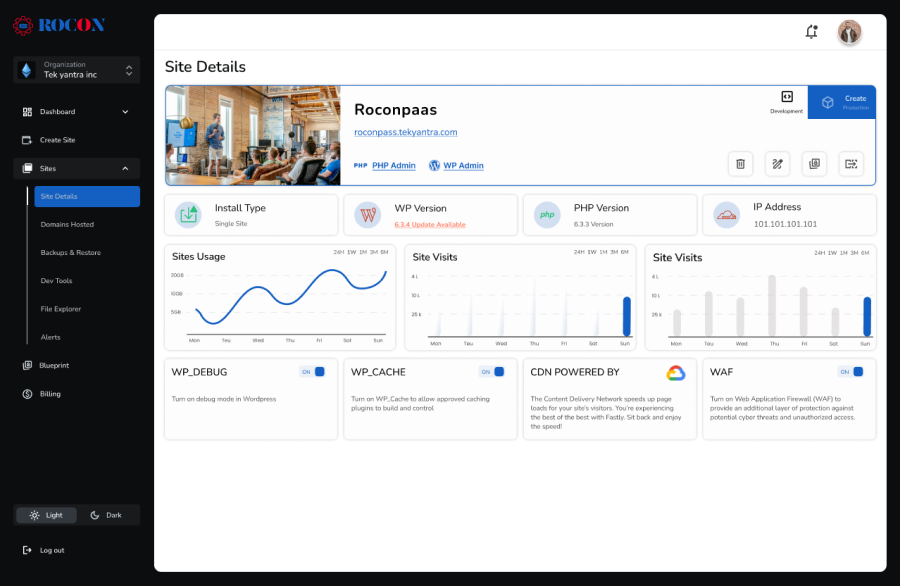
Rocon is a modern managed WordPress hosting platform built for agencies, developers, and growing businesses. What sets it apart is its container-based architecture and auto-scaling capabilities, making it an ideal Flywheel alternative for teams looking for high-performance and DevOps-ready infrastructure.

Key Features:

  • Containerized WordPress hosting with Docker-like deployment
  • Built-in auto-scaling for traffic spikes
  • Free SSL, CDN, and backups
  • Git-based deployment workflows
  • Easy migration tools and one-click staging
  • Intuitive control panel
  • Email hosting integrations
  • 24/7 support

Why It’s a Great Flywheel Alternative:

  • More developer-friendly with deeper stack control
  • Scales seamlessly for high-traffic websites
  • Better value for money for agencies managing multiple sites

Pricing:

Starts at $1.99/month with annual plan

2. Kinsta – High-End Performance for Businesses

kinsta

Kinsta is a popular choice among Flywheel users seeking powerful performance backed by Google Cloud. Kinsta offers managed WordPress hosting with a focus on speed, uptime, and premium support.

Key Features:

  • Google Cloud C2 machines
  • Automatic daily backups
  • Free migrations
  • Advanced caching
  • Built-in APM (Application Performance Monitoring)
  • Developer tools like SSH, WP-CLI, Git
  • Staging environments

Pros:

  • Enterprise-level performance
  • Great for WooCommerce and multisite hosting
  • High-quality customer support

Cons:

  • On the pricier side
  • No email hosting

Pricing:

Starts at $35/month.

3. WP Engine – Enterprise-Ready

WP Engine

As the parent company of Flywheel, WP Engine offers a broader range of features for more demanding applications. It’s a robust platform for enterprise-level WordPress hosting.

Key Features:

  • Proprietary EverCache technology
  • Global CDN
  • Free StudioPress themes
  • Automated daily backups
  • Multiple environments for dev, staging, and production
  • SSH access and Git integration

Pros:

  • Built for scale
  • Great documentation and support
  • Advanced performance optimization

Cons:

  • More expensive for small sites
  • Add-ons for features like Genesis Pro can add up

Pricing:

Starts at $30/month.

4. Cloudways – Flexible and Customizable

cloudways

For users who want more control without managing a server from scratch, Cloudways is a popular choice. It sits between DIY and fully managed hosting, offering flexibility with ease of use.

Key Features:

  • Supports AWS, Google Cloud, DigitalOcean, Vultr, and Linode
  • Custom control panel
  • Free SSL and automated backups
  • One-click staging and cloning
  • Vertical scaling options
  • Integrated caching and CDN

Pros:

  • Choose your cloud provider
  • Very affordable for high-performance hosting
  • Full server access

Cons:

  • Slight learning curve for beginners
  • No email hosting

Pricing:

Starts at $14/month (DigitalOcean Standard Plan).

5. SiteGround – Balance of Cost and Features

siteground

SiteGround offers a user-friendly interface, excellent support, and fast performance, making it a solid Flywheel alternative for freelancers and small businesses.

Key Features:

  • Google Cloud infrastructure
  • SuperCacher technology
  • Free SSL and daily backups
  • Managed security and WordPress updates
  • Built-in CDN and email hosting
  • Custom Site Tools dashboard

Pros:

  • Excellent uptime and performance
  • Lower entry cost
  • In-house support team is highly rated

Cons:

  • Limited staging environment on lower-tier plans
  • Higher renewal prices

Pricing:

Starts at $2.99/month (introductory rate).

6. Pressable – Ideal for Agencies and WooCommerce

Pressable, backed by Automattic (makers of WordPress.com), is a strong choice for WooCommerce sites and creative agencies needing managed WordPress hosting with white-label options.

Key Features:

  • Built on the same infrastructure as WordPress.com VIP
  • Daily backups and malware scanning
  • Unlimited storage and bandwidth
  • Built-in CDN and caching
  • Team collaboration tools
  • White-label options for agencies

Pros:

  • Tailored to WooCommerce
  • Clean and simple dashboard
  • Excellent performance

Cons:

  • Not as customizable as some others
  • No email hosting

Pricing:

Starts at $25/month.

7. GridPane – For Power Users and DevOps Teams

GridPane is a developer-focused platform for managing your own servers while still getting the benefits of a control panel and automation. It’s ideal for teams that want root-level access and automation.

Key Features:

  • Works with your own cloud VPS providers
  • Full control over server configuration
  • Advanced security options
  • Staging environments
  • Performance tuning tools
  • Git, WP-CLI, and SSH access

Pros:

  • Unmatched flexibility
  • Cost-effective at scale
  • Customizable stack

Cons:

  • Requires technical knowledge
  • No native email hosting

Pricing:

Starts at $50/month for the control panel (you pay for your own VPS separately).

Comparison Table: Flywheel vs. Alternatives


Hosting Provider Starting Price Key Feature Ideal For
Rocon $1.99/month Containerized, auto-scaling Agencies, Developers
Kinsta $35/month Google Cloud + APM High-traffic sites
WP Engine $30/month Enterprise features Large businesses
Cloudways $14/month Choose your cloud provider Developers, SMEs
SiteGround $2.99/month* Email + performance combo Freelancers, SMBs
Pressable $25/month WooCommerce optimized Ecommerce, Agencies
GridPane $50/month DevOps + full control Power users, DevOps

Which Flywheel Alternatives Should You Choose?

The best Flywheel alternatives really depends on your specific needs:

  • Want agency-focused scalability with DevOps tools? Go with Rocon.
  • Need top-tier performance with amazing support? Try Kinsta.
  • Looking for flexibility and cost-efficiency? Cloudways is your best bet.
  • Power user or DevOps-savvy? GridPane offers ultimate control.
  • Prefer all-in-one ease of use with email hosting? Consider SiteGround.
  • Running WooCommerce or multiple client sites? Pressable is a solid pick.

Final Thoughts

Flywheel is a great managed WordPress hosting service, but it’s not the best choice for everyone. There are several options in 2025 that are more flexible, cost-effective, and provide capabilities that are useful for developers, agencies, ecommerce companies, and high-performance websites.

You can choose a solution that meets your needs and even goes above and beyond what Flywheel offers, whether you want containerized scalability with Rocon, cloud customisation with Cloudways, or white-label hosting with Pressable.

Pick the platform that fits your level of technical skill, your growth path, and your business goals. Then enjoy a hosting experience that really helps your WordPress projects.

Flywheel Alternatives FAQs

1. Who are Flywheel competitors?

Other Flywheel competitors include Kinsta, WP Engine, SiteGround, Rocon, and Cloudways. They offer similar features like managed updates, strong security, daily backups and performance optimization. It often comes down to budget, support quality and scalability needs.

2. What features should I look for in Flywheel alternatives?

When looking at Flywheel alternatives look for hosting speed, uptime reliability, strong security, scalable resources and responsive support. A host like Rocon has container based hosting and budget pricing.

3. Are Flywheel alternatives more affordable for small businesses?

Yes, some alternatives have more cost effective plans for startups and small business. Rocon and SiteGround have flexible pricing without compromising on performance or security.

4. Can I migrate my website easily from Flywheel to another host?

Most Flywheel alternatives provide free or automated WordPress migrations. Hosts like Rocon even offer free migration at the hosting level, making the switch smooth and hassle-free.

5. Is there a faster alternative to Flywheel hosting?

Yes, there are faster alternatives to Flywheel hosting. Platforms built on cloud or container-based infrastructure often deliver better speed by using dedicated resources, built-in caching, and global CDN integration, which results in faster load times and more consistent performance.

6. Which hosting is more scalable than Flywheel?

Cloud-based hosting platforms are generally more scalable than Flywheel. Unlike fixed plans with resource limits, scalable hosting allows you to increase server resources on demand, making it easier to handle traffic growth and sudden spikes without affecting performance.

Start the conversation.

    Leave a Reply

    Your email address will not be published. Required fields are marked *

    Recommended articles

    WordPress

    How to Improve TTFB in WordPress 2026 Guide

    Maria

    Icon

    7 Min Read

    WordPress

    Headless CMS vs WordPress 2026: Which One Should You Choose?

    Maria

    Icon

    10 Min Read

    WordPress

    11 Best Anime Website Free Themes for WordPress

    Adam

    Icon

    9 Min Read