8 WP Engine Alternatives 2026 for Faster WordPress Hosting
November 1, 2024 by James


November 1, 2024 by James


WP Engine has long been seen as a premium choice for managed WordPress hosting, especially for businesses that want strong performance and hands-off management. However, in 2026, more site owners are actively exploring WP Engine alternatives due to rising renewal costs, strict visitor limits, and resource caps that can slow down growing websites.
The WordPress hosting market has matured. Today, users expect consistent speed, predictable pricing, and infrastructure that scales without forcing frequent plan upgrades.
As a result, several WP Engine competitors now offer comparable—or even better—performance and reliability at a more practical long-term cost. This shift matters for business sites, agencies managing multiple projects, and WooCommerce stores where speed and uptime directly impact SEO and revenue.
In this guide, we objectively examine the most reliable WP Engine alternatives, comparing how they differ in infrastructure, pricing models, performance consistency, and ideal use cases—so you can choose based on fit rather than hype.
Too busy to read everything? Here’s the fast breakdown:
| If You Want To… | Use This | What You’ll Gain | Monthly Cost |
|---|---|---|---|
| Get premium performance with smarter pricing | Rocon | Container-based isolation, auto-scaling, agency-ready features | $1.99/mo |
| Run on Google Cloud’s premium tier | Kinsta | High-performance C2 infrastructure, strong uptime consistency | $35/mo |
| Maximize global speed without extra plugins | Rocket.net | Built-in enterprise CDN and advanced caching stack | $25/mo |
| Stay aligned with the WordPress ecosystem | Pressable | Automattic-backed hosting with integrated security features | $25/mo |
| Simplify workflows for designers & agencies | Flywheel | Collaboration tools and a client-friendly dashboard | $15/mo |
| Choose your own cloud infrastructure | Cloudways | Flexibility across DigitalOcean, AWS, Vultr & more | $14/mo |
| Start with a trusted WordPress host | DreamHost | WordPress-recommended with stable long-term plans | $16.95/mo |
| Optimize WooCommerce performance | Nexcess / Liquid Web | eCommerce-ready scaling and performance tuning | $19/mo |
*Pricing may vary based on plan tier and renewal terms.
WP Engine is designed for performance-focused WordPress sites that benefit from a tightly controlled environment. However, some website owners begin evaluating alternatives as their needs change.
Common reasons include rising renewal costs, traffic-based overage fees, restricted plugin usage, and limited flexibility when experimenting with custom setups. These constraints are not flaws, but tradeoffs that come with a managed, enterprise-oriented platform.
For users who prioritize predictable costs, greater customization freedom, or infrastructure that scales automatically without plan changes, exploring WP Engine alternatives can be a practical next step rather than a downgrade.
WP Engine is premium hosting and the pricing reflects that. Although the platform is great for support and performance, the plans are super expensive for small businesses, personal blogs or small websites on a tight budget.
As your website expands or you manage multiple websites, WP Engine’s pricing tiers increase significantly, which can result in financial strain for small businesses and entrepreneurs.
For many users, WP Engine’s top features—such as dedicated support, robust security, and managed services—are not necessarily essential for their website’s daily operations.
This is where alternative providers, like Rocon, Pressable, or Flywheel, provide a more budget-friendly yet effective solution, giving users access to the core features they need at a fraction of WP Engine’s cost.
WP Engine’s managed hosting environment gives you a secure and solid platform by managing server configurations and updates.
Good for users who value convenience but not so good for users who want to get their hands dirty. WP Engine’s infrastructure is designed to perform so they control everything tightly.
For developers or techy users who want to fine tune their hosting environment this can be a problem. Providers like Rocon, Pressable and Flywheel offer more flexibility in server management, customizable server environments where developers can optimize resources, adjust configurations and even install custom modules or software to support specific website requirements.
To maintain performance and prevent conflicts with its optimized environment, WP Engine blocks certain plugins—especially caching, backup, and security plugins that might duplicate WP Engine’s own native features.
For users who rely on particular plugins to manage their workflow, enhance security, or perform backups, these restrictions can be a drawback. WP Engine’s restrictions may also limit the types of customizations that advanced users or developers want to implement.
Hosting providers like Rocon, Pressable, and Rocket.net give users full control over plugin choices, enabling them to integrate third-party plugins without restriction.
This flexibility is especially valuable for users who rely on specific tools for SEO, performance monitoring, or specialized content management that may not be supported in WP Engine’s ecosystem.
While WP Engine’s hosting environment is robust, its pricing and tiered plans can make scalability costly for growing sites. As your traffic increases, WP Engine requires users to upgrade their plans to accommodate higher visitor counts, storage needs, or bandwidth, which can lead to significant cost increases.
Alternative hosting providers, like Kinsta, Pressable, and Rocon, offer scalable options where resources can be adjusted more dynamically and affordably.
For instance, Pressable provides a flexible, pay-as-you-go pricing model, making it ideal for websites that experience seasonal traffic spikes or unpredictable growth.
Rocon’s affordable entry-level plans also allow users to scale up as needed without overpaying, making it easier for businesses to grow sustainably.
WP Engine offers exceptional customer service; however, it is primarily designed for users of managed WordPress hosting and may not be as affordable for those with limited financial resources.
Premium support features are included in WP Engine’s higher-tier plans; however, they may be financially unattainable for small enterprises and individuals.
Furthermore, WP Engine’s support may not always be suitable for sophisticated users or those who require immediate assistance with non-standard configurations.
Other providers, such as Rocon, Flywheel, and Pressable, provide 24/7 customer support, often with specialized WordPress experts.
Rocon, in particular, offers dedicated account managers even on lower-tier plans, ensuring that users get personalized and responsive assistance without needing to pay for premium support plans.
This makes these wp engine alternatives appealing to users who prioritize consistent, affordable support without the need for high-tier, costly plans.
WP Engine is renowned for its managed hosting setup; however, it may be deficient in certain developer-centric features or productivity tools that are essential for users who manage multiple sites or complex projects.
Developers, agencies, or sophisticated users frequently seek hosting providers that support collaborative workflows, such as white-label branding, team access, staging environments, and billing flexibility.
Providers like Flywheel and Pressable cater specifically to designers and developers by offering features such as one-click staging environments, white-label hosting options, and team collaboration tools.
Rocon also offers performance, scalability, and agency-specific features, such as multi-site management, and collaborative access options.
This makes Rocon and other alternatives more appealing for development teams or agencies managing multiple client websites who require an efficient, flexible workspace.
While WP Engine’s premium hosting experience includes a suite of advanced tools, its entry-level plans lack some of the bonuses commonly provided by other hosts, like free website creation, email hosting, or flexible billing options.
WP Engine’s packages are optimized for WordPress, but they may not offer certain conveniences that smaller website owners find valuable, such as domain registration or integrated email services.
Providers like Rocon bundle these additional features into their entry-level plans, providing users with free CDN, SSL certificates.
Rocon, for example, includes free daily backups, DDoS protection, and SSL certificates, even in its most affordable plans. For users looking for an all-in-one solution that reduces the need for multiple providers, these features are often a deciding factor.
WP Engine’s premium pricing may be unaffordable for small enterprises, startups, and individual site owners. Domain registration, SSL, backup storage, and increased server resources can all contribute to the rapid accumulation of hosting costs.
WP Engine’s pricing structure can be a substantial financial commitment, especially for users who do not require all of the sophisticated features it provides.
Rocon provides a compelling alternative for budget-conscious users, as it includes many of the essential hosting features at a more affordable rate. Rocon’s pricing structure is designed to provide excellent value without requiring users to compromise on quality.
Hence, this cost-effectiveness allows users to access premium hosting features—such as advanced security, CDN, caching, and customer support—without exceeding their budgets, making Rocon a preferred choice for high-quality, affordable hosting.
Here are a few leading alternatives worth considering:
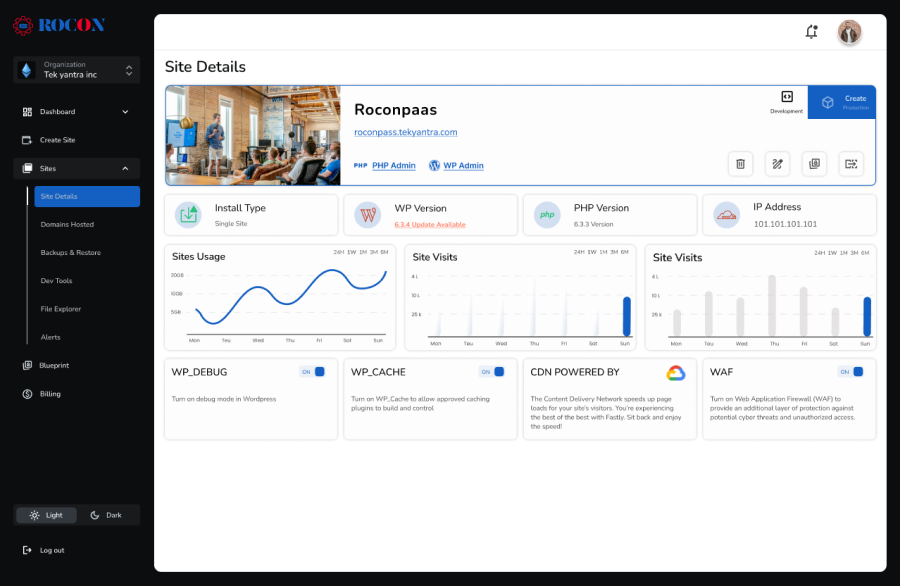
Rocon is a managed WordPress hosting platform built on container-based infrastructure, where each website operates within its own isolated environment. This approach differs from traditional shared or VPS-based managed hosting by reducing resource contention and performance variability.
Because containers allocate dedicated resources at the site level, performance tends to remain stable even during traffic spikes. This model is particularly relevant for growing business websites, WooCommerce stores, and agencies managing multiple client projects.
Rocon may be a suitable option for users who want managed WordPress hosting without plugin restrictions, prefer predictable pricing, and need infrastructure that scales without requiring manual server management. It is not positioned as an enterprise replacement, but rather as a middle-ground solution between premium managed hosts and self-managed cloud setups.
| Provider | Rocon | WP Engine |
|---|---|---|
| Rating | 4.8 ★ ★ ★ ★ ★ | 4.6 ★ ★ ★ ★ ☆ |
| Pricing | Starts at $1.99/month | Starts at $30/month |
| Control Panel | Custom Managed Dashboard | User Portal |
| Uptime Guarantee | 99.99% | 99.95% |
| Response Time | 21 | Premium Cloud Performance |
| Server Locations | Global Cloud Infrastructure | Global Data Centers |
|
Pros |
Cons |
| ✅ Container-based isolated performance | ❌ No email hosting included |
| ✅ Auto‑scaling for traffic spikes | ❌ No domain registration |
| ✅ Daily backups with one‑click restore | |
| ✅ Free SSL certificates included | |
| ✅ Team & client collaboration tools | |
| ✅ One‑click staging & site cloning | |
| ✅ Built-in WAF, DDoS, and malware protection | |
| ✅ Easy managed WordPress setup | |
| ✅ 24/7 WordPress expert support | |
| ✅ Developer tools (staging, SSH, Git) |
Best WP Engine Alternative For: Beginners, freelancers, and small businesses seeking affordable, reliable, and managed WordPress hosting without compromising performance.
Pricing: Starting $1.99/mo, Sites allowed: 1, Traffic: Unmetered visits monthly, Bandwidth: 40 GB, Disk space: 5 GB, Free Trial Coupon: Free trial here.

Kinsta is a premium managed WordPress hosting provider built for businesses and high-traffic websites. Hence, this hosting is fully managed, meaning Kinsta handles backups, server updates, and security patches for you, leaving you free to focus on your site’s content and growth. Kinsta’s custom dashboard,
Kinsta also offers a one-click staging environment, daily backups, and a built-in CDN, which are perfect for testing changes without impacting your live site.
Support is available 24/7 with WordPress experts ready to assist. Although the price tag might seem high for new bloggers or small sites, Kinsta’s reliability and premium features make it worth considering for those needing dependable performance.
| Pros | Cons |
|---|---|
| ✅ Google Cloud infrastructure | ❌ Expensive entry pricing |
| ✅ Excellent speed and uptime consistency | ❌ No email hosting included |
| ✅ Daily automatic backups | ❌ Overages can be costly |
| ✅ Built-in CDN and security stack | |
| ✅ Developer tools (staging, SSH, Git) | |
| ✅ 24/7 WordPress expert support |
Best WP Engine alternative for: Businesses, high-traffic blogs, and sites that need premium, reliable hosting.
Pricing: Starts at $35/month for 1 site, 10 GB storage, and 25,000 visits.
Also read: Best Kinsta Alternatives for Your Agencies

Rocket.net is a high-performance managed WordPress hosting provider designed to optimize site speed and security. With a global edge network and built-in CDN, Rocket.net ensures your content reaches users quickly, no matter their location.
The platform manages all technical aspects, including security patches, backups, and updates, allowing you to focus on growing your site. It also provides an intuitive dashboard and 24/7 expert support.
While it might be on the higher end of the price spectrum, Rocket.net’s focus on speed and security makes it a top choice for businesses needing robust and reliable hosting.
| Pros | Cons |
|---|---|
| ✅ Enterprise CDN + security built-in | ❌ Limited server-level customization |
| ✅ Excellent global speed performance | ❌ No email hosting |
| ✅ Daily automatic backups | ❌ Overkill for very small sites |
| ✅ Built-in WAF, DDoS, and malware protection | |
| ✅ Easy managed WordPress setup | |
| ✅ Fast WordPress expert support |
Best WP Engine alternative for: Businesses, high-traffic websites, and users prioritizing speed and security.
Pricing: Starts at $25/month for 1 site, 10 GB storage, 50 GB bandwidth, and 250,000 visits.

Pressable is a managed WordPress hosting provider tailored for simplicity and reliability, with a focus on agencies and small-to-medium businesses.
Pressable offers automatic backups, malware scanning, and updates to keep your site secure. It also includes a one-click staging environment for testing site changes.
With 24/7 expert support and a robust infrastructure, Pressable makes hosting worry-free. The affordable price makes it appealing for businesses and agencies that want high-quality hosting without breaking the bank, although it lacks some advanced features offered by higher-priced competitors.
| Pros | Cons |
|---|---|
| ✅ Managed WordPress updates & security | ❌ Limited advanced developer tools |
| ✅ Daily backups & one‑click restore | ❌ Bandwidth caps on entry plans |
| ✅ One‑click staging environment | ❌ Not ideal for enterprise scaling |
| ✅ 24/7 WordPress expert support | ❌ No email hosting included |
| ✅ Reliable performance for SMB sites | |
| ✅ Easy dashboard for site management |
Best WP Engine alternative for: Agencies, small-to-medium businesses, and users seeking simple, reliable managed WordPress hosting.
Pricing: Starts at $25/month for 1 site, 10 GB storage, and 50,000 monthly visits.

Flywheel is a managed WordPress hosting provider tailored specifically for designers, freelancers, and creative agencies. Known for its beautiful interface and streamlined workflow tools, Flywheel makes it easy to manage multiple client sites from a single dashboard.
Flywheel’s dashboard is intuitive and visually appealing, allowing users to manage multiple sites and client projects seamlessly.
Flywheel’s one-click staging environment allows for safe testing of site changes, and collaboration tools make it easy to grant clients or team members access without sharing sensitive credentials.
So, Flywheel leverages Google Cloud servers and includes built-in caching for fast load times, making it a strong option for high-performance sites.
Flywheel’s user-centered design and team collaboration features make it perfect for creative professionals managing multiple client sites. So, with its focus on managed WordPress hosting, Flywheel provides the simplicity and performance needed to keep clients happy.
Key features:
| Pros | Cons |
|---|---|
| ✅ Intuitive dashboard and site management | ❌ Higher price for entry plans |
| ✅ One‑click staging environment | ❌ Limited server‑level control |
| ✅ Built‑in caching for performance | ❌ Storage and visit limits on lower tiers |
| ✅ Team & client collaboration tools | ❌ Bandwidth limits on cheaper plans |
| ✅ Designed for agencies & freelancers | |
| ✅ Managed WordPress updates & security |
Best WP Engine alternative for: Designers, freelancers, and creative agencies managing multiple client sites.
Pricing: Starts at $15/month for 1 site, 5 GB storage, and 20,000 monthly visits.
Also read: Best Flywheel Alternatives for Your Website

Cloudways is a managed WordPress hosting platform that gives you flexibility, speed, and control by allowing you to choose from top cloud providers like DigitalOcean, AWS, Google Cloud, Vultr, and Linode. It’s ideal for developers, agencies, and growing businesses that want managed hosting without being locked into a single infrastructure.
The platform handles server management tasks such as security patches, updates, and backups, so you can focus on your website. Cloudways also provides one-click staging, automated backups, and integrated caching, ensuring both performance and reliability. Its intuitive dashboard makes it easy to manage multiple sites and scale resources on demand.
With 24/7 expert support and flexible cloud options, Cloudways is perfect for users who want enterprise-grade performance at competitive prices without the complexity of traditional server management.
Key features:
| Pros | Cons |
|---|---|
| ✅ Choice of top cloud providers (DO, AWS, Google) | ❌ Requires some technical knowledge |
| ✅ Scalable cloud resources | ❌ No built‑in domain registration |
| ✅ Managed security, updates & backups | ❌ Support requires paid plans |
| ✅ One‑click staging & site cloning | ❌ Add‑ons can raise the price |
| ✅ Integrated caching and optimization tools | |
| ✅ Pay‑as‑you‑go resource scaling |
Best WP Engine alternative for: Developers, agencies, and businesses looking for flexible, scalable, and high-performance managed WordPress hosting.
Pricing: Starts at $10/month on DigitalOcean servers, with pay-as-you-go scaling based on resources and provider.
Also read: Best Cloudways Alternatives

DreamHost’s DreamPress is a managed WordPress hosting platform built for simplicity, speed, and reliability. It’s perfect for small-to-medium businesses, bloggers, and agencies who want a fully managed environment without technical hassles.
The platform handles automatic updates, daily backups, and security monitoring, allowing you to focus on creating content. DreamPress also includes one-click staging, built-in caching, and free SSL certificates to improve performance and secure your site. Its user-friendly dashboard makes managing multiple sites easy, while scalable resources ensure your website can grow without interruptions.
With 24/7 expert support and reliable infrastructure, DreamHost provides a solid managed WordPress experience at an affordable price point, making it an excellent alternative to WP Engine for users who want performance and ease of use.
Key features:
| Pros | Cons |
|---|---|
| ✅ Managed WordPress updates & daily backups | ❌ Limited advanced developer tools |
| ✅ One‑click staging environment | ❌ Bandwidth is not fully unmetered |
| ✅ Built‑in caching for performance | ❌ Not ideal for high‑traffic enterprise sites |
| ✅ Free SSL certificates included | |
| ✅ 24/7 WordPress support | |
| ✅ Simple dashboard for easy management |
Best WP Engine alternative for: Small-to-medium businesses, bloggers, and agencies seeking affordable and reliable managed WordPress hosting.
Pricing: Starts at $16.95/month for 1 site, 30 GB storage, and unmetered bandwidth.
Also read: Best DreamHost Alternatives

Nexcess is a managed WordPress hosting platform optimized for performance, reliability, and scalability, making it ideal for WooCommerce stores, agencies, and growing businesses. It’s built to handle high-traffic websites without requiring constant technical oversight.
The platform provides auto-scaling, built-in caching, daily backups, and dedicated PHP workers, ensuring your site stays fast and stable even during traffic spikes.
Nexcess also includes performance monitoring tools to track plugin and checkout performance, helping prevent issues before they impact visitors. With 24/7 expert support, you always have assistance when needed.
While it’s not the cheapest option, Nexcess’s focus on performance and WooCommerce optimization makes it a solid choice for businesses that rely on their online stores for revenue.
Key features:
| Pros | Cons |
|---|---|
| ✅ Auto‑scaling for traffic spikes | ❌ Higher starting price |
| ✅ Built‑in caching & dedicated PHP workers | ❌ Limited entry‑level storage |
| ✅ Daily backups with one‑click restore | ❌ Not beginner‑focused UI |
| ✅ Performance monitoring tools | ❌ No free email hosting included |
| ✅ 24/7 WooCommerce & WordPress support | |
| ✅ Strong WooCommerce optimization |
Best WP Engine alternative for: WooCommerce stores, agencies, and growing businesses that need reliable, high-performance hosting.
Pricing: Starts at $24/month for 1 site, 30 GB storage, and 3 TB bandwidth.
Choosing the right WP Engine alternative starts with understanding your website’s real needs rather than focusing on brand reputation alone. Different WordPress sites have different priorities, so the best hosting option is the one that aligns with your traffic patterns, technical requirements, and long-term goals.
Begin by reviewing your current traffic levels and estimating how your site might grow over time. A suitable hosting platform should be able to handle sudden traffic spikes without slowing down or requiring immediate plan changes. Hosts that support flexible resource allocation or modern infrastructure models tend to perform more consistently as traffic increases.
Security is a foundational requirement for any WordPress website. Look for hosting providers that include automatic WordPress updates, malware protection, SSL certificates, and regular backups as part of their standard offering. These features help reduce the risk of data loss, downtime, and security breaches without requiring constant manual oversight.
A hosting dashboard should make day-to-day site management easier, not more complicated. User-friendly interfaces, clear performance insights, one-click installations, and straightforward plugin management can save time and reduce errors—especially for site owners who prefer not to deal with server-level tasks.
Responsive support can make a significant difference when issues arise. Consider whether the hosting provider offers 24/7 assistance, access to WordPress-specific expertise, and helpful documentation. Reliable support ensures problems are resolved quickly, minimizing disruptions to your site.
Price alone shouldn’t determine your decision. Instead, compare what each plan includes and whether it meets your needs over time. Some lower-cost options may require frequent upgrades, while slightly higher-priced plans may offer better performance consistency, fewer limitations, and predictable expenses as your site grows.
Switching hosting providers should be as smooth as possible. Look for services that offer guided or assisted migrations to reduce downtime and technical risks. It’s also worth considering whether the platform can support future technologies, integrations, or higher resource demands as your website evolves.
The best WP Engine alternative is one that fits both your current requirements and your plans. By focusing on scalability, security, usability, support, and overall value, you can choose a hosting solution that supports steady growth without unnecessary complexity or cost.
Yes, most WP Engine alternatives, including Rocon, are beginner-friendly and provide managed updates, simple WordPress setup, and intuitive dashboards, allowing non-technical users to run fast and secure websites without managing servers.
Rocon is built for businesses and agencies that want enterprise-level speed and security without enterprise pricing. Its container architecture prevents noisy-neighbor issues, improves uptime, and supports automatic scaling, making it reliable for blogs, business websites, and WooCommerce stores.
You should consider switching from WP Engine if rising renewal costs, visitor caps, or performance drops during peak traffic are limiting your site’s growth. Websites that need smoother scaling, more flexibility, or better cost efficiency often benefit from modern container-based WordPress hosting.
WP Engine competitors include managed WordPress hosts such as Kinsta, Flywheel, Pressable, Rocket.net, Cloudways, and container-based platforms like Rocon. These providers offer varying levels of performance, scalability, pricing, and infrastructure, giving users alternatives based on traffic needs, budget, and flexibility.
There is no universal replacement for WordPress, but platforms like Webflow, Wix, Shopify, and Squarespace can be better for specific use cases such as design-focused sites, eCommerce-only stores, or simple websites. The best option depends on customization needs, scalability, and long-term control.
No, WP Engine is not banned from WordPress. It is an independent managed hosting provider that fully supports WordPress core. Plugin restrictions on WP Engine are based on performance and security policies, not any official ban from WordPress.org.
Rocon offers a container-based WordPress hosting alternative to WP Engine, providing faster load times, improved uptime, and budget-friendly pricing without compromising performance or security.
To switch from WP Engine to another WordPress host, back up your website files and database, migrate them to the new hosting server using a migration plugin or manual transfer, update your domain’s DNS to the new host, and test the site before canceling your WP Engine plan. Rocon offers the free migration assistant from WP Engine to Rocon.
Elevate your WordPress hosting with 30-day money-back guarantee, free migration, and 24/7 support.
Sign Up Today
March 6, 2026
Akshay

9 Min Read
March 4, 2026
Maria
7 Min Read
Before You Go… Get 1 Month FREE on Rocon Hosting!

Experience lightning-fast speeds

No downtime or hidden fees

Dedicated 24/7 expert support

Leave a Reply