Roconpaas

Blog

How to Access WordPress Admin With a Fatal Error Warning

June 3, 2026 Written by Maria

WordPress Keeps Logging Me Out

Introduction

A WordPress fatal error warning can be alarming, especially when it prevents you from accessing the admin dashboard. Instead of logging in normally, you may see an error message, a blank screen, or a critical error notification that blocks access to your website’s backend.

These errors are commonly caused by plugin conflicts, theme issues, corrupted WordPress files, exhausted PHP memory, or incompatible code. Because the admin area relies on these components to function properly, even a single faulty file can lock you out of your dashboard.

The good news is that a fatal error doesn’t usually mean your website is permanently broken. In most cases, you can regain access by disabling problematic plugins, switching themes, increasing PHP limits, or reviewing WordPress error logs to identify the root cause.

In this guide, you’ll learn how to safely access your WordPress admin area after a fatal error warning, diagnose the underlying issue, and apply the most effective fixes to restore your website and prevent similar problems in the future.

What is a Fatal Error Warning in WordPress?

A fatal error warning in WordPress typically occurs when a critical issue stops the execution of PHP code on your site. This results in a message that may look something like:

Fatal error: Uncaught Error: Call to undefined function in /path/to/wordpress/wp-content/plugins/plugin-name/plugin-file.php on line 20

This type of error can prevent your entire website, including the WordPress admin dashboard, from loading. Unlike minor errors or warnings, a fatal error halts the PHP execution entirely, making it impossible to access the backend through the standard login URL (yoursite.com/wp-admin).

Common causes of fatal errors include:

  • Plugin conflicts or faulty plugins
  • Theme-related issues
  • Memory limit exhaustion
  • Corrupted WordPress core files
  • PHP version incompatibility
  • Missing or corrupted files in your WordPress installation

Steps to Access WordPress Admin After a Fatal Error Warning

To resolve a fatal error and regain access to the WordPress admin, follow these troubleshooting steps. We will cover multiple methods, from deactivating plugins to increasing memory limits and repairing corrupted files.
1. Enable Debug Mode

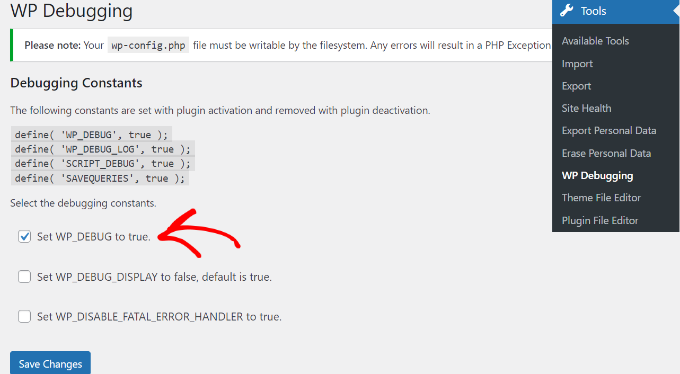
enable debug mode

WordPress has a built-in debugging feature that can help you identify the source of a fatal error. To enable debug mode:

  1. Access your site files via FTP or your hosting control panel (cPanel).
  2. Locate the wp-config.php file in the root directory.

Add the following lines of code just before the line that says:

/* That's all, stop editing! Happy blogging. */
define('WP_DEBUG', true);
define('WP_DEBUG_LOG', true);
define('WP_DEBUG_DISPLAY', false);
3. Save the file and refresh your site.

WordPress will now log error details in a file named debug.log located in the wp-content folder. You can open this file to find specific error messages, which can help you pinpoint the issue.

2. Deactivate All Plugins

Faulty or conflicting plugins are one of the most common causes of fatal errors. To determine if a plugin is causing the issue, you need to deactivate all plugins manually:

  1. Access your site via FTP or cPanel File Manager.
  2. Navigate to the wp-content folder.
  3. Rename the plugins folder to something like plugins_old.

This action will deactivate all plugins. Now, try accessing the WordPress admin (yoursite.com/wp-admin). If you can log in successfully, the issue was caused by one of the plugins.

To identify the specific plugin causing the error:

  1. Rename the plugins_old folder back to plugins.
  2. Go to the WordPress admin dashboard and reactivate each plugin one by one.
  3. After each activation, check if the error reappears. When it does, you’ve found the problematic plugin.

3. Switch to a Default Theme

Sometimes, a faulty theme can cause a fatal error. To determine if your theme is the issue:

  1. Access your site files via FTP or cPanel.
  2. Go to wp-content/themes.
  3. Rename your current theme’s folder (e.g., mytheme_old).
  4. WordPress will automatically switch to a default theme like Twenty Twenty-One or Twenty Twenty-Three.

Try accessing the admin dashboard again. If the issue is resolved, the problem lies with your theme.
4. Increase PHP Memory Limit

Increase PHP Memory Limit

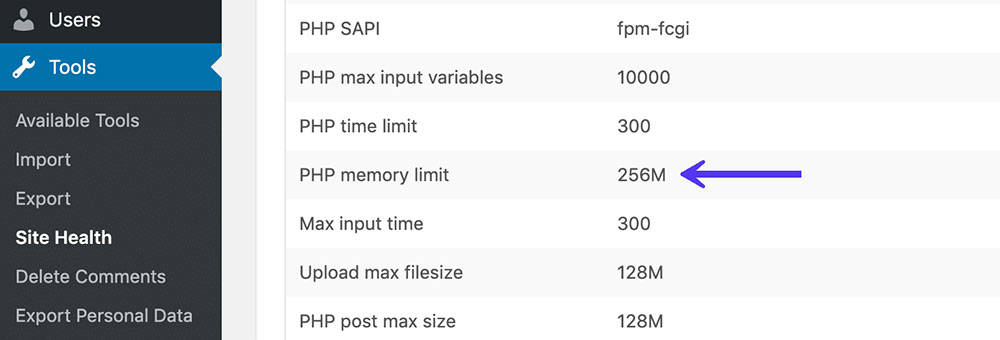
A fatal error can occur if your site exceeds the allocated memory limit. To increase the PHP memory limit:

  1. Edit the wp-config.php file and add the following line before the /* That’s all, stop editing! Happy blogging. */ line:
    define(‘WP_MEMORY_LIMIT’, ‘256M’);
  2. Save the file and check if you can access the admin dashboard.

You can also increase the memory limit by editing your php.ini file:

  • memory_limit = 256M

If you don’t have access to php.ini, you can try adding this to your .htaccess file:

  • php_value memory_limit 256M

5. Repair Corrupted Core Files

Corrupted WordPress core files can cause fatal errors. To fix this issue:

  1. Download a fresh copy of WordPress from wordpress.org.
  2. Unzip the downloaded file and delete the wp-content folder (you don’t want to overwrite your themes, plugins, or uploads).
  3. Upload the remaining files via FTP to your site’s root directory, replacing the existing files.
  4. Try accessing the WordPress admin.

6. Check PHP Version Compatibility

Using an outdated or incompatible PHP version can cause fatal errors. To check and update your PHP version:

  1. Log in to your hosting control panel (cPanel, Plesk, etc.).
  2. Find the “Select PHP Version” or “PHP Settings” option.
  3. Ensure you are using a supported version (e.g., PHP 7.4, 8.0, or higher).
  4. Update if necessary and check if the error is resolved.

7. Restore a Backup

If all else fails, restoring a recent backup can help you regain access. Most hosting providers offer backup options in their control panels.

  1. Log in to your hosting account.
  2. Go to the backup section and restore a backup from a date when your site was functioning properly.

Best Practices to Prevent Fatal Errors in WordPress

Maintaining a stable, secure, and error-free WordPress website requires proactive measures and attention to detail. Fatal errors can lead to downtime, broken functionality, and poor user experience. Follow these best practices to prevent fatal errors and ensure the smooth operation of your site:

1. Keep WordPress, Plugins, and Themes Updated

  • Why It Matters: Updates often include security patches, performance improvements, and compatibility fixes. Running outdated software increases the risk of security breaches and compatibility issues.
  • How to Implement:
  1. Enable automatic updates for core WordPress files by adding this line to wp-config.php:

    define('WP_AUTO_UPDATE_CORE', true);
    
  • Regularly check for plugin and theme updates in the WordPress dashboard.
  • Read update changelogs to understand what changes are being made and test updates on a staging site before applying them to the live site.

2. Use Reliable Plugins and Themes from Trusted Developers

  • Why It Matters: Poorly coded or unsupported plugins and themes can introduce vulnerabilities or conflicts that lead to fatal errors.
  • How to Implement:
    • Only download plugins and themes from reputable sources like the WordPress Plugin Repository, ThemeForest, or well-known developers.
    • Check user reviews, update frequency, and support responsiveness before installing.
    • Avoid using nulled (pirated) plugins and themes, as they often contain malicious code.

3. Regularly Backup Your Site

  • Why It Matters: Backups act as a safety net, allowing you to restore your site to a previous state if a fatal error occurs or if the site is compromised.
  • How to Implement:
    • Use reliable backup plugins like UpdraftPlus, BackupBuddy, or Jetpack.
    • Schedule daily or weekly backups depending on how frequently your site content changes.
    • Store backups in multiple locations (e.g., cloud storage like Google Drive, Dropbox, or external servers).

4. Enable Automatic Backups and Restore Points

  • Why It Matters: Automating backups and restore points ensures you have the most up-to-date copies of your site, reducing the risk of data loss.
  • How to Implement:
    • Set up automatic backups using plugins like VaultPress or BlogVault.
    • Create restore points before making significant changes, such as updating themes or plugins.
    • Many hosting providers (e.g., Rocon or WP Engine) offer automated backups and easy restore options.

5. Monitor Site Performance and Errors

  • Why It Matters: Early detection of errors and performance issues can prevent fatal errors from escalating and impacting site visitors.
  • How to Implement:
  1. Enable Debugging: Add the following code to wp-config.php to display errors during development:
define('WP_DEBUG', true);
define('WP_DEBUG_LOG', true);
define('WP_DEBUG_DISPLAY', false);
  • This logs errors to a file (wp-content/debug.log) without showing them publicly.
  • Use Monitoring Tools:
    • WP Debugging Plugin: Helps you find and fix PHP errors quickly.
    • Error Log Monitor: Alerts you to errors by checking the debug log regularly.
    • Google Analytics and Google Search Console: Identify performance issues or broken pages.

Use Uptime Monitoring Tools: Services like Pingdom, UptimeRobot, or Jetpack Monitor notify you if your site goes down.

Additional Best Practices

  1. Use a Staging Site:
    Test updates, new plugins, and theme changes on a staging environment before deploying them live.
  2. Optimize Database and Site Performance:
    • Regularly clean your database with tools like WP-Optimize.
    • Use caching plugins such as W3 Total Cache or WP Super Cache to reduce server load.
  3. Check PHP Compatibility:
    Ensure plugins and themes are compatible with the PHP version used by your server. Use the PHP Compatibility Checker plugin to scan for potential issues.
  4. Implement Security Measures:
    • Install security plugins like Wordfence or Sucuri Security.
    • Use a Web Application Firewall (WAF) for an additional layer of protection.
  5. Limit Plugin Use:
    Avoid installing too many plugins, as they can slow down your site and introduce conflicts.

By following these best practices, you can minimize the risk of fatal errors, ensure consistent site performance, and maintain a secure and user-friendly WordPress experience.

Conclusion

A fatal error warning in WordPress can be frustrating, especially when it blocks access to the admin dashboard. However, most fatal errors are caused by plugin conflicts, theme issues, memory limitations, or corrupted files that can be identified and resolved through systematic troubleshooting.

Start by enabling WordPress debugging, disabling plugins, switching to a default theme, and reviewing server error logs. These steps often help pinpoint the source of the problem and restore access to your WordPress admin area without affecting your site’s data.

To reduce the risk of future fatal errors, keep WordPress, themes, and plugins updated, perform regular backups, and test major changes before deploying them to a live site. If the issue persists, your hosting provider or a WordPress professional can help diagnose and resolve more complex server-side problems.

FAQs

1. What does fatal error mean on a website?

A fatal error occurs when a website encounters a critical problem that prevents it from running normally. On WordPress sites, fatal errors are often caused by plugin conflicts, theme issues, corrupted files, PHP errors, or insufficient server resources.

2. What is the meaning of fatal error?

A fatal error is a severe software or server issue that stops a program or website from executing. In WordPress, it usually means the system cannot continue processing due to a code, configuration, or resource-related problem.

3. How can I fix a fatal error?

To fix a fatal error, start by enabling WordPress debugging, reviewing error logs, and identifying recent changes. Common solutions include disabling plugins, switching themes, increasing PHP memory limits, updating software, or restoring a backup.

4. How to access WordPress admin with a fatal error warning?

If a fatal error prevents access to the WordPress dashboard, connect to your site using FTP or File Manager. Then disable recently installed plugins, switch to a default theme, or rename the plugins folder to regain access to the admin area.

5. How to fix an error in WordPress?

The best way to fix a WordPress error is to identify the root cause first. Check error logs, disable plugins one by one, test with a default theme, update WordPress files, and verify your hosting environment meets WordPress requirements.

6. What causes a WordPress fatal error?

WordPress fatal errors are commonly caused by incompatible plugins, theme conflicts, corrupted core files, exhausted PHP memory, coding mistakes, or unsupported PHP versions. Reviewing the error message usually helps pinpoint the exact cause.

7. How do I fix the “Fatal error: Maximum execution time of 30 seconds exceeded”?

This error occurs when a script takes longer to run than the server allows. You can fix it by increasing the PHP execution time limit, optimizing resource-intensive plugins, reducing large database operations, or upgrading your hosting resources.

8. Can a plugin cause a fatal error in WordPress?

Yes. A faulty, outdated, or incompatible plugin is one of the most common causes of WordPress fatal errors. Disabling the problematic plugin through FTP or the hosting file manager often resolves the issue quickly.

9. What is the difference between a fatal error and Error Establishing a Database Connection?

A fatal error is usually caused by PHP, plugin, theme, or code-related issues. Error Establishing a Database Connection occurs specifically when WordPress cannot communicate with the database due to incorrect credentials, server problems, or database corruption.

Maria

Maria is a Content Writer with 7+ years of experience creating content for WordPress, web hosting, and digital marketing. She specializes in taking technical topics and turning them into clear, practical guides that non-technical readers can actually follow. Her work covers everything from beginner WordPress tutorials to hosting comparisons and site optimization tips. She focuses on writing that answers real questions without unnecessary complexity, which is harder to do well than it sounds.

Start the conversation.

    Leave a Reply

    Your email address will not be published. Required fields are marked *

    Recommended articles

    WordPress

    Why Managed Kubernetes is Future of WordPress Hosting

    Ankit