WordPress PHP Compatibility: Versions & Requirements 2026
May 20, 2026 Written by Ankit Kumar


May 20, 2026 Written by Ankit Kumar


PHP is the engine running your WordPress site. Every page request, every form submission, every plugin function call runs through PHP on the server before anything reaches a visitor’s browser.
Running an outdated PHP version is the most common cause of WordPress security vulnerabilities, slow load times, and plugin breakage. And the fix is usually a 2-minute change in your hosting dashboard.
This guide cover the PHP version support lifecycle, the full WordPress compatibility matrix, how to test before you upgrade, what breaks and why, and the exact tools to use.
PHP (Hypertext Preprocessor) is a server-side scripting language. When a visitor lands on your WordPress site, PHP executes on the server, pulls data from your database, processes your theme and plugin logic, and builds the HTML the visitor sees. All of that happens before the browser receives a single byte.
WordPress core is written almost entirely in PHP. So are your themes, plugins, and any custom functions.php code you’ve added. If PHP breaks or behaves unexpectedly, everything on the site breaks with it.
The PHP version your host runs affects the speed of all of that. PHP 8.2 processes the same WordPress page roughly 18% faster than PHP 7.4, according to benchmark testing. And unlike switching themes or installing a caching plugin, upgrading PHP costs nothing.
Every PHP version follows a fixed 3-year support window. Understanding where your version sits in that window is the whole ballgame.
Running EOL PHP means known vulnerabilities in your PHP runtime get no fix. Attackers know this. WordPress sites on PHP 7.4 and older are actively targeted because EOL dates are public.
| PHP version | Release date | Active support until | EOL date | Status |
|---|---|---|---|---|
| PHP 8.4 | Nov 2024 | Nov 2026 | Nov 2027 | Active support |
| PHP 8.3 | Nov 2023 | Nov 2025 | Nov 2026 | Security fixes only |
| PHP 8.2 | Dec 2022 | Dec 2024 | Dec 2025 | EOL since Dec 2025 |
| PHP 8.1 | Nov 2021 | Nov 2023 | Nov 2024 | EOL since Nov 2024 |
| PHP 8.0 | Nov 2020 | Nov 2022 | Nov 2023 | EOL since Nov 2023 |
| PHP 7.4 | Nov 2019 | Nov 2021 | Nov 2022 | EOL since Nov 2022 |
| PHP 7.3 and older | Various | Varies | Varies | EOL (do not use) |
WordPress and PHP have separate release schedules. Each WordPress release recommends a specific PHP version and sets a minimum. Here’s the full matrix for all major releases since WordPress 6.0.
| WordPress version | Release date | Min PHP version | Recommended PHP | PHP 8.1 support | PHP 8.2 support | PHP 8.3 support |
|---|---|---|---|---|---|---|
| 6.8 (current) | Apr 2025 | 7.2.24 | 8.0+ | Compatible | Compatible | Compatible |
| 6.7 | Oct 2024 | 7.2.24 | 7.4+ | Compatible | Compatible | Compatible |
| 6.6 | Jul 2024 | 7.2.24 | 7.4+ | Compatible | Compatible | Beta |
| 6.5 | Apr 2024 | 7.2.24 | 7.4+ | Compatible | Beta | Beta |
| 6.4 | Nov 2023 | 7.2.24 | 7.4+ | Compatible w/ exceptions | Beta | Beta |
| 6.3 | Aug 2023 | 7.2.24 | 7.4+ | Compatible w/ exceptions | Beta | Beta |
| 6.2 | Mar 2023 | 7.2.24 | 7.4+ | Beta | Beta | Not tested |
| 6.1 | Nov 2022 | 7.2.24 | 7.4+ | Beta | Beta | Not tested |
| 6.0 | May 2022 | 7.2.24 | 7.4+ | Beta | Not tested | Not tested |
WordPress uses 4 official compatibility designations for each PHP version. ‘Compatible with exceptions’ means WordPress works on that PHP version, but with a small number of known edge cases. For PHP 8.0 and 8.1 on WordPress 6.3 and 6.4, the documented exceptions are:
For most production sites, these exceptions don’t cause issues. But if you’re running custom code that calls these functions directly, test on staging first.
PHP 8.0 through 8.4 each introduced changes that affect WordPress. The performance gains are real. So are the breaking changes.
Keeping your PHP up to date isn’t just a technical tick box – it’s a fundamental part of running a secure, stable and fast website. Here’s why this matters:
Out of date PHP versions are more vulnerable to known exploits. Once a version reaches End of Life (EOL) it stops getting security patches and your WordPress site is exposed to threats. Upgrading to a supported PHP version protects your site from exploits and cyber attacks.
PHP 8.x versions are way faster than PHP 7.x. Faster means quicker load times, less server resource usage and a better experience for users and search engines.
Newer PHP versions fix bugs and are more reliable. Sites on updated versions have fewer crashes, plugin conflicts and theme and custom code compatibility issues.
Themes and plugins evolve to support the latest PHP standards. Using an up-to-date.
means your WordPress ecosystem works as expected without functionality errors.
Most upgrade problems come from plugins and themes written for PHP 7.x that haven’t been updated. Here’s what breaks and why.
PHP removes old functions over time. Plugins calling create_function(), each(), or money_format() on PHP 8.0+ throw fatal errors, not warnings. The site goes white-screen.
The most common offenders: older WooCommerce extensions, outdated page builders, and WordPress themes last updated before 2021.
PHP 8.2 deprecated dynamic properties (setting arbitrary properties on class instances without declaring them). PHP 8.3 moved this from deprecated to removed for non-stdClass objects. This breaks older plugins that relied on this pattern.
Symptom: deprecation notices flood your error log on PHP 8.2, or fatal errors on PHP 8.3+.
PHP 8 introduced stricter type handling. Functions that silently coerced data types in PHP 7 now throw TypeErrors in PHP 8. A plugin passing a string where an int is expected used to work; now it throws a fatal error.
In PHP 8.0, warnings and notices that were previously silent (or logged only) became fatal errors in some contexts. If your plugin had suppressed warnings in PHP 7, those same code paths may now crash the site.
These functions were deprecated in PHP 8.2 and removed in PHP 8.4. Plugins that use them for character encoding break completely on PHP 8.4. The replacement is mb_convert_encoding().
| Quick Diagnostic
In WordPress, go to Tools > Site Health > Info > Server. This shows your current PHP version. Then go to Tools > Site Health > Status: WordPress will flag known PHP compatibility issues with your installed plugins and themes before you upgrade. |
Don’t upgrade PHP on a live site without testing first. These tools tell you exactly what will break before you flip the switch.
PHPCompatibilityWP is a WordPress-specific ruleset for PHP CodeSniffer. It scans your plugin and theme code and flags every function call, syntax pattern, and type usage that’s incompatible with a target PHP version. Run it against your entire wp-content directory before upgrading.
Install via Composer: composer require –dev phpcompatibility/phpcompatibility-wp
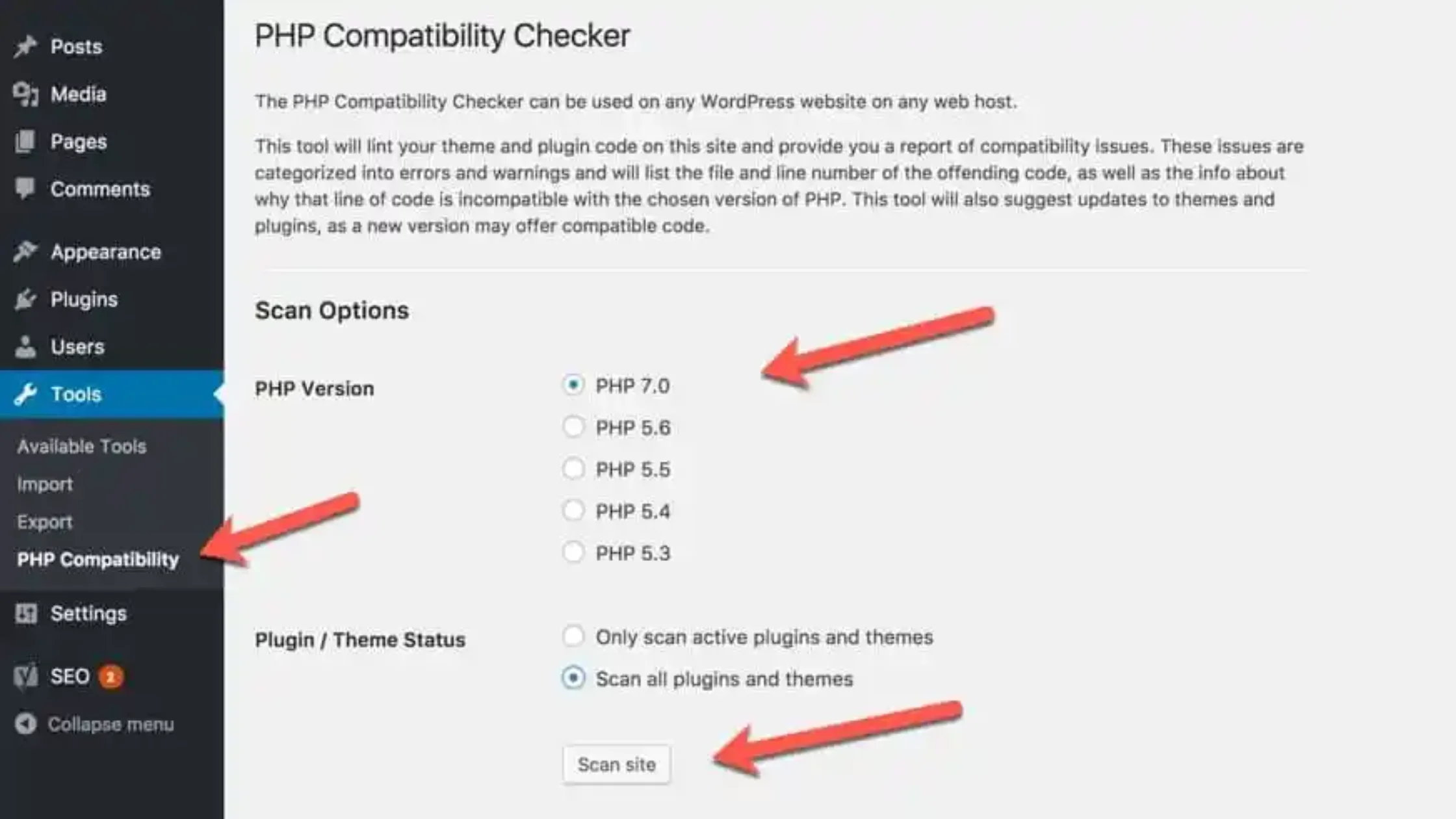
Available in the WordPress plugin repository, this plugin scans your installed themes and plugins from the WordPress admin. No command line needed. Set a target PHP version, run the scan, and it lists every incompatibility it finds.
Plugin repo slug: wpe-php-compat-check. Search ‘PHP Compatibility Checker’ in your WordPress plugin search.
Built into WordPress core since 5.2. Go to Tools > Site Health > Info > Server to see your current PHP version. The Status tab flags known compatibility issues. This is the first place to check on any site.
A developer tools plugin that shows PHP errors, warnings, and notices in a dashboard panel on every page load. Run it on staging after upgrading PHP to catch anything the static scanners missed. It surfaces errors from plugin code that only triggers during specific user actions, like adding to cart or submitting a form.
From the command line on your server, run wp cli info to see your PHP version, and wp eval ‘phpinfo();‘ for full PHP configuration. Useful for verifying that your hosting control panel change actually took effect.
For developers who need to fix PHP compatibility issues rather than just detect them: Rector automates PHP code refactoring. It rewrites deprecated function calls, updates syntax, and converts outdated patterns to modern equivalents. It saves hours of manual work on large codebases.
The upgrade itself takes 2 minutes. The preparation is what matters. Don’t skip the staging step.
In your WordPress admin, go to Tools > Site Health > Info > Server. Your current PHP version is listed there. Alternatively, check your hosting control panel under PHP settings.
Install the PHP Compatibility Checker plugin (search ‘PHP Compatibility Checker’ in your plugin library). Set the target PHP version to your intended upgrade target. Run the scan. Fix or replace any plugins flagged as incompatible before proceeding.
For a more thorough scan, use PHPCompatibilityWP via command line.
Outdated plugins are the main cause of upgrade failures. Update everything before testing. Check that each plugin you rely on has been updated within the last 12 months and supports your target PHP version.
Take a complete backup of your site files and database. This is your rollback point if anything goes wrong. If your host doesn’t provide automatic backups, use UpdraftPlus or Jetpack Backup before proceeding.
Create a staging copy of your live site. In your hosting dashboard, switch the PHP version on staging to your target version. Then test:
Once staging tests clean, log into your hosting control panel and update the PHP version on your live site. In Rocon’s dashboard, this is a single dropdown selection under your site’s PHP settings. No server restart needed.
Pick a low-traffic time window. The change is near-instant but test your live site immediately after.
Open your live site, log into the admin, and run through the same test checklist from Step 5. Check your error logs for the first 24 hours. If you see new fatal errors, roll back to the previous PHP version and debug from staging.
WordPress core has supported PHP 8.0 and above since version 5.6. PHP 8.1, 8.2, 8.3, and 8.4 are all supported on WordPress 6.3 and later.
The honest answer: WordPress itself is fine on PHP 8. Your plugins and themes are the variable.
WordPress uses 4 compatibility designations:
WordPress 6.8 (current) designates PHP 8.1, 8.2, and 8.3 as ‘Compatible’. PHP 8.4 support is currently in beta for the WordPress core. Most plugins have caught up with PHP 8.1 and 8.2. PHP 8.3 and 8.4 compatibility across the plugin ecosystem is still patchy.
Check your plugin list before upgrading. For each plugin you rely on, look at:
Plugins that haven’t been updated in 2+ years are high risk. The WP.org plugin repo shows a banner on plugins marked ‘not tested with your version of WordPress.’ That banner is a signal.
If you upgrade PHP and a plugin breaks, the fix is usually one of: update the plugin, find a replacement, or temporarily roll PHP back while you resolve it. Every major managed host lets you switch PHP versions without downtime. On Rocon you do it from your site dashboard in under 30 seconds.
These are the exact functions that break WordPress plugins when you upgrade. If your compatibility scan flags any of these, that plugin needs an update or replacement before you proceed.
| Function removed | Replacement | Common in |
|---|---|---|
| create_function() | Anonymous functions (closures) | Old custom code, legacy plugins |
| each() | foreach() loop | Older theme functions.php files |
| money_format() | NumberFormatter class | WooCommerce extensions, billing plugins |
| __autoload() | spl_autoload_register() | Older OOP plugins |
| get_magic_quotes_gpc() | No replacement needed | Old form handling code |
| read_exif_data() | exif_read_data() | Image processing plugins |
| Change | Impact |
|---|---|
| Passing null to non-nullable params deprecated | Triggers deprecation notices in many older plugins |
| Calling non-static methods statically deprecated | Common pattern in pre-2018 WordPress plugins |
| Serializable interface: serialize()/unserialize() deprecated | Some caching and session plugins affected |
| Returning non-array from usort() and similar deprecated | Sorting functions in some plugins throw notices |
| Function/behavior | Replacement | PHP version |
|---|---|---|
| Dynamic properties on non-stdClass objects | Declare properties explicitly | Deprecated 8.2, removed 8.3+ |
| utf8_encode() and utf8_decode() | mb_convert_encoding() | Deprecated 8.2, removed 8.4 |
| Implicitly nullable parameters | Explicitly declare as nullable | Deprecated 8.4 |
| ${} string interpolation | Use {} instead | Deprecated 8.2 |
For a full list, the official PHP migration guides. Each version has its own migration page with every backward-incompatible change.
Choosing the right host isn’t just about speed—it’s also about being compatible and secure. A good host makes sure your site can handle the latest PHP updates without breaking.
Managed WordPress hosting platforms like Rocon make PHP compatibility easy and stress-free. Here’s how:
Always up-to-date: Rocon has the latest stable PHP versions available.
Built-in compatibility tools: Find plugin/theme issues before you upgrade.
Automatic backups & updates: Protect your site and everything will run smoothly.
Developer tools: From staging environments to performance insights, upgrading PHP is a breeze even for growing teams.
If you want to be stress free when updating PHP hosting matters. Go with Rocon, built with security, performance and compatibility in mind.
PHP version management is one of the lowest-effort, highest-impact things you can do for a WordPress site. The upgrade itself takes minutes. The risk is almost entirely in untested plugins, which is why staging environments exist.
The short version:
If you’re using Rocon, your PHP version updates automatically from the site dashboard. Staging is built in. You can test the upgrade and push to production in the same session without opening a support ticket.
PHP 8.3 is the safest choice for most WordPress sites. It’s in security-only maintenance mode, which means it’s stable and well-tested without active development adding surprises. PHP 8.4 is fine if your plugin stack supports it. Anything 8.1 or older is End of Life and no longer receives security patches.
WordPress 6.8 requires PHP 7.2.24 as a minimum. Technically you can still run WordPress on PHP 7.2.24. Practically, you shouldn’t. PHP 7.4 reached End of Life in November 2022. Running it means your PHP runtime has had 3+ years of unpatched vulnerabilities.
It might, if your plugins or themes use functions that were removed or changed in newer PHP versions. That’s why you test on staging first with the PHP Compatibility Checker. If the scan comes back clean and staging tests pass, upgrading PHP on production is very low risk.
Go to Tools > Site Health > Info > Server in your WordPress admin. Your PHP version is listed there. You can also check your hosting control panel under PHP settings or run wp cli info from the command line.
Three things happen over time. Security vulnerabilities in your PHP runtime stay permanently unpatched. Plugin developers stop supporting old PHP versions so compatibility issues accumulate. And PHP 7.x performance is measurably slower than PHP 8.x, so your site’s load times suffer.
No. WordPress core supports PHP 8.x. Whether your specific plugins and themes support it depends on when they were last updated. A plugin last updated in 2019 probably uses deprecated functions. Check the ‘Tested up to’ field on each plugin’s WordPress.org page and look for recent changelog entries mentioning PHP 8 support.

Elevate your WordPress hosting with 30-day money-back guarantee, free migration, and 24/7 support.
Sign Up Today


Before You Go… Get 1 Month FREE on Rocon Hosting!

Experience lightning-fast speeds

No downtime or hidden fees

Dedicated 24/7 expert support

Leave a Reply