WordPress vs Weebly: Which is Better in 2026?
July 1, 2026 Written by Maria


July 1, 2026 Written by Maria


When comparing WordPress vs Weebly, the first question most people ask is which platform is the better fit for their website. Whether you’re building a blog, business website, portfolio, or online store, choosing the right platform can make managing and growing your site much easier over time.
Both platforms let you create a website without advanced coding skills, but they take very different approaches. Weebly focuses on simplicity with its drag-and-drop builder, while WordPress offers greater flexibility, customization, and control for users who want a website that can grow with their needs.
If your priority is launching a simple website quickly, Weebly can be a practical option. If you need advanced SEO, thousands of plugins and themes, complete design freedom, or a scalable eCommerce store, WordPress provides far more opportunities for long-term growth.
This guide compares the two platforms across the features that matter most, including ease of use, design flexibility, SEO, eCommerce, pricing, security, and scalability, helping you choose the option that best supports your goals.
WordPress is the world’s most popular open-source content management system (CMS), powering over 40% of websites on the internet. It is known for its flexibility, scalability, and massive ecosystem of themes and plugins, making it suitable for everything from personal blogs to business websites and large online stores.
There are two versions of WordPress:
For most businesses and website owners, WordPress.org is the preferred choice because it provides full ownership, better scalability, and the freedom to customize every aspect of the site as your needs grow.
Weebly is a beginner-friendly website builder designed for users who want to create a website without dealing with technical setup or maintenance. Its drag-and-drop editor, built-in hosting, and ready-to-use templates make it easy to launch a website quickly, even if you have no coding experience.
Since becoming part of Square, Weebly has focused heavily on small business websites and online stores. It combines hosting, security, website management, and payment processing into a single platform, making it a convenient option for users who prefer an all-in-one solution.
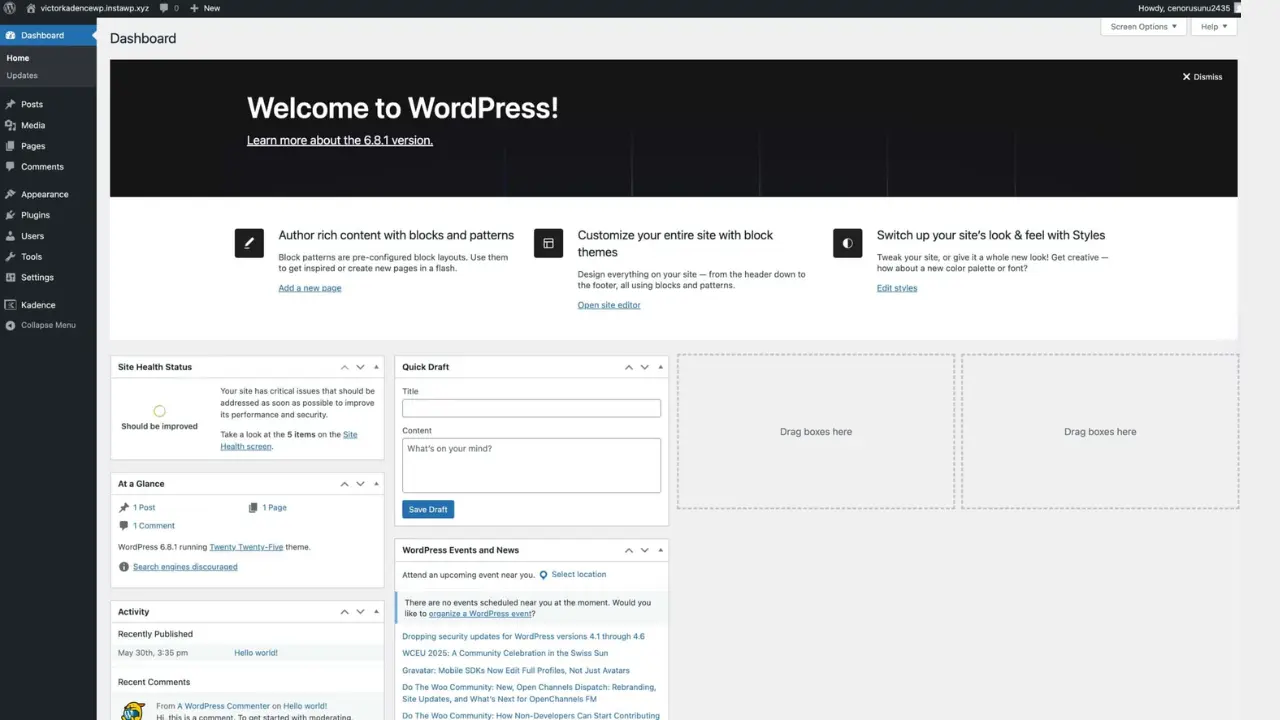
WordPress: WordPress is easy to learn, but it offers far more control than most website builders. The dashboard is well organized, and page builders like Elementor make designing pages much simpler without requiring coding skills. While there is a small learning curve at the beginning, most users become comfortable after creating a few pages. The benefit is that you gain a platform that can grow with your business instead of limiting future changes.
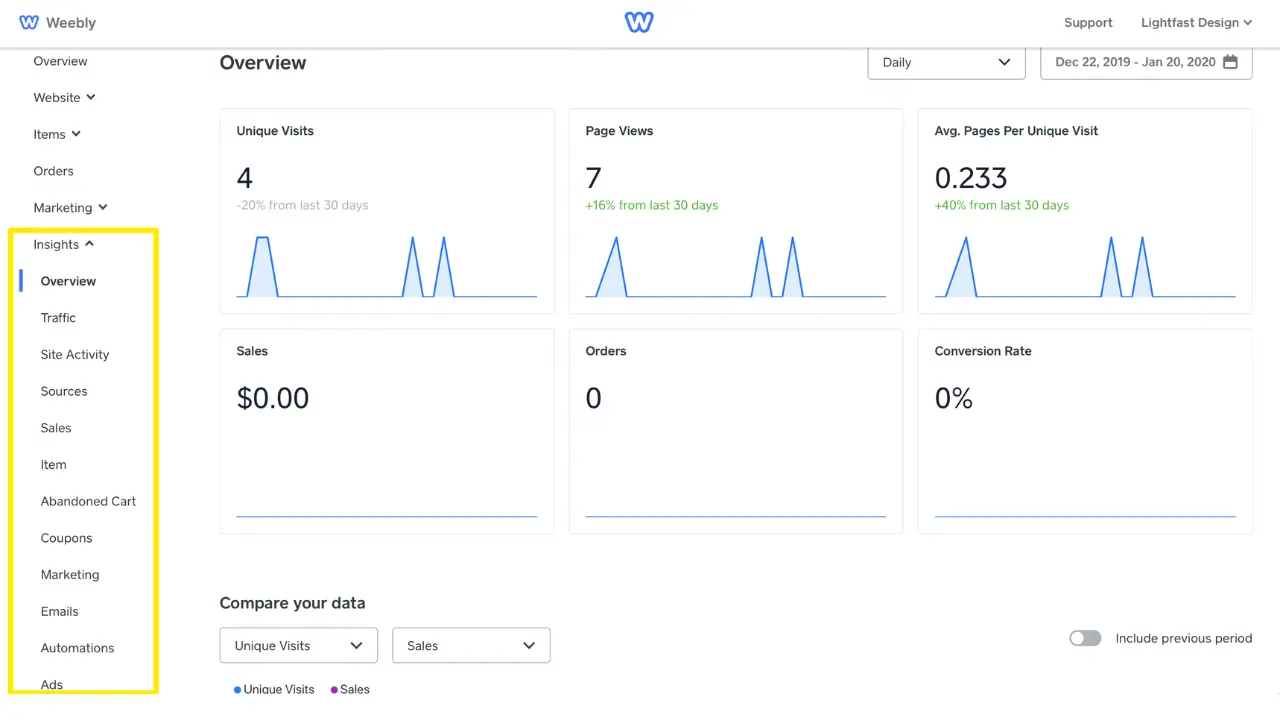
Weebly: Weebly is built for people who want to launch a website as quickly as possible. Its drag-and-drop editor, built-in hosting, and ready-made templates allow you to publish a simple site in a short amount of time. Almost everything is handled for you, so there is very little technical setup involved. The trade-off is that customization becomes limited once your website needs more advanced features.
Winner: Weebly for beginners who want a simple website with minimal setup. WordPress is the better long-term choice if you value flexibility, scalability, and complete control over your website.

WordPress: WordPress gives you complete creative freedom with thousands of free and premium themes, plus powerful page builders like Elementor and Gutenberg. You can customize layouts, colors, typography, and functionality to match your brand without being restricted to a fixed template. As your website grows, you can continue refining the design without rebuilding the entire site.
Weebly: Weebly offers professionally designed templates that make it easy to create a clean and attractive website. Its drag-and-drop editor is simple to use, but customization options are limited compared to WordPress. If you need unique layouts, advanced styling, or custom functionality, you’ll likely reach those limits fairly quickly.
Winner: WordPress. While Weebly is great for creating a simple website, WordPress provides far greater design flexibility and customization, making it the better choice for businesses and creators who want a website that can evolve with their needs.
WordPress: WordPress gives you full control over your website’s security, but it also means you’re responsible for keeping the core software, themes, and plugins updated. Choosing a reliable hosting provider and using trusted security plugins such as Wordfence or Sucuri can significantly improve protection. If you ever need help, WordPress has one of the largest communities, with thousands of tutorials, forums, and developer resources available.
Weebly: Weebly takes a more hands-off approach by managing security, hosting, updates, and maintenance for you. This makes it a good option for users who prefer not to handle technical tasks themselves. Support is available through Weebly’s help center and customer service, although the overall community and third-party resources are much smaller than those available for WordPress.
Winner: Tie. Weebly is better for users who want built-in security with minimal maintenance, while WordPress is the stronger choice for those who want greater control, advanced security options, and access to a much larger support ecosystem.
WordPress: With the WooCommerce plugin, WordPress can be transformed into a fully featured online store that grows with your business. It supports customizable product pages, multiple payment gateways like Stripe, PayPal, and Square, flexible shipping options, inventory management, and advanced features such as subscriptions, bookings, and memberships. Its large ecosystem of extensions also makes it easy to integrate with marketing, accounting, and CRM tools as your store expands.
Weebly: Weebly includes built-in eCommerce tools that are closely integrated with Square, making it easy to start selling online without additional setup. You can sell physical and digital products, manage basic inventory, create discount coupons, offer gift cards, and configure simple shipping rules. While these features work well for smaller stores, customization and third-party integrations are more limited than what WooCommerce provides.
Winner: WordPress. WooCommerce offers far more flexibility, advanced selling features, and scalability, making it the better choice for businesses planning long-term eCommerce growth.
WordPress: WordPress is one of the strongest platforms for SEO because it gives you complete control over how your website is optimized. You can customize meta titles, descriptions, URLs, image alt text, and use powerful plugins like Yoast SEO or Rank Math for on-page optimization. It also supports schema markup, XML sitemaps, breadcrumbs, and fast, mobile-friendly themes that help improve search visibility.
Weebly: Weebly includes essential SEO features that are enough for basic websites. You can edit page titles, meta descriptions, image alt text, and custom URLs, while responsive templates and automatic XML sitemaps help search engines crawl your site. However, advanced SEO options and optimization tools are limited, making it harder to compete for highly competitive keywords.
Winner: WordPress. It provides far more control, advanced SEO tools, and flexibility, making it the better choice for businesses that rely on organic search traffic.
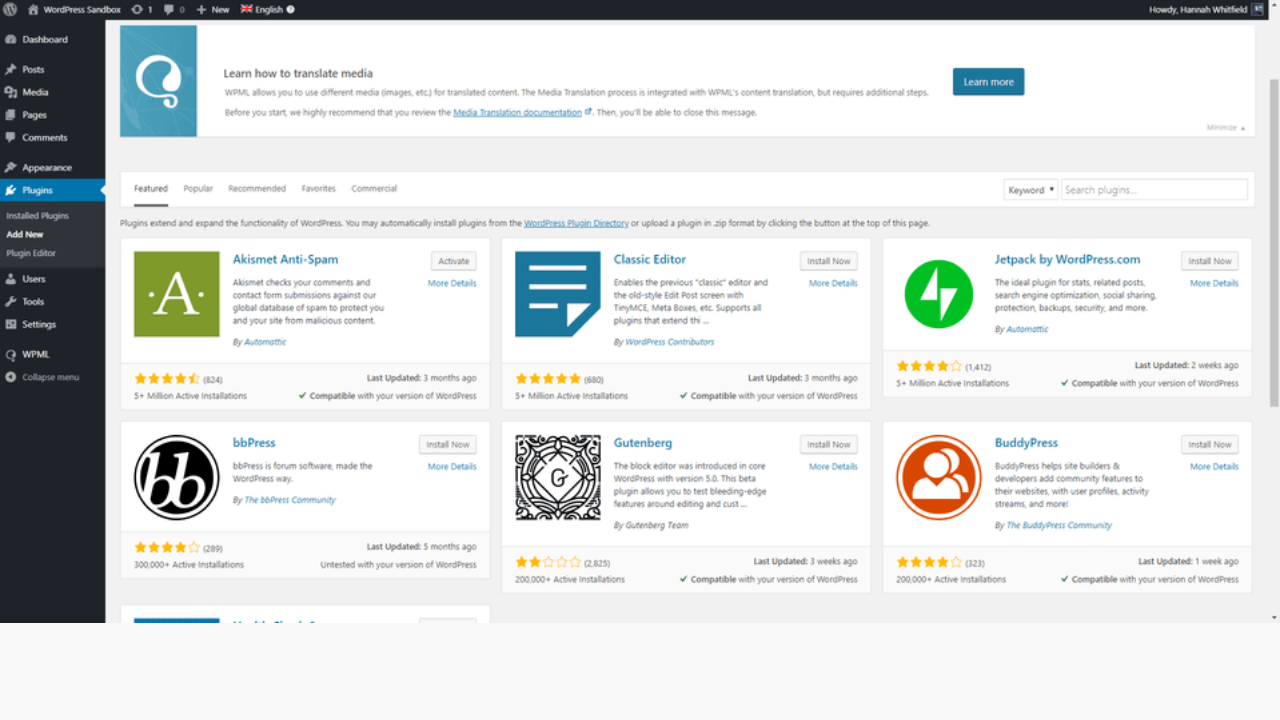
WordPress: One of the biggest strengths of WordPress is its massive plugin ecosystem. With more than 50,000 plugins available, you can add features such as SEO tools, contact forms, membership systems, analytics, marketing automation, and advanced eCommerce functionality without rebuilding your site. This flexibility makes WordPress suitable for everything from simple blogs to large business websites.
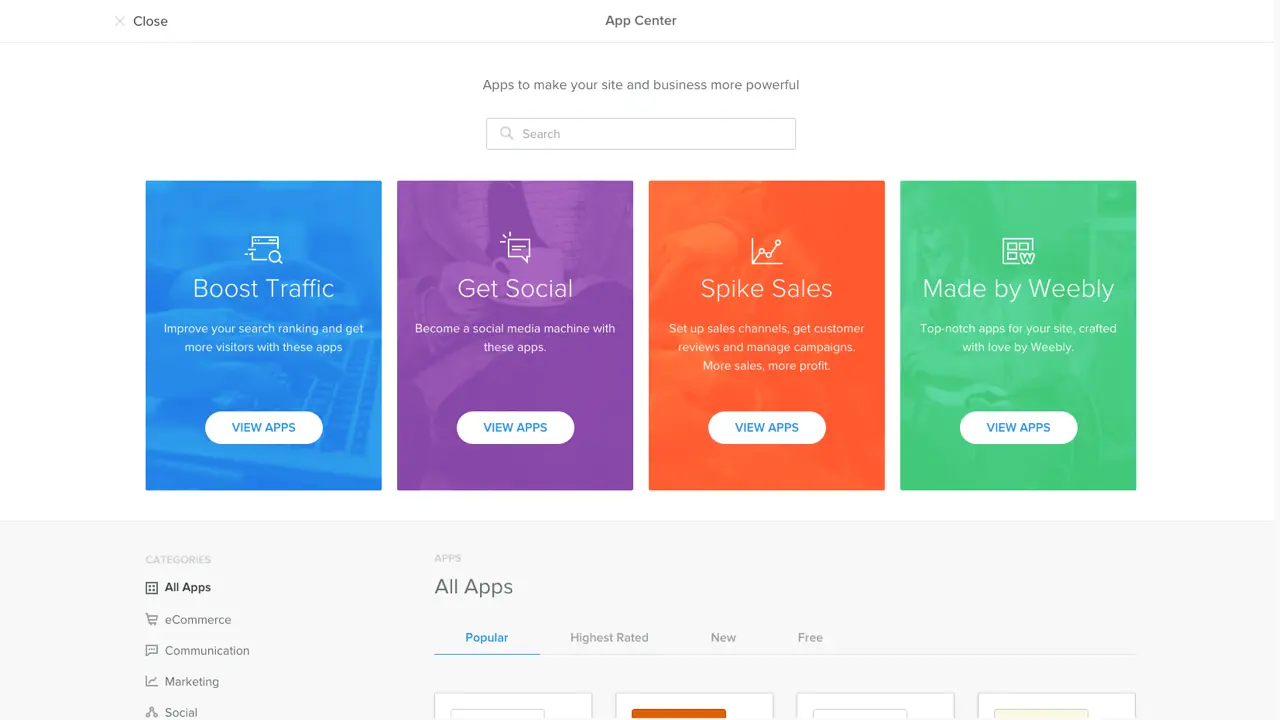
Weebly: Weebly includes an App Center with integrations for marketing, social media, booking tools, and online selling. The selection is much smaller than WordPress, but it covers many common needs for small businesses and personal websites. Setup is usually straightforward, although advanced customization and specialized integrations are more limited.
Winner: WordPress. Its extensive plugin library, wider range of integrations, and ability to add almost any feature make it the stronger platform for businesses that need flexibility and room to grow.
WordPress: WordPress performance depends largely on your hosting environment and optimization. With quality managed hosting, caching, image optimization, and lightweight themes, WordPress can deliver excellent loading speeds even for content-rich websites. It also gives you the flexibility to fine-tune performance as your traffic and website grow.
Weebly: Weebly comes with built-in hosting and performance optimization, so users don’t need to configure caching or server settings themselves. Most small websites load consistently well out of the box, making it a convenient choice for beginners. However, performance optimization options are limited compared to WordPress as your website becomes larger or more complex.
Winner: WordPress. With the right hosting and optimization, WordPress offers better long-term performance and can handle growing traffic more effectively than Weebly.
WordPress: Building a WordPress website involves a few separate costs, but you only pay for the features you actually need.
Although the initial setup may require a little more planning, WordPress offers excellent value because you can scale your website without being locked into a fixed pricing structure.
Weebly: Weebly follows a straightforward subscription model where hosting, security, and support are included.
The pricing is predictable and easy to understand, but businesses may eventually need features that require upgrading to higher-tier plans.
Winner: WordPress offers better long-term value and flexibility, while Weebly is ideal for users who prefer simple, all-inclusive pricing.
Choose WordPress if you want a highly customizable website that can grow alongside your business or personal brand. It is an excellent choice for blogs, business websites, content-driven marketing, and advanced eCommerce stores that require flexibility and long-term scalability.
Choose Weebly if your priority is getting a website online quickly without dealing with technical setup or ongoing maintenance. It works well for portfolios, small business websites, and simple online stores that don’t require extensive customization.
Both platforms serve different needs, so the right choice depends on your goals, budget, and future plans. If long-term growth, SEO, and complete control are important, WordPress is the stronger investment. If you simply need a professional website with minimal effort, Weebly remains a practical and reliable option.
If you choose WordPress, pair it with high-performance managed hosting from Rocon. Enjoy faster loading speeds, automatic scaling, built-in security, and expert WordPress optimization, so you can focus on growing your website instead of managing your hosting.
The biggest disadvantage of Weebly is its limited customization and scalability. It works well for simple websites, but advanced design changes, SEO features, and third-party integrations are far more limited than WordPress, making growth more difficult.
There isn’t a platform that’s universally better than WordPress. While Webflow, Wix, or Shopify may suit specific needs, WordPress remains the top choice for flexibility, SEO, plugins, and long-term website growth.
No, Weebly is not discontinued. However, development has slowed since Square acquired the platform, with more focus placed on Square Online, making WordPress a stronger long-term option for many businesses.

Elevate your WordPress hosting with 30-day money-back guarantee, free migration, and 24/7 support.
Sign Up Today
November 6, 2026
Sreekar


Before You Go… Get 1 Month FREE on Rocon Hosting!

Experience lightning-fast speeds

No downtime or hidden fees

Dedicated 24/7 expert support

Leave a Reply