WooCommerce Maintenance Service to Protect Your Revenue
September 25, 2025 by Nitish


September 25, 2025 by Nitish


Running a WooCommerce store is exciting, but keeping it running smoothly can be challenging. That’s where a WooCommerce maintenance service comes in. Without regular care, even a beautifully designed store can face slow performance, broken checkout pages, or security vulnerabilities.
Think of your WooCommerce store like a physical shop. You wouldn’t leave it open every day without cleaning, restocking, or fixing issues. Your online store works the same way. Routine maintenance keeps it fast, secure, and ready for customers.
A professional WooCommerce maintenance service takes care of updates, backups, and performance checks. It also monitors security, prevents downtime, and ensures your store runs without interruptions.
With ongoing maintenance, you can focus on growing your business instead of troubleshooting technical problems. Your customers get a smooth shopping experience, and your store avoids costly mistakes.
A WooCommerce maintenance service is more than just fixing problems—it’s a set of ongoing tasks designed to keep your online store secure, fast, and running smoothly. Think of it as preventive care for your website, ensuring issues are caught before they affect your customers.
A typical WooCommerce maintenance package often includes:
It’s important to understand the difference between reactive fixes and ongoing maintenance. A one-time fix addresses problems after they happen. Ongoing maintenance is proactive—it prevents issues from reaching your customers in the first place.
Many store owners think occasional updates or backups are enough. But WooCommerce is dynamic—it handles orders, payments, customer data, and third-party integrations. Missing an update or backup can disrupt your business and harm revenue.
A professional WooCommerce maintenance service goes beyond technical support. It protects your store, keeps your customers happy, and ensures your business continues to grow without interruptions.
Your WooCommerce store isn’t just a website—it’s a revenue engine. Even small issues can cost sales, customers, and credibility. That’s why ongoing maintenance isn’t optional—it’s essential. Here’s why every WooCommerce store benefits from a proactive maintenance plan.
Downtime means lost sales. A customer trying to check out during a flash sale might face a 500 error if your site is down. Regular maintenance monitors uptime, optimizes server performance, and ensures your store loads quickly on all devices. Fast, reliable sites keep customers happy and boost conversions.
WooCommerce stores handle sensitive customer and payment data, making them a prime target for hackers. Malware, ransomware, and brute-force attacks can cause major damage. Maintenance services implement firewalls, malware scans, SSL checks, and secure login protocols to prevent breaches.
Broken checkout pages, outdated product listings, or slow carts frustrate users and increase cart abandonment. Maintenance ensures every part of your store—from product pages to payment gateways—works seamlessly, providing a smooth, trustworthy shopping experience.
Google factors in speed, security, and uptime for rankings. Slow, insecure, or error-prone stores risk losing search visibility. Ongoing maintenance keeps your site fast, mobile-friendly, and technically sound, protecting your SEO value and online presence.
Skipping updates may seem convenient, but it adds up over time. Outdated plugins or themes can conflict with WooCommerce updates, causing errors or downtime. Maintenance keeps your site compatible, minimizing future technical headaches.
As your store grows, traffic spikes during promotions or seasonal sales. Without proper maintenance, these spikes can slow or crash your site. Maintenance services prepare your WooCommerce store for scaling with server optimization, caching strategies, and database management.
Consider a store that ignored plugin updates. A minor conflict caused the checkout to crash during Black Friday, costing thousands in revenue. Another lost customer data due to missed backups. These examples show how skipping maintenance can directly impact your business.
Ongoing WooCommerce maintenance protects revenue, safeguards customer trust, boosts SEO, and ensures your store is always ready for growth. It’s a proactive investment that saves time, money, and frustration while keeping your business running smoothly.
A professional WooCommerce maintenance service is more than just applying updates. It’s a complete package designed to keep your store secure, fast, and prepared for growth. Here are the essential components every store owner should expect:
WooCommerce, WordPress, and third-party plugins are updated regularly to fix bugs, patch vulnerabilities, and sometimes add new features.
Themes and custom code affect both design and functionality. Child themes, page builders, and custom snippets need constant attention.
WooCommerce stores hold sensitive customer data, making security essential.
Unexpected errors, crashes, or server failures can strike at any time.
Site speed impacts user experience and conversions.
Over time, databases accumulate unnecessary data, slowing down the store.
Every minute your store is down is lost revenue.
Even well-maintained stores can run into problems.
As your store grows, traffic spikes become more frequent.
A comprehensive maintenance service addresses technical, security, and performance needs while preparing your store for growth. By proactively managing updates, backups, security, and scalability, it protects revenue, improves user experience, and ensures your store is always ready for customers.
So many WooCommerce store owners are stuck with the same question: do it yourself or hire a pro? While DIY seems cheap at first it has hidden risks and inefficiencies.
If you have technical knowledge, certain tasks can be managed in-house:
While these tasks may seem manageable, they require consistent attention and technical awareness. Missing an update or misconfiguring a plugin can lead to serious issues, including downtime, security breaches, and data loss.
Professional WooCommerce maintenance services offer a proactive, all-in-one approach:
While DIY maintenance may save money upfront, professional services reduce hidden costs:
Professional WooCommerce maintenance is cheaper in the long run especially for growing stores or high traffic and sales stores.
DIY may work for small stores with low traffic, but for serious WooCommerce businesses professional maintenance means reliability, security and growth while saving you time, stress and potential revenue loss.
Choosing the right WooCommerce maintenance provider is key to your store’s success. The wrong one can cause delays, security holes and lost revenue, the right one will keep everything running smoothly, growing and stress free. Here’s a detailed guide to help you make the right choice.
Not all WordPress maintenance services are created equal. You need a provider with specific WooCommerce experience. They should understand:
A provider with WooCommerce expertise can proactively prevent issues that general WordPress services may miss.
Your store operates 24/7, so your maintenance provider should offer reliable support, ideally 24/7. Consider:
Fast, reliable support ensures problems are resolved before they affect customers or revenue.
Check the breadth of services included in their maintenance packages:
A provider offering all these services under one plan is more efficient than managing multiple vendors.
Maintenance services typically follow:
Compare plans carefully, ensuring the value matches the cost, not just the price tag.
A reputable provider builds trust and confidence that your store is in expert hands.
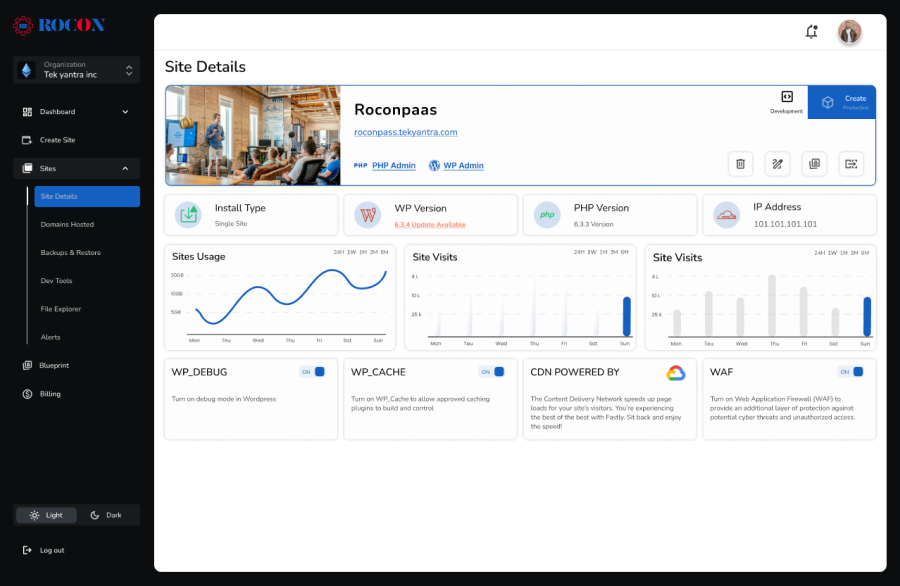
Some providers, like RoconPaas, combine managed hosting with WooCommerce maintenance, offering:
Bundled solutions simplify and ensure your store’s hosting and maintenance are fully aligned.
Choosing the right WooCommerce maintenance provider is about expertise, reliability and comprehensive services. By evaluating skills, support, service scope, pricing, reputation and hosting synergy you’ll keep your store secure, fast and ready to grow.
Investing in a professional WooCommerce maintenance service is not just about keeping your site running—it’s about protecting revenue, user experience and long term growth. Here are the benefits of professional maintenance for your WooCommerce store.
Running an online store is stressful—orders, customer support and marketing campaigns. Professional maintenance means your site runs smoothly and you can have peace of mind. You don’t have to worry about broken plugins, theme conflicts or security threats. Instead you can focus on growing your business and serving your customers.
Website speed directly affects user experience, SEO, and conversion rates. Maintenance services include performance optimization, such as:
A fast-loading WooCommerce store keeps customers engaged, reduces bounce rates, and improves search engine rankings.
Security is one of the most important parts of eCommerce. WooCommerce stores are a target for malware, hacking and data breaches. Professional maintenance means continuous monitoring, SSL checks, firewalls and malware scans to reduce the risk of attacks and protect customer data.
A smooth shopping experience means more completed orders. By keeping your WooCommerce store up to date, secure and fully functional maintenance prevents errors during checkout, broken product pages or slow loading carts so customers can shop without friction.
Professional services help your store scale. During promotions, sales or high traffic events your WooCommerce site stays responsive and stable. So you never lose revenue due to site crashes or performance issues.
With a maintenance plan you have predictable monthly or annual costs rather than unexpected bills when things go wrong. It’s a proactive investment that reduces emergency fixes, downtime losses and customer trust issues.
Maintenance providers have WooCommerce expertise. From plugin conflicts to theme customisation issues, expert technicians can identify and fix problems faster than most DIY approaches. This minimises downtime and ensures everything runs smoothly all the time.
WooCommerce maintenance is a strategic investment not just a technical requirement. It means your store runs fast, is secure, scales with your business and delivers a seamless shopping experience – all while giving you peace of mind and protecting your revenue.
WooCommerce store maintenance goes beyond updates—it needs a strategy for security, performance and growth. Best practices prevent issues, optimise your store and give your customers a great experience. Here’s the full guide.
Regular updates are crucial for security and compatibility. Outdated plugins or core software can cause site errors or expose vulnerabilities.
Backups are your safety net in case something goes wrong, from plugin conflicts to server failures.
A compromised store can lead to lost revenue and damaged customer trust.
Speed impacts both SEO and user experience. A slow store loses customers.
Downtime or slow pages can affect both sales and Google rankings.
The checkout process is critical for conversions. Even minor errors can cause abandoned carts.
As your store grows, so does the traffic and server load.
Following these WooCommerce best practices means your store will be secure, fast and working, protecting revenue and a smooth experience for your customers. Proactive is better than reactive, saves time, money and customer frustration.
Understanding the cost of a WooCommerce maintenance service is essential for making informed decisions about your store’s upkeep. While prices vary depending on the provider, package scope, and store size, professional maintenance is generally a cost-effective investment when compared to the potential losses from downtime, security breaches, or slow performance.
The price of WooCommerce maintenance services depends on several factors:
Investing in maintenance might seem like an added expense, but the return on investment (ROI) is significant:
While cheaper may seem attractive the quality and breadth of the maintenance plan matters more than the price. A reliable provider like Rocon offers end to end WooCommerce maintenance—updates, backups, security, performance and scalability all under one plan. This minimizes risk and means your store will always be running optimally.
WooCommerce maintenance costs vary depending on store complexity and service scope but maintenance is an investment in revenue protection, performance and peace of mind. Going for quality over price means long term stability and growth for your online store.
Running a WooCommerce store is rewarding, but it comes with challenges. Between plugin updates, security threats, performance optimization, and backups, there’s a lot to manage. A structured maintenance approach keeps your store running smoothly, securely, and efficiently.
A good WooCommerce maintenance service covers every aspect of your store:
Regular maintenance ensures your store performs at its best, reducing downtime and protecting your revenue.
Experienced WooCommerce professionals can spot issues before they affect your store. Expert teams resolve plugin conflicts, ensure customizations are compatible with updates, and proactively prevent common technical problems that DIY or general WordPress services may overlook.
Protecting customer data is critical. Effective maintenance includes:
This proactive approach reduces risk and ensures your store meets modern security standards.
Fast-loading stores improve user experience and search visibility. Key practices include:
Optimized performance reduces bounce rates, increases conversions, and keeps shoppers satisfied.
Downtime can lead to lost sales and frustrated customers. Continuous monitoring detects issues immediately, and regular backups allow fast recovery, minimizing disruption.
Maintenance should fit your business, whether a small boutique or an enterprise store. Flexible plans provide predictable costs, full coverage, and dedicated support tailored to your WooCommerce store.
With structured maintenance, your WooCommerce store runs smoothly, stays secure, and performs optimally. This frees you to focus on growth, customer engagement, and sales—without worrying about technical issues.
Running a WooCommerce store isn’t optional—it’s critical for any business that wants to succeed online. From performance optimization and security monitoring to updates, backups, and scalability, professional maintenance ensures your store runs smoothly, securely, and efficiently.
DIY maintenance may work for very small stores, but larger or growing stores need expert support. Professional WooCommerce maintenance services provide proactive monitoring, troubleshooting, and comprehensive solutions that save time, prevent costly errors, and protect your revenue.
With the right maintenance partner, your WooCommerce store stays optimized for speed, secure against threats, and fully functional at all times. Customers experience a seamless shopping journey, and you gain peace of mind knowing technical issues won’t slow your business down.
Investing in ongoing maintenance is an investment in growth and longevity. It lets you focus on marketing, customer engagement, and scaling your store, while experts handle the technical side. For serious WooCommerce store owners, prioritizing performance, security, and professional maintenance is one of the smartest decisions you can make.
Elevate your WordPress hosting with 30-day money-back guarantee, free migration, and 24/7 support.
Sign Up Today

Before You Go… Get 1 Month FREE on Rocon Hosting!

Experience lightning-fast speeds

No downtime or hidden fees

Dedicated 24/7 expert support


Leave a Reply