What is Rocon Hosting? Complete Guide for WordPress Users
May 22, 2026 Written by Nitish Kumar


May 22, 2026 Written by Nitish Kumar


Rocon is a managed WordPress hosting platform that runs your site on Kubernetes, the same container system Google uses internally. The platform handles speed, security, auto-scaling, backups, and free migration for you, so you don’t have to mess with server configs to keep your WordPress site fast and stable.
This guide covers everything you need to know about Rocon hosting in 2026: how it works, what’s included, what it costs, and exactly how to migrate your existing WordPress site over.
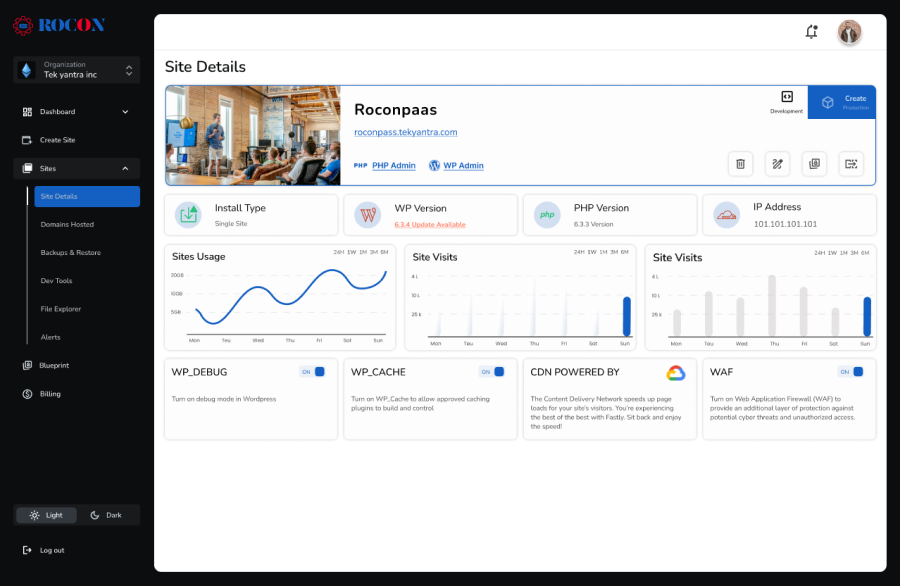
Rocon runs each WordPress site inside its own Kubernetes container, not on a shared server. That means your site gets dedicated resources and doesn’t have to fight other websites for CPU or memory.
Underneath, the platform uses Google Cloud for the network, Google CDN for global content delivery, and Amazon RDS for the WordPress database. The same infrastructure powers some of the biggest brands on the internet, so the engineering foundation is solid.
You sign in to a clean dashboard, see your sites, check performance, manage backups, and contact support. Everything else (server patches, scaling, security updates) happens automatically.
Shared hosting works fine when your site is small. Once you start growing, the cracks show. Pages slow down. A traffic spike breaks the site. Plugin updates introduce issues and rolling back is a multi-hour ordeal. Support takes 2 days to reply.
Rocon was built specifically to solve these problems for WordPress users.
Customers report up to 49% speed improvements after migrating. The platform sits at a 99% uptime SLA and around 97% customer satisfaction. Most importantly, you stay focused on your content, products, or client work, while Rocon handles the technical side.
Here’s what’s included with every Rocon plan.
Your site runs inside its own Kubernetes container. If a server has issues, your site automatically shifts to a healthy node without downtime. You don’t share CPU or memory with other sites, so performance stays consistent even during peak traffic.
Every plan includes Google’s Content Delivery Network with 100+ points of presence worldwide. A visitor in Berlin gets a cached version from Berlin. A visitor in Mumbai gets one from Mumbai. Pages load faster everywhere your audience is.
If your site gets a traffic spike from a viral post, a product launch, or a featured mention, the platform adds resources automatically. You don’t get a surprise overage bill. Scaling stays included in your plan.
Your WordPress database sits on Amazon RDS, which handles backups, failover, and version patching. This is enterprise-grade database infrastructure, included with every plan. Your data is safer and faster than on standard hosting.
Rocon runs automated nightly backups for every site. You can also trigger an on-demand backup before pushing a big update. If something breaks, roll back in one click. No add-on cost.
The Web Application Firewall runs on Google Cloud Platform. It blocks common WordPress attacks like brute-force logins on /wp-login.php, SQL injection attempts, and xmlrpc abuse. DDoS mitigation is included for every plan.
Real-time malware scans run continuously across your site. If anything suspicious shows up, you get an instant alert. If your site does get compromised, Rocon’s team helps you clean it at no extra cost.
Switching hosts is usually painful. Rocon has an in-house team that handles the full migration for you, files, database, URL replacement, and DNS guidance, all included free with every plan.

Rocon offers 3 main hosting paths, plus dedicated solutions for agencies.
Container-based, auto-scaling WordPress hosting starting at $1.99/month with the current 85% off promo. This is the right pick for most solo sites, small businesses, and growing WordPress projects.
High-performance dedicated WordPress hosting for very large WordPress sites or specific compliance setups. Custom pricing based on your resource needs.
Resell Rocon hosting under your own brand with our white-label hosting solution. Dashboard, billing, emails, and support portal customized to your agency. Perfect for marketing agencies and freelancers offering hosting as a service.
For agencies running multiple client sites, Agency Solutions plans add multi-site management features in a single dashboard, so you handle all your clients from one place.
Setting up your site on Rocon is straightforward. Here’s the full process from sign-up to live.
Head to the Rocon pricing page. For most WordPress users, the Kubernetes hosting plans are the right starting point. If you’re managing 10 or more client sites, check Agency Solutions instead.
Sign up. You’ll need your email, a password, and basic contact info. The whole sign-up takes about a minute. You’ll get instant access to your dashboard.
Inside your dashboard, request a migration. Tell Rocon’s team:
The in-house migration team handles the rest. Files, database, URL search-and-replace, all of it. You don’t lift a finger.
Once migration is complete, Rocon sends you a staging URL where your site runs on the platform before going live. Walk through it carefully:
If anything looks off, the migration team fixes it before you switch DNS.
Once you’re happy with the staging site, update your A record or nameservers at your domain registrar (Namecheap, GoDaddy, Cloudflare, or wherever your domain lives). The Rocon dashboard shows you the exact values to use. DNS propagation usually takes 30 minutes to a couple of hours.
After going live, check your Rocon dashboard daily for the first week. Watch:
The plugin checker is genuinely useful. It flags plugins that slow your site down or carry known security issues, so you know what to update or replace. If anything looks off, contact support anytime.
Support is one of the biggest reasons customers choose Rocon. You get round-the-clock access to real engineers, not chatbots or first-tier ticket agents. You can paste code, send screen recordings, and share screenshots directly. The team digs into your issue and replies quickly.
Whether it’s a tricky plugin conflict, a performance question, a migration check, or a security alert, you reach real people who know WordPress inside and out.
If you want WordPress hosting that’s fast, secure, and backed by a real support team, Rocon is built for that. Pick the plan that fits your site, request your free migration, and let Rocon’s team handle the move. You’re live within a day or two.
With the 30-day money-back guarantee, there’s no risk to trying it.
Managed WordPress hosting is a service where the hosting provider handles all the technical work behind the scenes: server management, updates, security, backups, and performance tuning. You focus on your content and your business. Rocon’s managed hosting is built specifically for WordPress with WordPress-specific tuning built in.
Yes. Free migration is included in every Rocon plan. The in-house team handles files, database, URL replacement, and DNS guidance. Migration usually completes within 24 to 48 hours depending on website size.
Yes. The platform is tuned for transactional WordPress, including WooCommerce stores. The Amazon RDS database handles WooCommerce sessions properly, and caching is configured so checkout flows don’t break.
You can upgrade to a higher Kubernetes tier or move to Dedicated Hosting for very high-traffic sites. The dashboard stays the same, so there’s nothing new to learn.
Yes, particularly under the Agency Solutions plans where multi-site management is built into the dashboard.
Every Rocon plan comes with a 30-day money-back guarantee. If Rocon isn’t the right fit, you get a full refund within 30 days.
Yes. Rocon’s White Label Hosting and Agency Solutions plans are built for agencies running multiple client sites under one platform, with branded dashboards, billing, and support.
Yes, the 85% discount applies to new sign-ups. It’s a limited-time promo, so the earlier you sign up, the longer you lock in the savings.

Elevate your WordPress hosting with 30-day money-back guarantee, free migration, and 24/7 support.
Sign Up Today
November 6, 2026
Sreekar


Before You Go… Get 1 Month FREE on Rocon Hosting!

Experience lightning-fast speeds

No downtime or hidden fees

Dedicated 24/7 expert support

Leave a Reply