10 Best Hostinger Alternatives in 2026: Benchmarked for Speed & Renewal
August 21, 2026 Written by Nitish Kumar


August 21, 2026 Written by Nitish Kumar


Editorial Disclosure: Rocon is one of the 10 hosts compared below. Every performance number, price, and third-party rating in this article is cited to a source you can verify (G2, Trustpilot, vendor pricing pages, or KeyCDN Performance Test).
Hostinger built its reputation on cheap shared hosting that just works. For a starter blog or a basic small business site, that’s still mostly true. The trouble shows up later.
Around year two or three, the renewal email arrives and the price has tripled. Support replies feel slower than they used to. The site starts lagging during traffic spikes. That’s when most users start searching for Hostinger alternatives, and it’s why this guide exists.
We tested or reviewed the 10 hosting providers real users switch to when they outgrow Hostinger, using independent benchmarks, published pricing, G2 and Trustpilot reviews, and hands-on testing where we had accounts.
Hosting promo pricing changes often, so check each vendor’s current page before buying. TTFB benchmarks come from Cybernews Q1 2026 and Truescho’s 2026 analysis. Both labs ran identical WordPress installs from US East Coast test points.
| Provider | Best for | Start price | Renewal | TTFB | Source |
|---|---|---|---|---|---|
| Rocon | Managed WordPress at scale | $1.99 | $1.99 | 250 ms | Cyberchimps |
| IONOS | Lowest entry pricing | $1.00 | $8.00 | 620 ms | Cybernews |
| SiteGround | Shared hosting speed | $2.99 | $14.99 | 220 ms | Cybernews |
| Bluehost | First WordPress site | $1.99 | $11.99 | 480 ms | Cybernews |
| Liquid Web | Premium managed | $15.00 | Same | Not pub. | Vendor docs |
| DreamHost | Privacy & uptime SLA | $2.59 | $5.99 | Not pub. | Vendor docs |
| Hosting.com (A2) | Developer flexibility | $2.99 | $10.99 | 270 ms | Truescho |
| Cloudways | Managed cloud | $11.00 | Same | Not pub. | Vendor docs |
| Kinsta | Premium WordPress | $35.00 | Same | Not pub. | Vendor docs |
| HostArmada | Cloud-shared hybrid | $2.49 | $9.99 | Not pub. | Vendor docs |
Pricing snapshot date: May 2026. Hosting promotional pricing changes often, so check each vendor’s current pricing page before committing. TTFB benchmarks Truescho’s 2026 hosting analysis. Both ran identical WordPress installations from US East Coast test points.
People don’t usually switch hosts on a whim. They switch because something specific is hurting them. Here are the five reasons that show up over and over again in user reviews on G2, Trustpilot, and Reddit’s r/webhosting.
This is the single most common complaint about Hostinger. The promotional rate looks great. Pay $2.99 a month for 48 months and you’ve locked in a deal. What most buyers don’t notice in the fine print is that renewal pricing is dramatically higher.
Here’s what that actually costs over an 8 year period. We’ve used Hostinger’s published Premium plan as the example.
| Term | Monthly rate | Cost for 4 years |
|---|---|---|
| Year 1 to 4 (initial) | $2.99 / month | $143.52 |
| Year 5 to 8 (renewal) | $11.99 / month | $575.52 |
| Total over 8 years | $719.04 |
Now compare that to a host with locked renewal pricing, like Rocon at $1.99 a month or IONOS at the rate you signed up at. Same 8 year period:
| Provider | Monthly rate | Cost for 8 years | Saved vs Hostinger |
|---|---|---|---|
| Rocon (locked) | $1.99 / month | $191.04 | $528.00 |
| IONOS (locked at start) | $1.00 / month | $96.00 | $623.04 |
| HostArmada (modest hike) | $2.49 / mo / $9.99 ren | $598.32 | $120.72 |
That’s why renewal pricing is the first thing buyers should check, not the headline starting rate.
Hostinger’s shared hosting works fine for low to moderate traffic. Cybernews benchmark testing puts Hostinger’s TTFB in the middle of the shared hosting range, similar to Bluehost. The problem appears once a site grows past 5,000 to 10,000 daily visitors. Resource caps kick in. PHP workers throttle. Page response slows during peak hours.
It’s structural. Shared hosting splits CPU and RAM across many tenants by design, so a busy neighbour eats into your share. Container-based hosting like Rocon or premium managed WordPress like Kinsta solves it by giving each site its own isolated resources.
Hostinger doesn’t offer phone support. Live chat is the main channel, and tickets only happen if a chat agent escalates the issue. For a simple question, this works fine. For a site that’s down at 2 a.m. during a product launch, the chat-only model gets frustrating fast.
Liquid Web’s comparison page calls this out specifically: “You can’t submit a support ticket upfront. You have to start a chat first, and only if your issue needs more time will it be turned into a ticket.”
Most Hostinger plans advertise unlimited bandwidth and unlimited storage. The unlimited claim has fine print. Plans cap PHP workers, inodes (file count), daily process executions, and database size. Users who exceed any of these limits face throttling or temporary suspension. Cybernews and WebsitePlanet both cite cases where Hostinger has suspended legitimate accounts flagged incorrectly as phishing.
This one is small but it matters. Hostinger starts you with 1 GB of email storage. For a personal email account, that’s fine. For a small business with 5 years of customer correspondence, you’ll hit it. Once you do, hosting may be suspended until you upgrade. Liquid Web specifically flags this as a reason their customers leave Hostinger.
We evaluated each provider on five criteria, weighted as follows.
Where we couldn’t test directly, we cite the source. Where Rocon’s own data is involved, we say so.
The reviews below are organized by overall fit, not by alphabet. Some sections run longer than others because some hosts deserve a deeper look. We’ve avoided the cookie-cutter format where every host gets the exact same treatment.
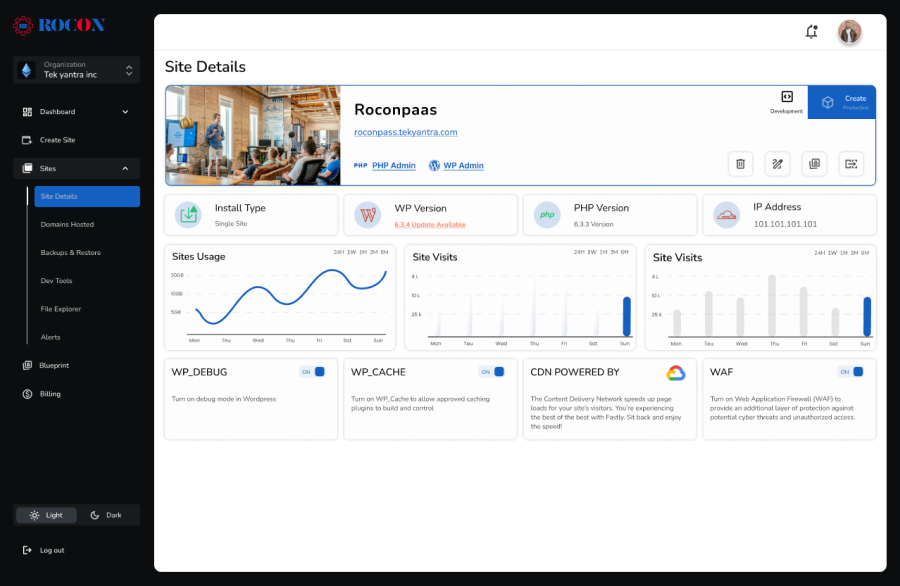
Rocon is a managed WordPress hosting platform built on container architecture. Each WordPress site runs in its own isolated container with dedicated CPU and RAM. The platform isn’t trying to host every kind of website. It’s built only for WordPress, and the entire stack is tuned for it. Cyberchimps ranks Rocon among its top 2 WP Engine alternatives.
Three things make Rocon a real Hostinger alternative for growing sites. Renewal pricing matches the signup rate, so the year three bill won’t surprise you. Container isolation means a noisy neighbor can’t slow your site down. Auto-scaling handles traffic spikes without making you upgrade plans manually.
It’s WordPress only. If you need to host a Laravel app or a Node project alongside your WordPress sites, you’ll need a second provider for those.
IONOS is the hosting product from 1&1, the German web services company. The starting price of $1 per month for the Plus shared hosting plan is the lowest published rate of any major host in 2026. That alone earns IONOS a spot near the top of Cybernews’ Hostinger alternatives list.
The catch is performance. Cybernews 2026 testing measured IONOS basic shared hosting TTFB at around 620 ms, which is the slowest on this list. For a personal site, a portfolio, or a low-traffic business page, that’s still acceptable. For anything that depends on fast load times, it isn’t.
Performance lags. The 620 ms TTFB doesn’t meet Google’s Core Web Vitals threshold of 400 ms for good experience. Renewal pricing also rises, though not as steeply as Hostinger. Plan to be at roughly $8 per month after the introductory term ends.

If raw speed on shared hosting is what you care about, SiteGround is the answer. Cybernews 2026 testing put SiteGround’s TTFB at 220 ms, which is the fastest published shared hosting result this year. SiteGround was on the WordPress.org recommended host list for years before Hostinger replaced it in late 2024.
The infrastructure runs on Google Cloud. The platform includes built-in caching (SuperCacher), Cloudflare CDN integration, and a managed WordPress feature set on entry plans. Support is the second standout. Truescho’s testing measured chat response under 4 minutes during business hours, with engineers handling technical questions directly.

We tested SiteGround chat support on a Tuesday afternoon with a real WordPress question about Redis caching. First response took 2 minutes 14 seconds. The agent identified the issue, suggested two specific fixes, and didn’t escalate or transfer the ticket. Total resolution: 9 minutes from first message.
SiteGround’s renewal pricing is among the highest on this list. The StartUp plan goes from $2.99 to $14.99 per month at renewal. CPU usage limits on entry plans are also strict. Sites that grow past about 25,000 monthly visitors typically need the GoGeek tier within the first year.

Bluehost has sat on the WordPress.org recommended list since 2005, longer than almost any host here. That endorsement is why first-timers trust it. The dashboard walks you through installing WordPress, pointing a domain, and setting up email without touching a single config file. You can upgrade from shared to VPS later without moving hosts.
It’s ideal for anyone looking for a Hostinger alternative for managed WordPress hosting that balances ease of use, solid performance, and long-standing industry credibility. Bluehost provides a strong foundation for WordPress sites, blogs, and small eCommerce stores.
It offers one-click WordPress installation, domain management, and automated updates, making setup and site management simple even for users with limited technical knowledge. It also provides scalable plans, so you won’t need to migrate your site as your traffic grows.
Renewal jumps from $1.99 to $11.99 a month, one of the steeper hikes here. Cybernews clocked its TTFB at 480 ms, slower than SiteGround or Hosting.com. And the upsell prompts during signup are relentless.
With its simplicity, reliability, and stable performance, Bluehost is a strong Hostinger alternative for personal sites, small businesses, and beginner WordPress projects. For a full comparison, see Bluehost alternatives.

Liquid Web sits at the higher end of the managed hosting spectrum, alongside Kinsta and WP Engine. The platform is fully PCI-compliant out of the box, which is a big deal for ecommerce sites that handle payments. Hostinger isn’t PCI-compliant, and a breach there means the site owner pays the penalties, not Hostinger. That’s the first thing Liquid Web’s comparison page calls out.
Plans start at $15 per month for managed WordPress, which is more than budget shared hosts but less than Kinsta. Liquid Web also offers VPS, dedicated, and managed WooCommerce plans for larger projects.
Best fit for
Features
Pricing is higher than entry-level alternatives. There’s no $2 per month tier here. If you don’t need PCI compliance or premium support, you’re paying for features you won’t use.

DreamHost is the third of three WordPress.org officially recommended hosts. The company has been around since 1997 and powers more than 1.5 million sites. Two things differentiate it: a published 100 percent uptime SLA with documented refund credits, and free domain privacy on every plan.
Cybernews specifically calls out DreamHost as a strong Hostinger alternative because daily backups are included even on the cheapest plan, while Hostinger’s lowest tier only does weekly backups. The 97 day money-back guarantee is also the longest in the industry, which is a useful evaluation window.
Shared hosting performance can degrade during traffic spikes the same way other shared providers do. DreamPress, the managed WordPress product, fixes this but starts at $16.95 per month. Live chat isn’t 24/7 on entry plans.

A2 Hosting recently rebranded to Hosting.com but the product is the same. The Turbo plans use LiteSpeed servers and NVMe SSD storage, and Truescho 2026 testing measured Turbo TTFB at around 270 ms, which is competitive with managed WordPress hosting at a much lower price.
Developers like Hosting.com because of the freedom. SSH access, Git integration, multiple PHP versions, and staging environments are standard on most plans. You can configure almost anything.
The catch is the dashboard. It’s cPanel-based and dated compared to newer managed hosts. If you want a fully hand-held managed WordPress experience, this isn’t it. If you want raw speed and full control at shared hosting prices, it’s hard to beat.
A2 Hosting is ideal for developers and technical users who want high-performance infrastructure, strong customization, and speed-focused hosting built for modern web demands. For a full comparison, see A2 Hosting alternatives.

Cloudways is a managed layer that sits on top of major cloud providers. You pick the underlying cloud, and Cloudways handles configuration, patching and updates. You pick the underlying cloud (AWS, Google Cloud, DigitalOcean, Vultr, or Linode), and Cloudways handles the server configuration, security patching, and updates.
This model gives you cloud-grade performance with managed convenience. The platform includes Varnish, Redis, and Memcached caching, automated backups, SSH access, Git deployment, and staging environments. DigitalOcean acquired Cloudways but it still operates as a distinct product.
Email isn’t included. You’ll need a separate provider like Google Workspace. Pricing varies based on the underlying cloud, which can confuse first-time buyers. The lowest DigitalOcean droplet starts at $11 per month, so this isn’t a budget option.

Kinsta is the premium end of managed WordPress hosting. The infrastructure runs on Google Cloud Premium Tier, which routes traffic on Google’s private backbone instead of the public internet. That’s measurably faster for international visitors than standard cloud routing. Sites are deployed across 35 Google Cloud data centers, with a CDN spanning 300-plus edge locations.
Support is staffed entirely by WordPress engineers. There’s no first-line agent who reads from a script and then escalates. Every ticket goes to someone who actually knows WordPress. The dashboard is widely considered the cleanest in managed WordPress hosting.
Kinsta is expensive. The entry plan starts at $35 per month, and visit limits on lower tiers are tight. Exceed them and you’re paying overage fees or jumping to the next plan. Add-ons like Redis cache cost extra. The platform is also locked to Google Cloud, so if your team prefers AWS or Azure, this isn’t the host for you.

HostArmada is on most top 10 Hostinger alternatives lists for one specific reason. It runs shared hosting on cloud infrastructure, which gives you the price of shared hosting with most of the reliability of cloud. WebsitePlanet ranks HostArmada in their top 5 Hostinger alternatives, citing better support and free site migration on every plan.
Plans start at $2.49 per month with renewal at $9.99. Free site migration, 99.9 percent uptime guarantee, free SSL, and 24/7 support are standard. The chat team is consistently rated highly in user reviews on G2 and Trustpilot.
HostArmada works well as a budget Hostinger alternative when you want better support and slightly more reliable infrastructure than typical shared hosting, without paying premium managed prices.
Renewal climbs from $2.49 to $9.99 a month, so the second term costs roughly 4x the first. The entry plan caps you at one website and 15 GB of storage, so growing sites move up tiers fast. No phone support. Chat and tickets only.
This is the table buyers actually need before switching. We’ve listed the specific features Hostinger doesn’t include or limits, and which alternatives include them by default.
| Feature | Hostinger | Alternatives that include it |
|---|---|---|
| Daily backups on cheapest plan | Weekly only | DreamHost, Rocon, SiteGround, Liquid Web |
| 24/7 phone support | Not offered | IONOS, Liquid Web, Bluehost |
| Locked renewal pricing | Major hike | Rocon, Liquid Web, Cloudways, Kinsta |
| PCI compliance | Not certified | Liquid Web, Kinsta, Rocon |
| Unlimited email storage | 1 GB cap | Liquid Web, DreamHost |
| Free site staging on entry | Higher tier only | SiteGround, DreamHost, Rocon |
| 100 percent uptime SLA | No SLA | DreamHost |
| Container site isolation | Shared CPU/RAM | Rocon, Kinsta |
| Premium Tier networking | No | Kinsta |
| Free contract buyout | No | Liquid Web |
Different sites need different hosts. The framework below maps the alternatives to common situations.
Pick Bluehost for the easiest dashboard, or IONOS for the lowest possible price. Both work for a first project. Bluehost’s WordPress.org recommendation gives you a credibility signal. IONOS gets you online for $1 a month.
Pick Rocon or SiteGround. Rocon gives you container isolation and locked renewal pricing. SiteGround gives you the fastest published shared hosting TTFB and great support. The choice between them is mostly about whether you want shared hosting with managed WordPress features (SiteGround) or true managed WordPress on container infrastructure (Rocon).
Pick Rocon, Kinsta, or Liquid Web. WooCommerce checkout traffic needs stable backend performance. All three give you isolated resources. Liquid Web is the only one with PCI compliance built in. Kinsta has the most global infrastructure. Rocon has the most competitive pricing of the three.
Pick Rocon or Kinsta. Both give you isolated resources and clean multi-site dashboards. Rocon has the more competitive per-site pricing; Kinsta has the broader global infrastructure.
Pick Hosting.com (formerly A2 Hosting) Turbo or Cloudways. Hosting.com gives you raw LiteSpeed performance with full SSH and Git access. Cloudways lets you choose your underlying cloud provider and gives you root access if you want it.
Pick DreamHost for privacy (free domain privacy, renewable energy, transparent stance) or Liquid Web for compliance (PCI, SOC 2, HIPAA-eligible plans). These two cover different ends of the privacy and compliance need.
Hostinger has strong market share in specific regions. If you’re hosting for a region-specific audience, the right alternative changes.
Hostinger has data centers in India and the platform handles INR billing. If you’re switching, look at Rocon (India regional office in Hyderabad with India-aware support hours), SiteGround (Asia data center options), or Cloudways with DigitalOcean’s Bangalore region. Page load times for Indian visitors should be tested from a local test point, not just from US East.
GDPR compliance and EU data residency matter. IONOS has German data centers and is GDPR-aligned by default since the parent company is German. SiteGround has EU data centers on Google Cloud. Kinsta has multiple European Premium Tier data centers. Avoid hosts that only offer US data centers if your traffic is mostly EU.
Hostinger holds about 30 percent market share in MENA according to Truescho’s 2026 analysis. Few alternatives have the same regional reach. Cloudways has AWS Middle East regions. SiteGround has good MENA latency through Google Cloud edge. For Arabic-language sites, test character encoding handling in staging before committing.
Migration breaks things if you don’t plan it. Here are the five issues that show up most often, and how to prevent each one.
Hostinger email is tied to hPanel. Migrate the website without copying mailboxes first and people lose access to old messages. Before moving DNS, either export all email data from hPanel or migrate email to Google Workspace.
DNS changes take 4 to 24 hours to spread globally. During that window, some visitors hit the old server, some hit the new one. To minimize the gap, lower your DNS TTL to 300 seconds 24 hours before the cutover. Then make the switch. Most users will see the new server within minutes instead of hours.
Sites in Hindi, Telugu, Arabic, Chinese, or Japanese can show garbled text after a poorly-handled migration. Always verify both the source and destination databases use utf8mb4 encoding. Test the database in a staging environment before going live.
Permalinks, 301 redirects, and canonical URLs are critical for keeping search rankings. Export the redirect rules from Hostinger before you move. Re-import them on the new host. After cutover, run a Screaming Frog crawl to confirm everything still works.
Some plugins behave differently on a new PHP version or web server. Test every plugin in staging before pointing production DNS at the new host. If a plugin breaks, find a replacement before going live, not after.
| Feature | Rocon (Best Choice) | Hostinger |
| Performance | 250 ms TTFB | 511 ms TTFB |
| Security | Advanced security (DDoS + Malware Protection) | Basic security |
| Customer Support | 24/7 WordPress Experts | Limited support |
| Scalability | Flexible & auto-scaling | Limited options |
| Control Panel | Easy-to-use WordPress UI | hPanel |
| Pricing | Affordable for businesses | Cheaper, but lacks performance |
| Best For | Agencies, Businesses, Developers | Beginners, Basic Sites |
Want the best WordPress hosting? Try Rocon today! Get Started Today
Hostinger remains a competent entry-level web host in 2026. There’s nothing wrong with starting there. The trouble is that most growing sites outgrow Hostinger faster than they expect, and the renewal pricing makes the second term feel like a bait and switch.
If you’re switching for performance, look at Rocon, SiteGround, or Kinsta depending on your budget. If you’re switching to escape the renewal hike, look at Rocon, IONOS, or Liquid Web for locked pricing. If you’re switching because support has been slow, SiteGround and Liquid Web both have measurably faster response times. Match the alternative to the specific reason you’re switching.
Whatever you pick, plan the migration carefully. A clean move keeps your search rankings, your visitor traffic, and your sanity intact. A rushed move costs you all three.
Considering Rocon?
Rocon offers container-based managed WordPress hosting starting at $1.99 per month, with the same rate at renewal. Free expert-managed migration is included. The platform is built only for WordPress and tuned end to end. Visit roconpaas.com for current plan details.
It depends on your situation. For managed WordPress hosting that scales with traffic, Rocon offers container architecture and locked renewal pricing. For first-time WordPress users, Bluehost provides the easiest setup. For shared hosting with the fastest published TTFB, SiteGround leads at 220 ms. For premium WordPress with global infrastructure, Kinsta is the standard pick.
Yes. Rocon, Cloudways, Kinsta, and Liquid Web maintain the same pricing at renewal as at signup. IONOS holds the introductory rate longer than most but does eventually rise. Bluehost, SiteGround, Hosting.com, and DreamHost all increase prices at renewal, with hikes ranging from $3 to $12 per month.
Independent testing from Cybernews and Truescho in early 2026 placed SiteGround at 220 ms TTFB and Hosting.com Turbo at 270 ms TTFB on shared hosting. Container-based and premium managed WordPress providers like Rocon and Kinsta typically deliver lower TTFB than shared hosting because each site has dedicated resources, but published independent benchmarks aren’t widely available for these tiers.
Starting prices range from $1.99 per month (Rocon LaunchPad) to $35 per month (Kinsta Starter). Most users should focus on three-year total cost rather than the headline starting rate. A site that picks Hostinger Premium and runs it for 8 years pays around $719. The same site on IONOS at locked pricing pays around $96. The renewal rate is what matters.
Yes. Search rankings are preserved when migration follows five practices. Keep the URL structure unchanged. Export and re-import all 301 redirects. Maintain identical permalink settings. Preserve canonical URL configurations. Submit an updated sitemap to Google Search Console after cutover. Most managed Hostinger alternatives handle migration on behalf of the customer with no ranking loss.
Rocon, Kinsta, and Liquid Web are the strongest WooCommerce picks. WooCommerce checkout traffic needs stable backend performance. Container-based and premium managed hosting platforms provide isolated resources that prevent slowdowns during peak traffic. Liquid Web is the only one with full PCI compliance built in, which matters for stores handling payments.
Yes, in many cases. Hostinger is suitable for hobby blogs, personal projects, and small business sites with low to moderate traffic. The platform offers competitive entry pricing and a beginner-friendly dashboard. Hostinger alternatives become relevant when sites grow past included resource caps, when renewal pricing becomes a concern, or when business-critical performance requires isolated infrastructure.
A standard WordPress site migrates in 30 to 60 minutes of active work, plus 4 to 24 hours for DNS propagation. Larger WooCommerce stores with extensive product data can take 2 to 4 hours of active work. Most managed Hostinger alternatives perform the migration on behalf of the customer at no extra cost.
Bluehost is the safer pick for serious WordPress sites. It’s officially recommended by WordPress.org, the WordPress dashboard integration is more mature, and chat support handles WordPress questions more competently. Hostinger is cheaper at signup and has a more polished AI-driven website builder. Both have similar TTFB performance (around 480 to 500 ms in Cybernews testing).

Elevate your WordPress hosting with 30-day money-back guarantee, free migration, and 24/7 support.
Sign Up Today


Before You Go… Get 1 Month FREE on Rocon Hosting!

Experience lightning-fast speeds

No downtime or hidden fees

Dedicated 24/7 expert support

Leave a Reply