Cloudways vs WP Engine 2026: Compare Speed, Price & Feature
February 17, 2026 by Maria


February 17, 2026 by Maria


If you are comparing Cloudways vs WP Engine, you are probably no longer looking for basic hosting. You are likely running a serious website, managing client projects, or planning to scale traffic.
In 2026, hosting is not just about keeping your website online. It directly affects page speed, user experience, SEO performance, and conversion rates. That is why choosing between these two platforms is a big decision, not a small technical choice.
Both platforms are built on powerful cloud infrastructure like Amazon Web Services and Google Cloud, but they use them in very different ways. One focuses more on giving you flexibility and server-level control.
The other focuses on giving you a fully managed WordPress environment where most technical work is handled for you. This difference impacts pricing, performance behavior, scaling method, and daily usability.
Most people comparing these two are trying to answer a simple but important question. Which hosting will give better performance for my site without wasting money or adding complexity?
The real answer depends on how technical you are, how fast you expect to grow, and how much control you want over your hosting environment. Some users prefer tuning performance manually, while others prefer predictable, hands-off hosting.
| Feature | Cloudways | WP Engine |
| Hosting Type | Managed Cloud Hosting | Managed WordPress Hosting |
| Infrastructure Model | Multi-Cloud Choice | Optimized Premium Cloud Stack |
| Pricing Model | Resource-Based (RAM, CPU) | Visitor / Plan-Based |
| Control Level | High (Server Level Access) | Medium (Platform Controlled) |
| Performance Approach | Depends on Server + Config | Pre-Optimized for WordPress |
| Best For | Developers, Agencies, Scaling Sites | Businesses, Non-Technical Users |

Cloudways is a managed cloud hosting platform that works differently from traditional managed WordPress hosting. Instead of locking you into one fixed infrastructure, it lets you launch your website on top of different cloud providers.
This means you can choose server power, location, and cost level based on your needs. Compared to platform-managed hosting, Cloudways usually gives more flexibility and performance tuning options, but it also expects users to understand basic server resource concepts.
From a comparison point of view, Cloudways is often chosen by agencies, developers, and businesses that expect traffic growth or manage multiple websites. It follows a resource-based pricing model, so you usually pay based on RAM, CPU, and storage instead of visitor limits.
This can make scaling more predictable when traffic increases fast. However, compared to fully managed WordPress platforms, it may require slightly more setup and performance planning to get the best results.

WP Engine is a premium managed WordPress hosting provider built only for WordPress websites. Unlike flexible cloud platforms, WP Engine focuses on delivering a highly optimized environment where most technical work is handled for you.
This includes automatic WordPress updates, daily backups, built-in caching, and security layers designed specifically for WordPress performance and stability. The platform is trusted by businesses, agencies, and enterprise brands that want reliability without managing servers themselves.
When comparing it with Cloudways, the key difference is philosophy. WP Engine is a closed but optimized ecosystem where infrastructure, tools, and performance tuning are pre-configured.
Cloudways gives infrastructure choice and control, while WP Engine gives a WordPress-only, highly optimized stack running on premium cloud infrastructure like AWS and Google Cloud. This makes WP Engine strong for hands-off WordPress hosting, but less flexible if you want infrastructure customization or multi-CMS hosting.
Performance is usually the deciding factor in a Cloudways vs WP Engine comparison. Both deliver strong results, but they approach performance very differently — Cloudways focuses on infrastructure flexibility, while WP Engine focuses on WordPress-specific optimization.
Cloudways works as a cloud platform layer that lets you deploy servers on providers like:
This gives flexibility but also means performance depends on the server configuration you choose.
WP Engine, on the other hand, standardizes its environment on premium cloud infrastructure with WordPress-specific server tuning, which creates more consistent performance across sites.
Cloudways Speed
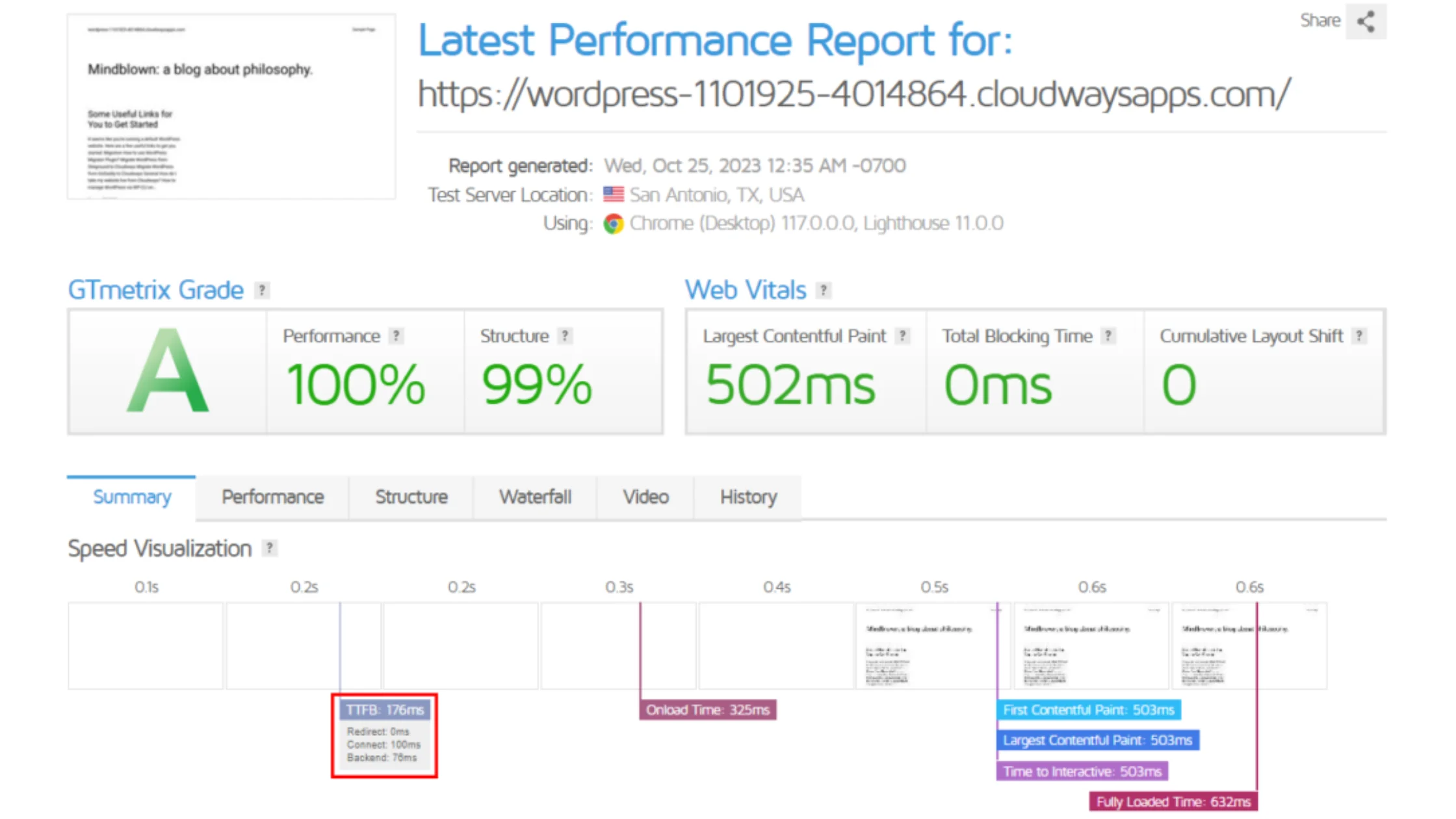
Cloudways can be extremely fast if configured correctly. With proper caching (Redis, Varnish, or Memcached) and optimized servers, it can handle high traffic efficiently. However, performance tuning often requires technical knowledge.
WP Engine Speed
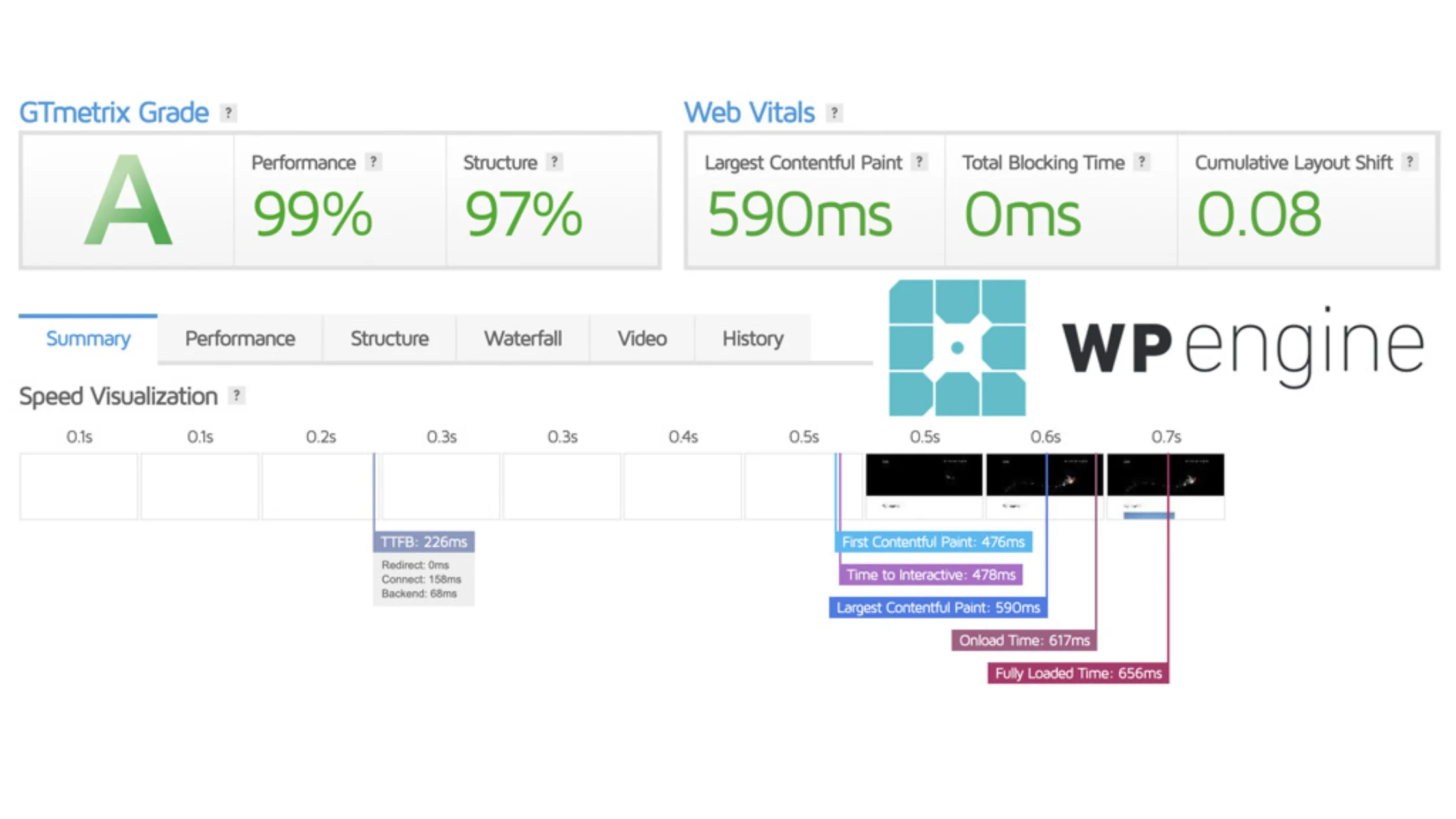
WP Engine focuses on out-of-the-box speed using:
For non-technical users, WP Engine often delivers faster real-world page load times without manual optimization.
Cloudways TTFB
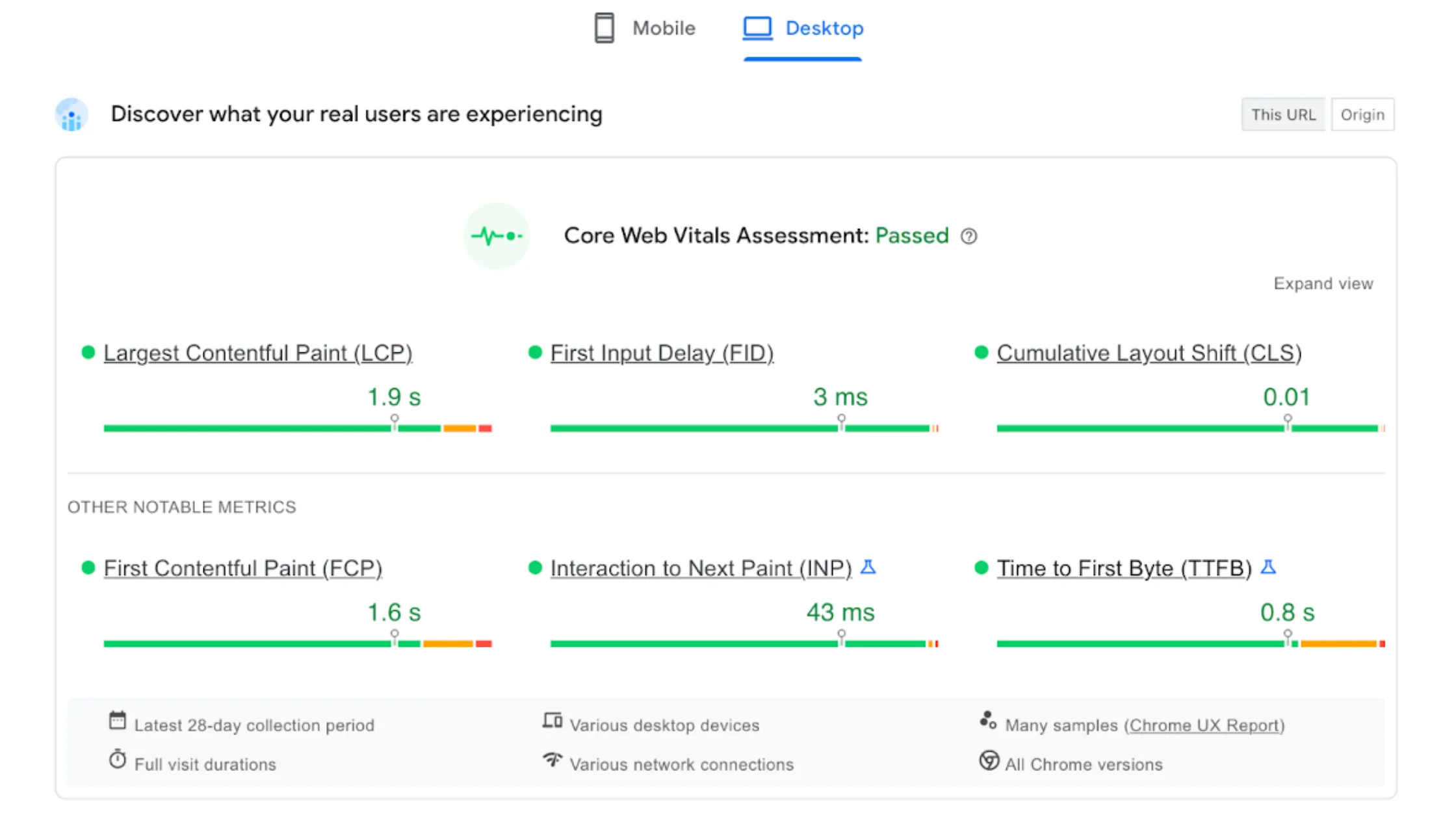
TTFB varies depending on:
With the correct setup, Cloudways can achieve excellent TTFB, but results are not always consistent for beginners.
WP Engine TTFB
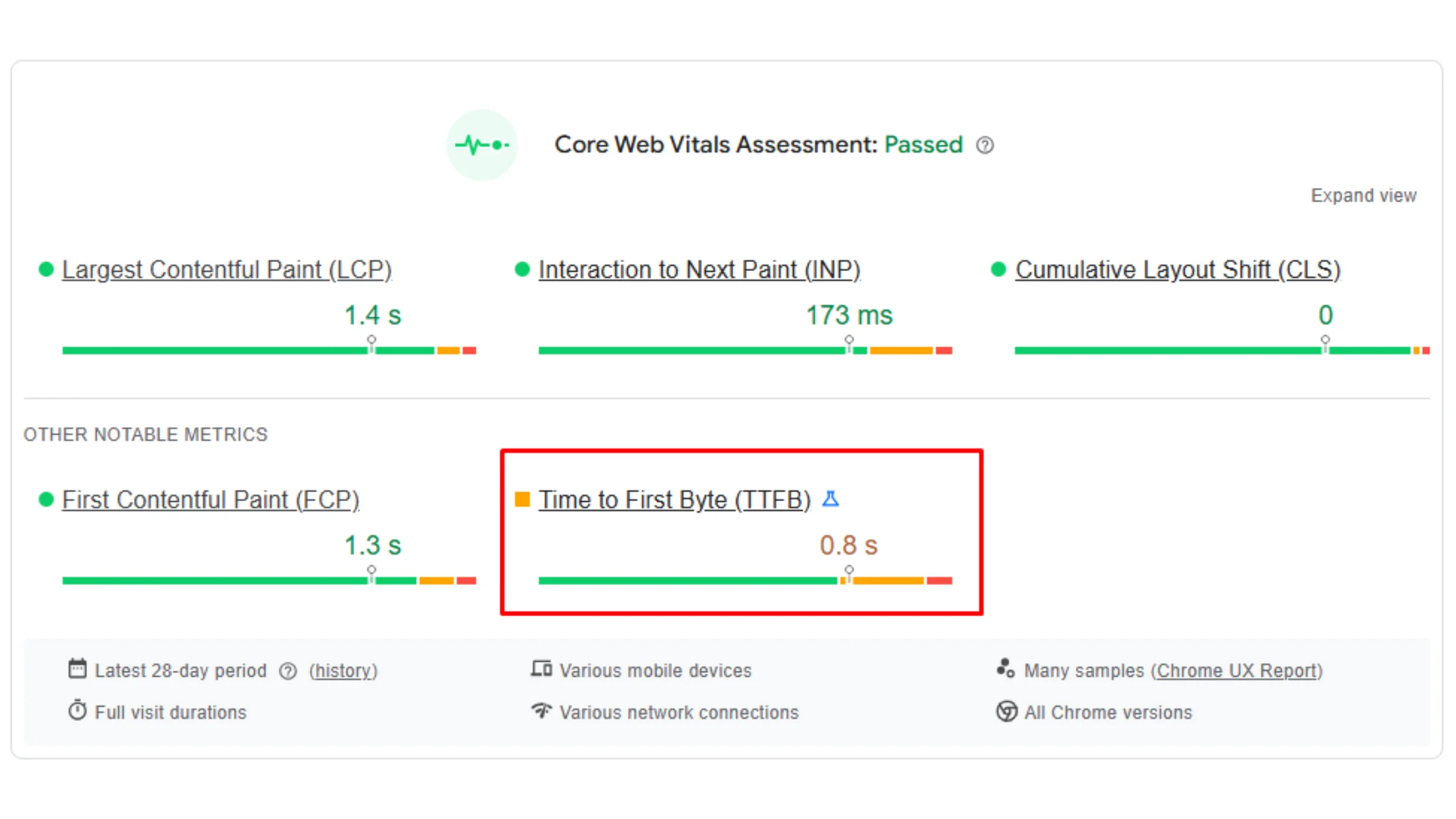
WP Engine generally delivers predictable and stable TTFB because the environment is pre-optimized for WordPress workloads and caching is handled automatically.
Cloudways Uptime
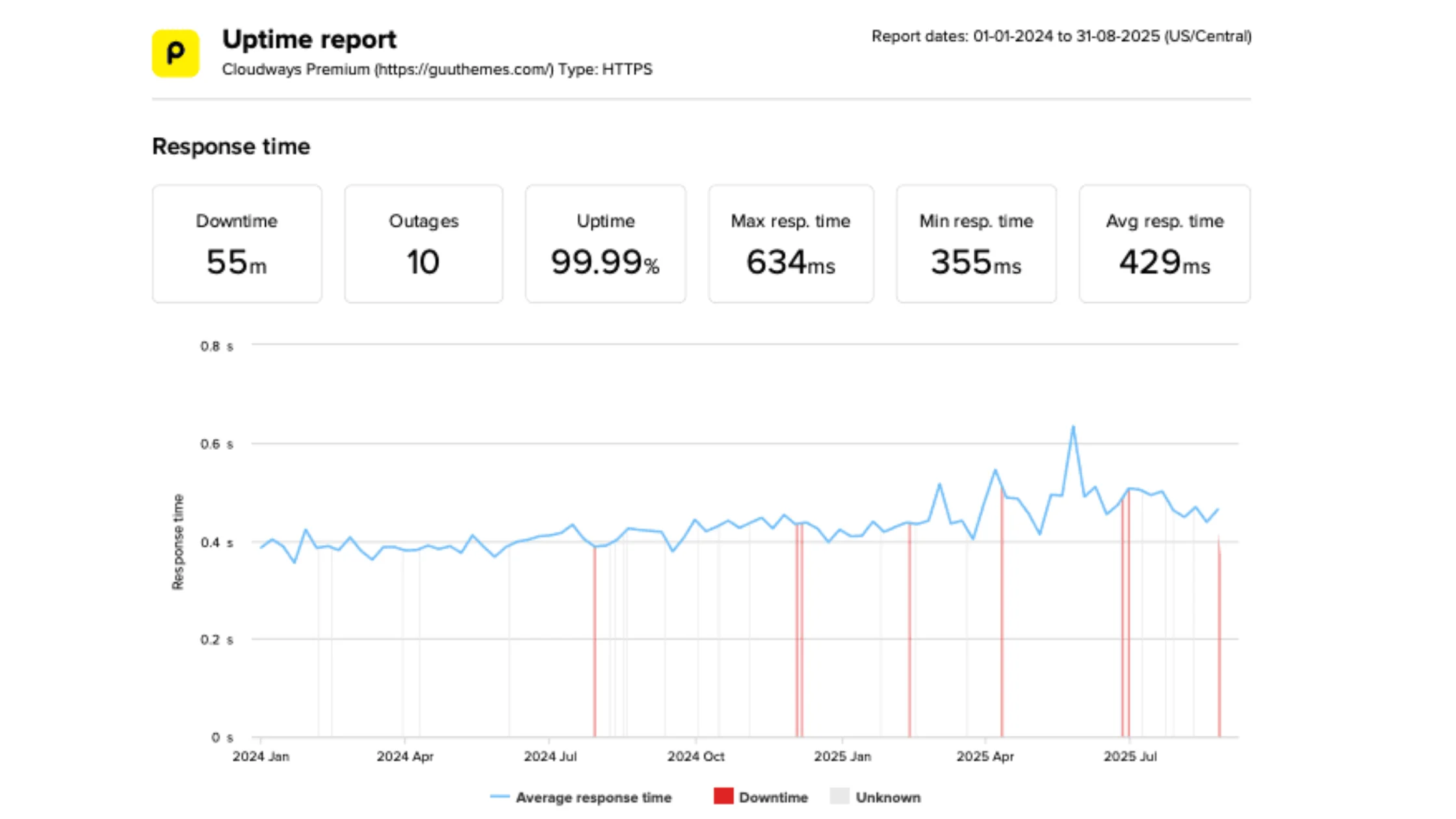
Cloudways uptime depends heavily on the selected cloud provider. Premium providers like AWS and Google Cloud usually deliver enterprise-level uptime, while budget providers may slightly vary.
WP Engine Uptime
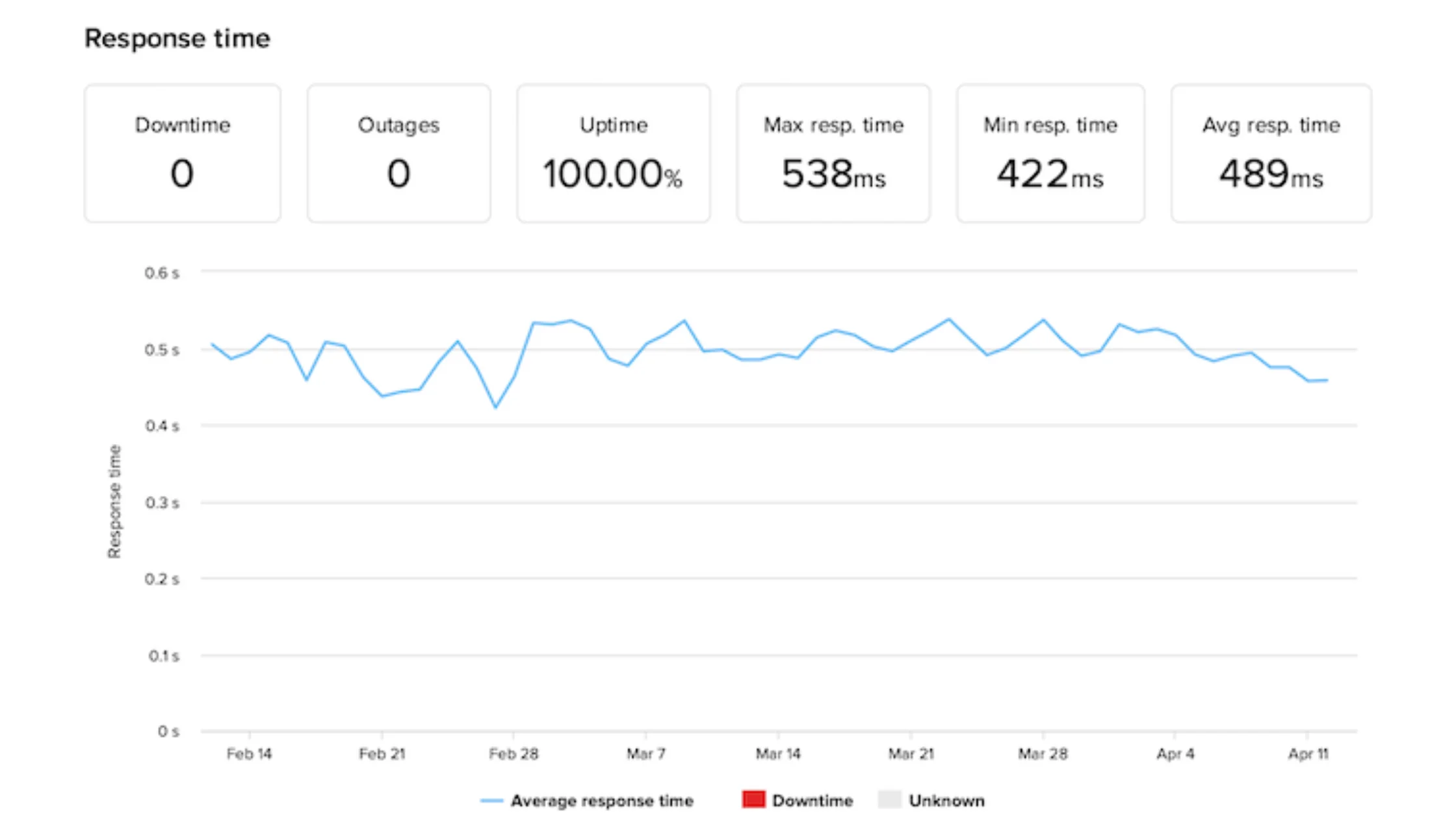
WP Engine typically delivers very stable uptime due to controlled infrastructure, proactive monitoring, and automated failover systems.

Cloudways WordPress hosting pricing 2026 starts around $14 per month, while WP Engine plans typically begin at $30 per month. Both platforms support monthly billing and maintain consistent renewal pricing, which adds long-term cost predictability for businesses and agencies.

The pricing difference mainly reflects infrastructure philosophy. WP Engine focuses on premium, fully managed WordPress performance. Cloudways focuses on cost flexibility and infrastructure choice, allowing deployments on providers like Amazon Web Services and Google Cloud. This gives users more control over performance and scaling costs based on real usage needs.
| Pricing Type | Cloudways (US$ /month) | WP Engine (US$ /month) |
| Introductory Price | $14 | $30 |
| Renewal Price | $14 | $30 |
| Monthly Payment | Yes | Yes |
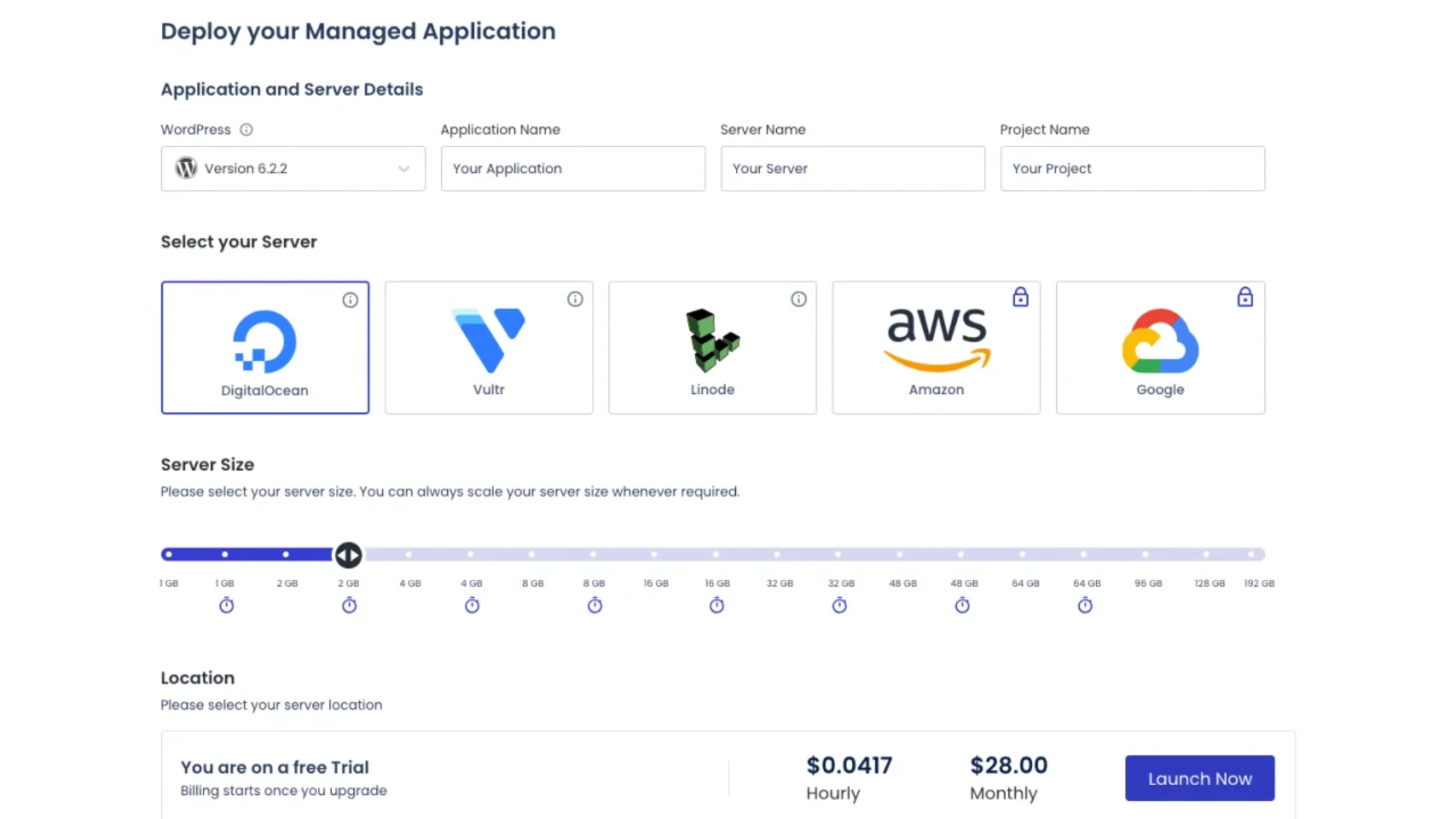
Cloudways is built for flexibility and control. Its custom control panel lets developers manage server settings, caching, staging, and deployments easily. It’s great for tech-savvy users, but beginners may need some time to get used to cloud server concepts like scaling and resources.
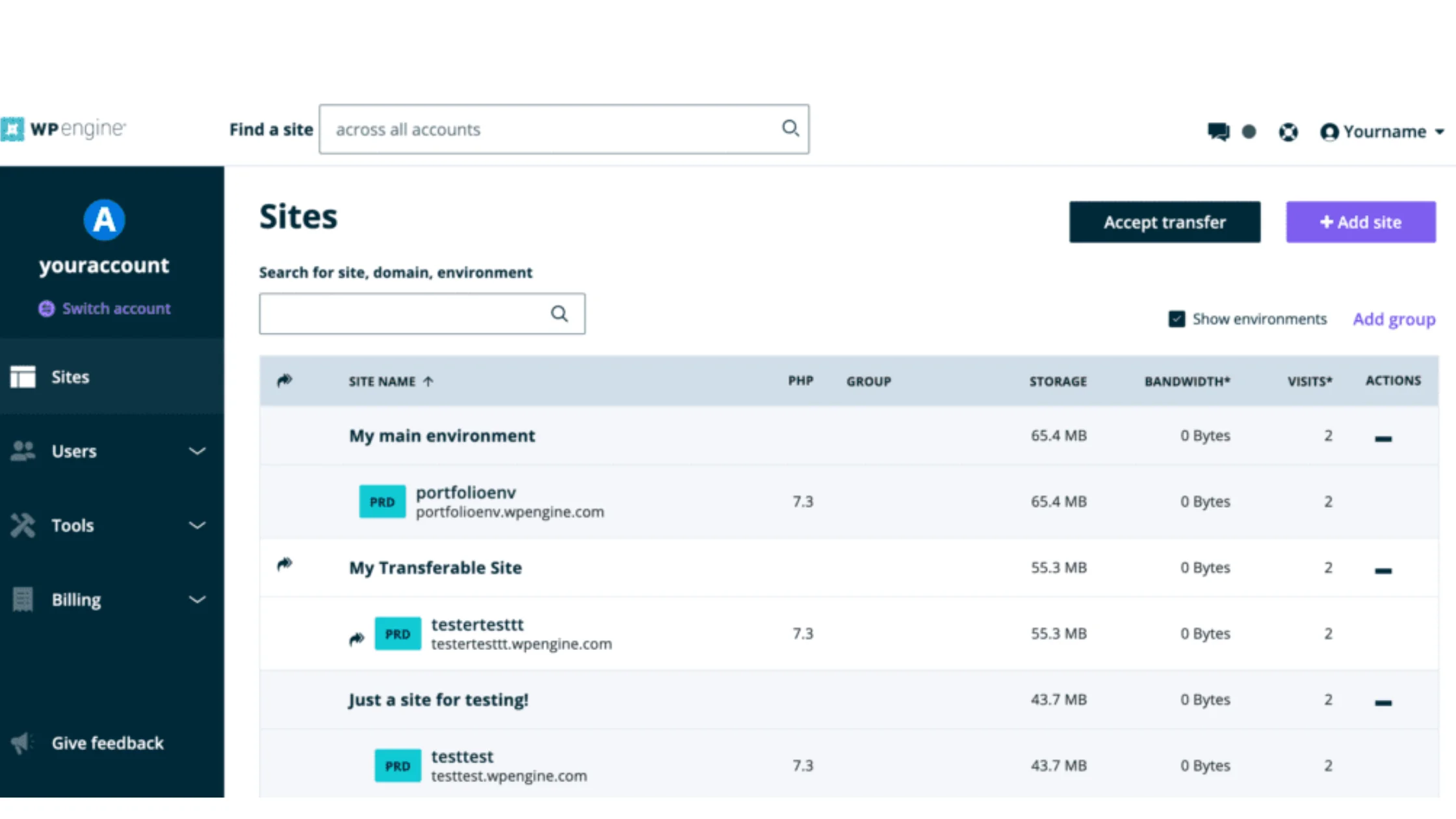
WP Engine is designed for beginners and non-technical users. Its clean WordPress-focused dashboard handles caching, CDN setup, and core optimization automatically. Business owners, bloggers, and agencies can manage their sites without worrying about server-level tasks.
Cloudways suits developers who want control, while WP Engine is ideal for users who prefer a hands-off, fully managed WordPress experience.
| Feature | Cloudways | WP Engine |
| Firewall Protection | Server-level firewall | Proprietary WordPress firewall |
| Environment Isolation | Dedicated app-level isolation | Platform-level WordPress isolation |
| Malware Protection | Basic protection + patching | Real-time malware scanning |
| Backup Frequency | Configurable automated backups | Daily automatic backups |
| Restore Option | Manual + automated restore | One-click instant restore |
| SSL Certificates | Free SSL included | Free SSL included |
| Threat Monitoring | Basic server monitoring | Real-time threat detection |
| WordPress Core Updates | User-controlled | Fully automatic |
| Security Management Style | Flexible, user-controlled | Fully managed, automated |
Cloudways focuses on giving users strong security tools with flexibility. You get server-level firewalls, environment isolation, bot protection, SSL, and automated backups. The key advantage is control — users can customize backup frequency, choose infrastructure providers, and add extra security layers. However, some security responsibility remains with the user, especially when managing applications and access.
WP Engine follows a more locked-down, fully managed security model built specifically for WordPress. It includes automatic core updates, real-time malware scanning, threat detection, and a proprietary firewall optimized for WordPress attacks. Backups run automatically every day with one-click restore, making security mostly hands-off for users who want maximum protection without manual configuration.
In simple terms, Cloudways is best for users who want security, flexibility, and infrastructure control. WP Engine is better for users who want automated, enterprise-level WordPress security managed entirely by the platform.
Scalability is where Cloudways vs WP Engine for agencies differs the most. Both support growing websites, but they use different approaches:
| Support Feature | Cloudways | WP Engine |
| Support Methods | Live chat, ticketing system | Live chat on entry plans, phone & email on higher plans |
| Support Hours | 24/7 | 24/7 |
| Website Migration | Yes | Yes |
| Money-Back Guarantee | None | 60 days |
Cloudways provides 24/7 support via live chat and tickets, with optional premium add-ons. The team assists with server issues, performance guidance, and platform troubleshooting, but WordPress-level debugging is limited.
WP Engine delivers WordPress-focused support, including plugin help, performance advice, and proactive guidance. Higher-tier plans include phone and email support, plus a 60-day money-back guarantee.
In short, Cloudways is strong for developers needing platform expertise, while WP Engine is ideal for those wanting hands-on WordPress support and premium guidance.
| Geographical Coverage | Cloudways | WP Engine |
| Number of Data Centers | 65+ | 14 |
| HQ Location | St Julians, Malta | Austin, Texas, USA |
| Data Center Regions | USA, Canada, Europe, Asia, Australia, Middle East, Africa, South America | USA, Belgium, UK, Germany, Netherlands, Finland, Asia |
Cloudways delivers a wide global infrastructure footprint with more than 65 data center locations. This broader distribution helps users deploy servers closer to their audience across North America, Europe, Asia-Pacific, and emerging regions like Africa and South America. For businesses targeting global traffic, this flexibility can help improve latency and regional performance consistency.
WP Engine maintains a smaller but strategically placed network of around 14 data centers. While the total count is lower, the platform still covers major traffic hubs across North America, Europe, and parts of Asia. This setup works well for businesses focused on primary global markets that prioritize platform optimization over infrastructure variety.
Below is a direct comparison of the strengths and weaknesses of Cloudways and WP Engine so you can quickly see the real trade-offs.
| Category | Cloudways | WP Engine |
| Pros | Flexible cloud provider choice | WordPress optimized infrastructure |
| Strong price-to-performance ratio | Premium WordPress expert support | |
| Pay-as-you-go style scaling | Excellent built-in security stack | |
| Good for agencies & multiple sites | Very beginner-friendly dashboard | |
| More server-level control | Strong backup & update automation | |
| Cons | Slight learning curve for beginners | Higher starting price |
| No default email hosting | Traffic-based pricing limits | |
| WordPress help is limited vs WP Engine | Plugin restrictions exist | |
| Interface is more technical | Less infrastructure customization |
Choose Cloudways if you want scalable cloud hosting with more control. It’s ideal for agencies, developers, high-traffic websites, multimedia-heavy sites, and growing eCommerce stores. Cloudways supports multiple websites, offers generous storage and bandwidth, and lets you pick cloud providers like AWS or Google Cloud while keeping management straightforward.
Choose WP Engine if you want a fully managed WordPress environment with minimal technical work. It’s best for WooCommerce stores, content-heavy blogs, and businesses that prioritize stability, security, and expert WordPress support. WP Engine also offers a 60-day money-back guarantee, making it easy to test before committing.
In short, Cloudways works best for flexible, multi-site, growth-focused users, while WP Engine is ideal for WordPress-specific projects needing hands-off management and premium support.
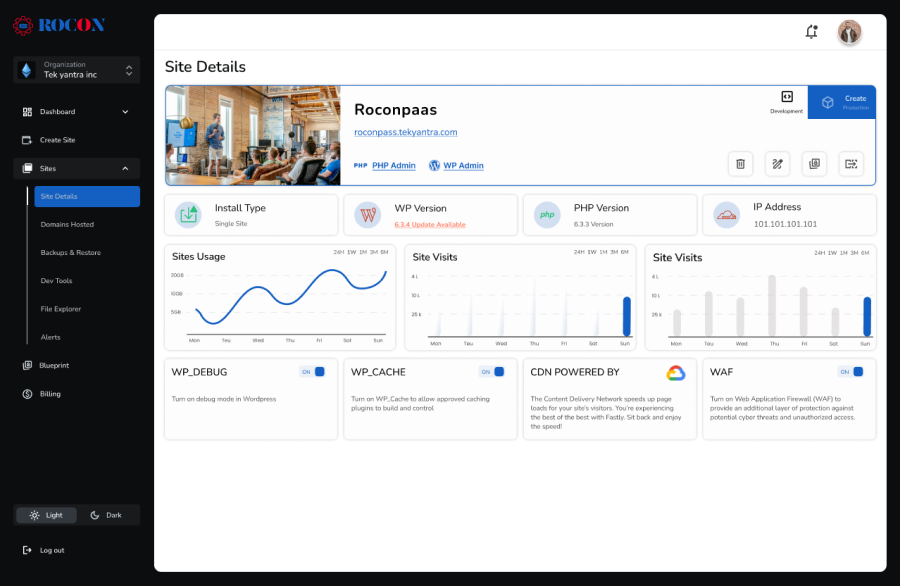
From a modern infrastructure perspective, Rocon follows a container-based managed WordPress architecture. This model focuses on performance isolation, stable resource allocation, and predictable scaling behavior.
Rocon uses a container-based managed WordPress architecture, where each website runs in its own isolated environment. This setup helps maintain consistent performance, stable resource allocation, and predictable scaling during traffic spikes.

Compared to traditional shared or standard VM hosting, containerization reduces cross-site interference and provides a structured approach for teams focused on long-term stability and scalable growth.
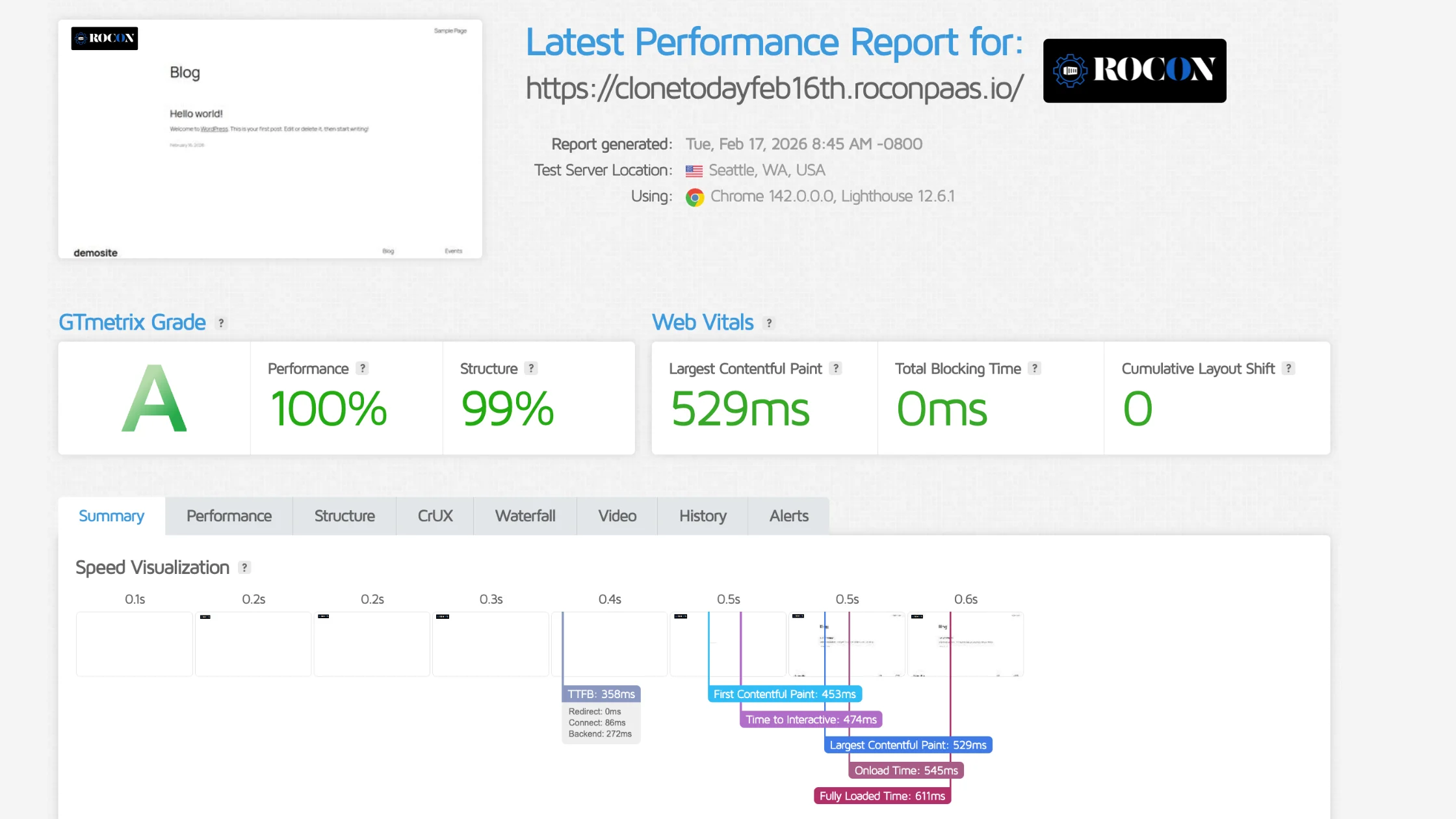
Key Features:
Compared to Cloudways, Rocon needs less manual setup and still scales efficiently. Compared to WP Engine, it offers similar premium features at more predictable pricing. For agencies, eCommerce stores, and high-traffic WordPress hosting, Rocon delivers better performance, flexibility, and value.
If we look at real-world use cases, the choice between cloudways vs wpengine comes down to control versus convenience. Both are strong managed hosting providers, but they are built with different priorities. Cloudways focuses on cloud flexibility and cost-performance balance, while WP Engine focuses on WordPress specialization and premium managed experience.
Cloudways usually wins for teams that want infrastructure freedom, multi-cloud deployment options, and better cost scaling as projects grow. It works well for agencies, developers, and businesses managing multiple websites or expecting traffic variation. WP Engine usually wins for businesses that want WordPress performance, strong security automation, and expert-level WordPress support without touching server settings.
There is no single winner for everyone. If you value cloud control, pricing flexibility, and scaling freedom, Cloudways is often the better choice. If you value WordPress-focused performance, hands-off management, and premium support quality, WP Engine is usually the better long-term fit.
WP Engine is more beginner-friendly. It offers a fully managed experience with automatic updates, built-in performance tools, and a simplified dashboard designed for non-technical users. Cloudways provides more flexibility and server control, but requires more configuration, making it better suited for users comfortable with technical settings.
Yes, Cloudways is generally cheaper than WP Engine. Cloudways offers flexible pricing based on your chosen cloud provider, which lowers entry costs. WP Engine includes premium managed features and tooling, which makes it more expensive at comparable resource levels.
Yes, Cloudways is generally cheaper than WP Engine. Cloudways offers flexible pricing based on your chosen cloud provider, which lowers entry costs. WP Engine includes premium managed features and tooling, which makes it more expensive at comparable resource levels.
Elevate your WordPress hosting with 30-day money-back guarantee, free migration, and 24/7 support.
Sign Up Today

Before You Go… Get 1 Month FREE on Rocon Hosting!

Experience lightning-fast speeds

No downtime or hidden fees

Dedicated 24/7 expert support


Leave a Reply