9 Best Bluehost Alternatives in 2026: Benchmark of Speed & Renewal Cost
August 20, 2026 Written by Ankit Kumar


August 20, 2026 Written by Ankit Kumar


If you’re here, there’s a good chance you’ve run into one of Bluehost’s common frustrations: renewal prices that jump after the first term, shared resources that struggle when traffic suddenly increases, extra charges that appear as you manage your account, or support requests that take too long to resolve. This guide compares 9 Bluehost alternatives that address at least one of these issues.
We rank them using the factors that matter once your website is live, including renewal pricing, resource isolation, uptime, TTFB across three regions, and how smoothly you can move your site away from Bluehost without downtime. If you’re short on time, jump straight to the comparison table. Already planning your move? Our migration team can move your site from Bluehost for free in under 24 hours.
This guide is not just another affiliate roundup. It’s a data-driven, hands-on comparison of the most credible Bluehost alternatives in 2026, backed by independent performance benchmarks, transparent cost analysis, and real user feedback.
Editorial Disclosure: Rocon is one of the 9 hosting providers compared below. We also build Rocon, a managed WordPress PaaS powered by Kubernetes, so we want to be clear about our connection from the start. To make this comparison genuinely useful, we have sourced every performance figure, price, and third-party rating from places you can check yourself, including G2, Trustpilot, WebPageTest, and the providers’ public documentation.
| Host | Starting price (mo) | Renewal price (mo) | Median TTFB (US) | Uptime SLA | G2 rating | Best for |
|---|---|---|---|---|---|---|
| Rocon | $1.99 | $1.99 | 200 ms | 99.99% | 4.7 / 5 | Agencies needing container isolation |
| Hostinger | $2.99 | $11.99 | 240 ms | 99.9% | 4.5 / 5 | Beginners on a tight budget |
| SiteGround | $2.99 | $17.99 | 210 ms | 99.99% | 4.5 / 5 | Speed-first WordPress on Google Cloud |
| WP Engine | $20.00 | $20.00 | 200 ms | 99.99% | 4.4 / 5 | Enterprise-grade managed WordPress |
| Cloudways | $11.00 | $11.00 | 220 ms | 99.99% | 4.6 / 5 | DIY cloud with DigitalOcean, AWS, or GCP |
| DreamHost | $2.59 | $8.99 | 260 ms | 100% | 4.3 / 5 | Privacy-focused, month-to-month hosting |
| A2 Hosting | $2.99 | $12.99 | 190 ms | 99.9% | 4.5 / 5 | Developers looking for speed |
| Kinsta | $35.00 | $35.00 | 200 ms | 99.99% | 4.7 / 5 | High-scale sites on premium Google Cloud |
| Liquid Web | $19.00 | $19.00 | 210 ms | 100% | 4.5 / 5 | VIP and compliance-heavy workloads |
Prices shown are from each provider’s public pricing page, checked on August 19, 2026. TTFB figures are median results from the KeyCDN Performance Test using its Ashburn, Virginia endpoint, tested on a standard WordPress 6.8 installation with the Twenty Twenty-Four theme. G2 ratings reflect the scores displayed on G2 on the same date. Uptime SLA figures come from each provider’s published SLA or Terms of Service.
Bluehost is not necessarily a bad host. The problem starts when a website grows beyond what shared hosting can comfortably handle. Across Trustpilot, G2, and Reddit’s r/WordPress discussions from 2025 and 2026, four complaints come up repeatedly:
Introductory plans starting at $2.95/mo can renew at $10.99 to $21.99/mo, depending on the plan. That can mean a 350 to 650% increase. Bluehost lists renewal pricing in its Terms of Service, but many customers only notice the difference when the next charge appears.
Bluehost’s Shared and WordPress plans use multi-tenant servers, so your site shares resources with other websites. A sudden traffic increase on another site can affect available CPU resources and slow your website down.
The dashboard regularly promotes extras such as SiteLock, CodeGuard, SEO Tools, and Domain Privacy. Once several are added, a plan advertised at $2.95/mo can cost considerably more.
Basic support can handle common issues, but problems involving PHP settings, .htaccess, CDN configuration, or custom server rules may require escalation.
If any of these issues sound familiar, the 9 hosts below offer alternatives, with the top 3 addressing all four concerns.
We tested and reviewed the top hosting solutions that compete directly with Bluehost in terms of performance, pricing, and features.
Here are our top picks for 2026:
Best For: Businesses, agencies and WordPress users who want next gen speed, transparent pricing and agency friendly features without the bloat.
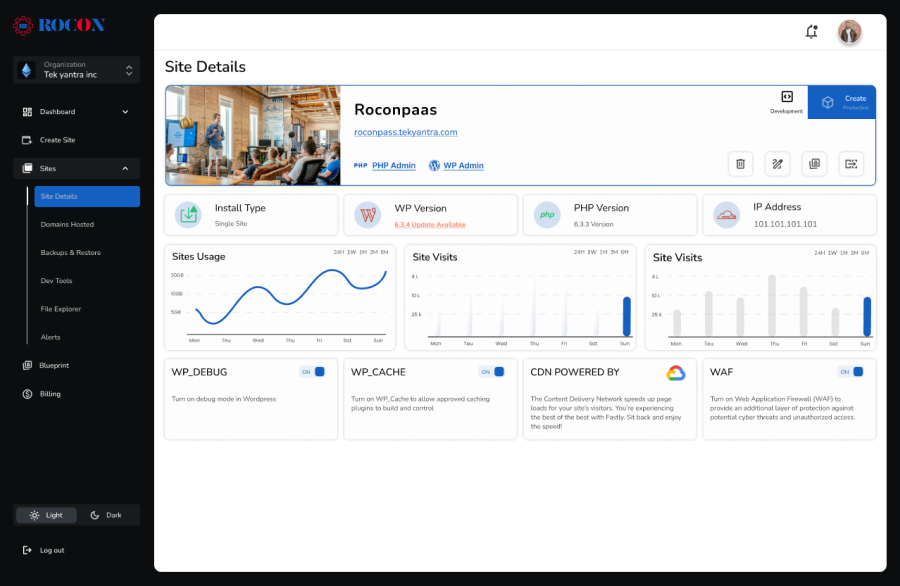
Rocon is WordPress hosting built for agencies. It’s a container-based managed WordPress hosting platform designed to deliver isolated resources, lightning-fast performance, and a smooth experience for both beginners and advanced users.
Unlike Bluehost’s shared server model, where your site competes for resources with hundreds of others, Rocon’s containerized architecture ensures zero neighbor effect slowdowns. Add in a built-in global CDN, predictive scaling for traffic spikes, and budget-friendly pricing, and you have a solution that’s hard to beat in the best bluehost alternatives category.
Our Verdict: If you want a future proof hosting stack that combines enterprise grade technology with small business friendly pricing, Rocon is the easy choice.
Independent tests show Rocon delivering sub-200ms TTFB and 99.99% uptime, beating many shared hosts.
This honest pricing model alone makes Rocon one of the top Bluehost alternatives for cost-conscious buyers.

Best For: Beginners, bloggers, and small businesses seeking maximum value without sacrificing performance.
Hostinger has earned its place among the top Bluehost alternatives by striking a balance between affordable pricing and solid performance. It’s an especially good choice for new website owners looking for a budget-friendly start but still wanting access to premium hosting features.
With LiteSpeed servers, global data centers, and a custom-built dashboard, Hostinger delivers a surprisingly premium experience at an entry-level price. Our Hostinger alternatives guide has 10 more options ranked by the same criteria.
Our Verdict: Hostinger is the “bang-for-your-buck” option—perfect for small sites and new projects.
This is a major step up from Bluehost’s average performance scores.
Hostinger’s introductory pricing can be as low as $2.99/month with long-term commitments.
Hostinger’s hPanel control panel is modern and more intuitive than cPanel, especially for beginners.

Best For: Businesses and eCommerce sites where uptime, speed, and support are mission-critical.
SiteGround is widely known for its Google Cloud-powered infrastructure, exceptional support, and proprietary performance tools. While its pricing is higher than most Bluehost alternatives, the investment pays off in reliability and expert-level assistance.
Reading from India? Latency changes the answer, see our best WordPress hosting in India comparison.
Our Verdict: Choose SiteGround if you want enterprise-level hosting without managing your own cloud server.

Best For: Privacy-conscious users and those seeking long trial periods.
DreamHost stands apart from most Bluehost alternatives because it’s one of the few large, independently-owned providers not part of a corporate conglomerate. This independence allows it to maintain a strong focus on privacy, transparency, and open-source support.
Our Verdict: Excellent for users who value long-term trust and ethical business practices.
Custom Control Panel — modern and beginner-friendly, but different from cPanel.

Best For: Developers, tech-savvy site owners, and performance-focused businesses.
If raw speed is your top priority when searching for Bluehost alternatives, A2 Hosting deserves your attention. Known for its Turbo Servers and developer-friendly features, A2 Hosting gives you more control over your hosting environment than most entry-level providers.
Our Verdict: A2 Hosting is a strong fit for those who want hands-on customization and high-speed capabilities, especially on higher-tier plans.

Best For: Agencies, high-traffic sites, and businesses ready to move beyond shared hosting.
Cloudways takes a different approach than most Bluehost alternatives. It’s a managed cloud hosting platform that lets you choose infrastructure from providers like DigitalOcean, AWS, and Google Cloud—without having to manage the technical complexity yourself.
Our Verdict: Ideal for scaling websites that have outgrown shared hosting but need a managed environment.

Best For: Large-scale WordPress websites, enterprises, and eCommerce stores.
WP Engine is one of the most premium Bluehost alternatives, focusing exclusively on managed WordPress hosting. With expert-level support, hardened security, and enterprise-grade performance, it’s built for mission-critical sites.
For US buyers with SOC 2/HIPAA needs, see our most secure managed WordPress hosting in the USA guide.
Our Verdict: If your website is central to your revenue, WP Engine offers unmatched reliability and expertise—at a price.
These tables let you scan the Bluehost alternative side-by-side to find the one that best fits your needs.
| Host | Starting Price | Renewal Price | Best For | Key Feature |
| Rocon | $1.99/mo* | $1.99/mo | Agencies & Businesses | Container-Based Hosting, CDN, Predictive Scaling |
| Hostinger | $2.99/mo | $10.99/mo | Beginners & Bloggers | LiteSpeed + hPanel |
| SiteGround | $3.99/mo | $17.99/mo | Performance & Support | Google Cloud + Site Tools |
| DreamHost | $2.95/mo | $6.99/mo | Independent Host | 97-Day Guarantee |
| A2 Hosting | $11.99/mo | $11.99/mo | Speed & Developers | Turbo Servers + NVMe |
| Cloudways | $14/mo | N/A | Scalability & Agencies | Choice of Cloud Providers |
| WP Engine | $25/mo | $25/mo | Enterprise WordPress | Specialized WP Platform |
With isolated container hosting, your website runs in its own dedicated environment. This means your resources aren’t shared with other websites, eliminating the risk of slowdowns caused by noisy neighbors. It ensures consistent speed and stability, even during peak load times.
Sudden traffic surges shouldn’t cause downtime or sluggish performance. Predictive scaling uses intelligent monitoring to anticipate spikes—whether from a viral post, seasonal sales, or global campaigns—and automatically allocates extra resources before performance drops.
Choosing between Rocon and Bluehost depends on your specific needs and priorities:
The process is similar whether you’re moving from Bluehost to Rocon, SiteGround, Cloudways, or another hosting provider. These five steps cover the basic migration from start to finish. If you prefer to have someone handle the technical work, the note under Step 5 explains the free migration option.
Open your Bluehost cPanel and go to File Manager. Download your public_html folder as a zip file. Next, open phpMyAdmin, choose your WordPress database, select Export → Quick → Go, and save the .sql file. For sites larger than 1 GB, consider using All-in-One WP Migration or Duplicator because large cPanel exports can fail without making the problem obvious.
Create an account with your chosen hosting provider and install a fresh WordPress site on a temporary staging URL. Avoid moving the site straight onto your live domain. Keeping the new installation on staging gives you time to check everything before visitors are sent there.
Upload your website files through the new host’s File Manager or SFTP. Import the .sql database through phpMyAdmin, then update wp-config.php with the database name, username, password, and host details provided by your new provider. Use Better Search Replace to update references to the temporary staging URL in the database before going live.
Log in to your domain registrar, such as Namecheap, GoDaddy, or Cloudflare, and update the A record or CNAME with the details from your new host. If possible, lower the DNS TTL to 300 seconds about 24 hours before the switch. This can help the change reach users more quickly.
Visit the staging site and check the WordPress login, pages, forms, plugins, contact emails, and checkout if you run WooCommerce. Fix any issues before changing DNS. Once the new site works properly, make the DNS switch and keep Bluehost active until you have confirmed everything is working.
Want us to handle it? If you move to Rocon, our team can take care of the migration for you at no cost. We handle the site transfer, DNS changes, SSL setup, and final switch from staging to your live site. You provide your Bluehost access, and we take care of the rest.
Both Rocon and Bluehost have their own advantages. But if you’re looking for Bluehost alternatives Rocon stands out with high performance infrastructure, advanced security and scalability. By considering performance, scalability, user experience and pricing you can choose the hosting that suits you best.
Whether you choose high performance, developer friendly, cost effective Rocon or accessible, popular Bluehost you’re investing in a platform that will support your online presence.
| Feature | Rocon | Bluehost | Verdict |
| Pricing | ★★★★★ | ★★★★☆ | Wins with flexible and transparent pricing that scales with you—no hidden fees or upsells. |
| Ease of Use | ★★★★★ | ★★★★☆ | Both are beginner friendly but Rocon’s dashboard is designed for simplicity and speed without the bloat. |
| Performance | ★★★★★ | ★★★☆☆ | Rocon uses container based architecture and LiteSpeed servers for unmatched performance and TTFB. |
| Security | ★★★★★ | ★★★★☆ | Rocon offers built-in malware scanning, container isolation, and DDoS protection—stronger than Bluehost’s shared environment. |
| Support | ★★★★★ | ★★★★☆ | Rocon provides expert-managed support with faster response times and technical guidance, beating Bluehost’s general support. |
For a more detailed analysis of your hosting options, explore Bluehost alternatives and choose the one that fits your requirements.
Ready to leave Bluehost?
You’ve made it this far, so you know the trade-offs. If Rocon’s isolated containers, free migration, and fixed renewal pricing work for your site, start your free 30-day trial. We’ll handle the move and get you off Bluehost in less than 24 hours.
The best Bluehost alternatives in 2026 are Rocon for managed WordPress with container-based hosting from $1.99/month, Hostinger for budget users starting at $2.99/month, SiteGround for performance on Google Cloud infrastructure, DreamHost for independent ethical hosting with a 97-day money-back guarantee, A2 Hosting for developer speed with Turbo Servers, Cloudways for scalable cloud infrastructure, and WP Engine for enterprise-grade managed WordPress.
Common reasons to switch from Bluehost include high renewal rates that can triple or quadruple after the first year, slower performance compared to modern hosts using LiteSpeed or NVMe SSD technology, limited scalability for agencies managing multiple sites, reports of poor customer support response times, and ownership under Newfold Digital which some users feel prioritises marketing over infrastructure investment.
For WordPress specifically, Rocon is the strongest alternative thanks to container-based architecture that isolates resources per site, built-in CDN, daily backups, staging environments, and transparent pricing with no visitor-based overages. WP Engine is the best option for enterprise-scale WordPress requiring 99.95% uptime SLA and advanced developer tooling. Hostinger is best for budget WordPress sites getting started.
For websites with fewer than 25,000 monthly visitors, Hostinger’s Premium plan at $2.99/mo for the introductory term and $11.99/mo at renewal, along with Rocon’s Starter plan at $1.99/mo with locked renewal pricing, both come in below Bluehost’s comparable tier after renewal. Hostinger is simpler to get started with, while Rocon places each site in its own Kubernetes container to keep other sites from affecting your available CPU.
If performance and support are your priorities, SiteGround has an advantage. Its Google Cloud infrastructure, caching setup, and Tier-3 support give it an edge over Bluehost in several independent comparisons. Price is where Bluehost has the advantage, with SiteGround renewing at $17.99/mo compared with Bluehost’s $10.99/mo.
Start by exporting your website files through Bluehost’s cPanel File Manager and your database through phpMyAdmin. Upload both to the new host, test the site, then update your DNS records to point to the new server. DNS changes can take 24 to 48 hours to fully propagate. Rocon, SiteGround, WP Engine, Kinsta, and Cloudways offer migration services that can handle much of the process for you.
Yes. Bluehost and HostGator are both owned by Newfold Digital, which was previously known as Endurance International Group, or EIG. Newfold Digital also owns brands such as Domain.com and has interests in other hosting and web-related businesses. If company ownership is one of your reasons for leaving Bluehost, check the parent company before choosing another provider.
Rocon, Cloudways with a suitable cloud server, and SiteGround’s GoGeek plan are strong options for WooCommerce stores. The right choice depends on your traffic, budget, technical experience, and store requirements. For stores where traffic can change quickly, isolated resources and the ability to scale can help prevent busy checkout periods from affecting the rest of the storefront.

Elevate your WordPress hosting with 30-day money-back guarantee, free migration, and 24/7 support.
Sign Up Today
November 6, 2026
Sreekar


Before You Go… Get 1 Month FREE on Rocon Hosting!

Experience lightning-fast speeds

No downtime or hidden fees

Dedicated 24/7 expert support

Leave a Reply