Hostinger vs Bluehost vs RoconPaas: Which Hosting is Best
December 22, 2025 by James


December 22, 2025 by James


Choosing the right web hosting provider plays a major role in how fast your website loads, how reliably it stays online, and how easily it scales as your business grows. With so many hosting options available, narrowing down the right platform can feel overwhelming—especially when popular names like Hostinger, Bluehost, and RoconPaas all promise strong performance and value.
Hostinger often attracts users looking for affordable plans and beginner-friendly tools. Bluehost remains a well-known choice for WordPress users, backed by long-standing industry recognition. RoconPaas, on the other hand, takes a modern approach with container-based and managed WordPress hosting, designed for performance-focused websites and growing teams.
While these providers serve different audiences, they often appear in the same buying journey. That makes a side-by-side comparison essential before making a decision.
In this guide, we compare Hostinger vs Bluehost vs RoconPaas for WordPress across the factors that matter most—pricing transparency, performance, WordPress support, scalability, ease of management, and long-term value. The goal is simple: help website owners, businesses, and agencies choose a hosting solution that aligns with their real needs, not just marketing claims.
Before comparing features and pricing, it’s important to understand what each hosting provider is designed for. Hostinger, Bluehost, and RoconPaas serve different user profiles and technical needs. This overview sets the foundation for a fair comparison.

Hostinger focuses on affordability and simplicity. It offers shared hosting, cloud hosting, VPS hosting, and managed WordPress plans aimed at individuals and small businesses.
The platform uses its custom hPanel, which simplifies basic website management tasks such as domain setup, email configuration, and WordPress installation. Hostinger also integrates LiteSpeed servers and built-in caching to improve page load times on entry-level plans.
Hostinger works best for users launching personal blogs, small business websites, or early-stage projects. While it provides solid performance for the price, advanced customization and enterprise-level scaling remain limited compared to container-based platforms.

Bluehost is one of the most recognized names in web hosting and is officially recommended by WordPress.org. It primarily targets WordPress users who want a familiar and guided hosting experience.
Bluehost relies on a cPanel-based environment combined with WordPress-specific tools such as one-click installs, automated updates, and built-in staging on higher plans. The platform also includes domain registration, email hosting, and customer support under one dashboard.
This hosting provider suits small to mid-sized businesses that value brand reliability and WordPress integration. However, Bluehost operates on a traditional server model, which can limit flexibility when traffic or resource demands change quickly. Also, read our full SiteGround vs Bluehost breakdown.
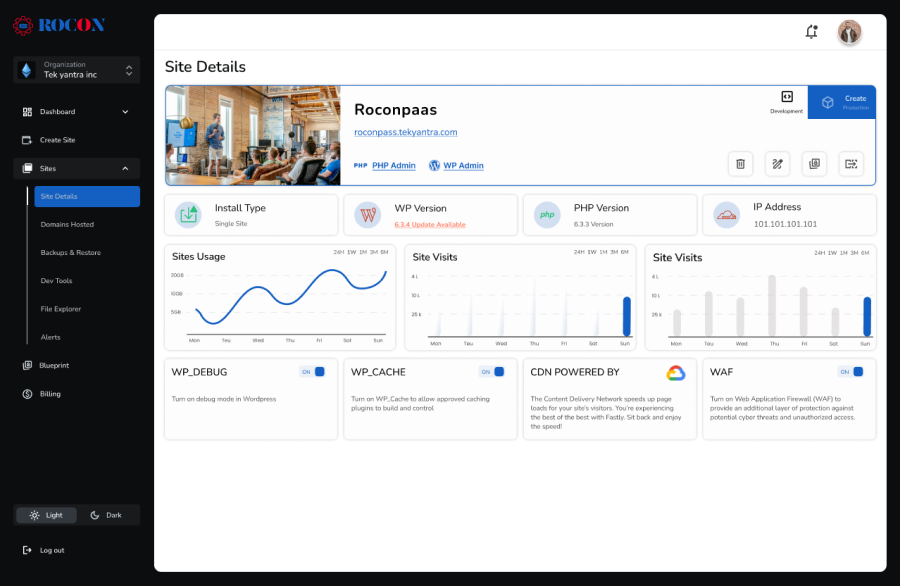
RoconPaas takes a different approach by offering managed WordPress hosting powered by Kubernetes. Instead of running websites on shared or fixed servers, RoconPaas deploys each site in isolated containers.
This container-based architecture improves performance consistency, resource isolation, and scalability. It also allows organizations and agencies to manage multiple websites through a centralized dashboard designed for team-based workflows.
RoconPaas fits businesses, developers, and agencies that need predictable performance, easier scaling, and modern infrastructure without managing Kubernetes manually. It also provides dedicated WordPress hosting for workloads that require fixed resources and traditional server control.
Security and uptime directly affect search rankings, user trust, and revenue. A reliable hosting provider must protect data, prevent downtime, and respond quickly to threats. Here’s how Hostinger, Bluehost, and RoconPaas compare on real-world security and reliability factors.
Hostinger includes essential security features such as SSL certificates, basic DDoS protection, and malware scanning on most plans. Weekly or daily backups are available, depending on the hosting tier.
Uptime performance is generally stable, but shared hosting environments mean resource sharing. Traffic spikes on neighboring sites can affect performance during peak periods.
Bluehost offers standard WordPress security tools, including SSL, malware protection, and automated backups on higher-tier plans. As an officially recommended WordPress host, Bluehost maintains solid baseline reliability.
However, many advanced protections—such as site backups, privacy tools, and enhanced malware removal—are sold as paid add-ons. This increases total cost and complicates long-term security management.
RoconPaas uses a container-based security architecture powered by Kubernetes. Each WordPress site runs in its own isolated container, preventing cross-site contamination—an issue common in shared hosting.
The platform includes built-in firewall protection, automated backups, proactive monitoring, and infrastructure-level isolation. High availability is achieved through container orchestration, which reduces downtime and supports fast recovery during failures.
| Security Factor | Hostinger | Bluehost | RoconPaas |
| SSL Certificate | Yes | Yes | Yes |
| Malware Protection | Basic | Paid add-on | Built-in |
| Backup Frequency | Plan-based | Paid add-on | Automated |
| Isolation Level | Shared | Shared | Container-based |
| High Availability | Limited | Limited | Built-in |
Hostinger and Bluehost provide standard security for small websites. However, shared environments increase exposure as traffic grows. RoconPaas delivers stronger reliability through container isolation and automated infrastructure-level protections, making it better suited for business-critical WordPress sites.
Website speed impacts user experience, Core Web Vitals, and Google rankings. Hosting infrastructure plays a major role in how fast a site loads and how it performs under traffic pressure. Below is a clear comparison of Hostinger, Bluehost, and RoconPaas based on real hosting architecture.
Hostinger uses LiteSpeed servers on many plans, which helps improve load times for WordPress sites. Built-in caching and optional CDN integration support basic speed optimization.
However, most Hostinger plans operate on shared hosting. When multiple sites compete for the same server resources, performance can fluctuate—especially during traffic spikes.
Performance Highlights:
Performance Limitation:
Bluehost relies on a traditional Apache-based stack with server-side caching enabled on WordPress plans. Performance remains consistent for small to medium sites but may degrade as traffic grows.
Since Bluehost uses shared and VPS environments for most users, scalability is limited without upgrading plans or migrating servers.
Performance Highlights:
Performance Limitation:
RoconPaas is built on container-based Kubernetes infrastructure. Each WordPress site runs in an isolated container with dedicated CPU and memory resources. This eliminates the “noisy neighbor” issue common in shared hosting.
The platform supports automatic scaling, server-level caching, and optimized PHP workers. This architecture ensures fast load times even during high traffic or campaign spikes.
Performance Highlights:
Performance Limitation:
| Performance Factor | Hostinger | Bluehost | RoconPaas |
| Server Type | LiteSpeed (Shared) | Apache (Shared) | Kubernetes Containers |
| Resource Isolation | No | No | Yes |
| Traffic Spike Handling | Limited | Limited | Strong |
| Scalability | Manual | Manual | Automatic |
| Core Web Vitals Ready | Moderate | Moderate | High |
Hostinger and Bluehost deliver acceptable speed for low to moderate traffic sites. However, shared resources limit consistency. RoconPaas offers superior performance through container isolation and auto-scaling, making it ideal for business, agency, and growth-focused WordPress sites.
Pricing is often the deciding factor when choosing a hosting provider. However, the real value comes from what users get at renewal, during scaling, and when performance demands increase.
Hostinger positions itself as a budget-friendly hosting provider. Introductory prices are very low, making it attractive for beginners and personal websites.
However, renewal rates increase significantly after the first term. Many advanced features—such as daily backups, staging, and enhanced security—are locked behind higher-tier plans.
Pricing Overview:
Value Assessment:
Hostinger offers good short-term value for small sites, but becomes less cost-effective as performance and security needs grow.
Bluehost pricing starts higher than Hostinger’s but includes WordPress-specific tools and basic marketing credits. Like most traditional hosts, Bluehost relies on discounted first-year pricing.
Renewal rates are noticeably higher, and scaling often requires moving to VPS or dedicated plans, which increases total cost quickly.
Pricing Overview:
Value Assessment:
Bluehost works for beginners but offers limited value for growing websites due to upgrade-driven pricing.
RoconPaas uses transparent, performance-based pricing. Instead of shared resources, users pay for containerized infrastructure with dedicated CPU, memory, and storage.
There are no aggressive renewal hikes. Features like staging, backups, security hardening, and performance optimization are included by default.
Pricing Overview:
Value Assessment:
RoconPaas delivers strong long-term value for businesses, agencies, and high-traffic WordPress sites where uptime and speed matter.
| Pricing Factor | Hostinger | Bluehost | RoconPaas |
| Introductory Cost | Low | Moderate | Transparent |
| Renewal Increase | High | High | Minimal |
| Resource Allocation | Shared | Shared | Dedicated Containers |
| Scaling Cost | Increases fast | Requires upgrades | Gradual & predictable |
| Included Features | Plan-based | Plan-based | Included by default |
Hostinger and Bluehost appear cheaper upfront, but become expensive as sites grow. RoconPaas offers better cost efficiency over time by eliminating shared hosting limits and surprise renewal hikes.
A hosting platform should simplify website management, not complicate it. Dashboard usability, workflow efficiency, and daily maintenance tools directly affect productivity—especially for non-technical users and agencies.
Hostinger uses a custom control panel called hPanel. The interface is clean and beginner-friendly. Common tasks like installing WordPress, managing domains, and setting up email are easy to access.
However, hPanel lacks deeper server-level controls. Advanced users may feel restricted when handling performance tuning or custom configurations.
Ease-of-Use Highlights:
Usability Limitation:
Bluehost relies on a modified cPanel interface integrated with its WordPress dashboard. This setup feels familiar to many users and offers a wide range of hosting tools.
The downside is interface clutter. Multiple upsells and add-ons appear inside the dashboard, which can slow down workflows.
Ease-of-Use Highlights:
Usability Limitation:
RoconPaas offers a modern, purpose-built dashboard designed for managing container-based WordPress hosting. Users can deploy WordPress, create staging environments, manage backups, and scale resources from a single interface.
The platform supports organization-based access, making it easy to manage multiple sites or clients. Despite using Kubernetes in the backend, the user experience remains simple and non-technical.
Ease-of-Use Highlights:
Usability Limitation:
| Feature | Hostinger | Bluehost | RoconPaas |
| Control Panel | hPanel | cPanel (Modified) | Custom Dashboard |
| Beginner Friendly | Yes | Moderate | Yes |
| Advanced Controls | Limited | Moderate | High |
| Multi-Site Management | Limited | Limited | Strong |
| Upsells Inside Panel | Few | Many | None |
Hostinger suits beginners who want simplicity. Bluehost offers familiarity but adds clutter. RoconPaas delivers a clean, efficient workflow ideal for professionals, agencies, and businesses managing multiple WordPress sites.
Security and data protection are critical for WordPress websites. A reliable hosting provider should protect sites from malware, data loss, and unauthorized access—without forcing users to buy multiple add-ons.
Hostinger includes basic security features such as SSL certificates, firewall protection, and malware scanning. Automated backups are available, but daily backups are limited to higher-tier plans.
Security controls remain mostly reactive. Advanced protections often require manual setup or plan upgrades.
Security Highlights:
Security Limitations:
Bluehost provides standard security measures, including SSL, resource protection, and malware scanning. However, many security tools—such as advanced backups and site monitoring—are offered as paid add-ons.
Users often need third-party plugins or upgrades to achieve full protection.
Security Highlights:
Security Limitations:
RoconPaas is designed with container-level isolation, which prevents one compromised site from affecting others. Each WordPress site runs in its own container with dedicated resources.
The platform includes automated backups, server-level security hardening, firewall protection, and controlled access management. Security updates and patches are handled at the infrastructure level.
Security Highlights:
Security Limitations:
| Security Feature | Hostinger | Bluehost | RoconPaas |
| Free SSL | Yes | Yes | Yes |
| Daily Backups | Paid plans | Add-on | Included |
| Malware Protection | Basic | Basic | Advanced |
| Site Isolation | No | No | Yes |
| Server-Level Security | Limited | Limited | Strong |
Hostinger and Bluehost offer baseline protection but rely heavily on upgrades. RoconPaas delivers built-in, proactive security through container isolation and automated backups—ideal for business-critical WordPress sites.
As websites grow, hosting infrastructure must scale without downtime, data loss, or complex migrations. Scalability directly impacts performance, revenue, and long-term sustainability.
Hostinger supports basic scaling through plan upgrades. Users can move from shared hosting to cloud or VPS plans when traffic increases.
However, scaling is manual and often requires server changes or site migration. During peak traffic, shared environments may struggle before upgrades are applied.
Scalability Strengths:
Scalability Limitations:
Bluehost offers shared, VPS, and dedicated hosting tiers. Scaling usually means switching to a higher plan or a different hosting type.
This process often involves configuration changes and possible downtime. Bluehost works best for gradual growth rather than sudden traffic spikes.
Scalability Strengths:
Scalability Limitations:
RoconPaas is built for automatic scaling using Kubernetes. Each WordPress site runs in a container that can scale CPU and memory resources in real time.
This architecture handles sudden traffic spikes without manual intervention. Users can scale up or down directly from the dashboard, with no site migration.
Scalability Strengths:
Scalability Limitations:
| Scalability Factor | Hostinger | Bluehost | RoconPaas |
| Auto-Scaling | No | No | Yes |
| Manual Migration Required | Yes | Yes | No |
| Traffic Spike Handling | Limited | Limited | Strong |
| Long-Term Growth Ready | Moderate | Moderate | High |
Hostinger and Bluehost support growth through manual upgrades. RoconPaas offers future-ready scalability through container-based infrastructure, making it ideal for businesses, agencies, and high-growth websites.
WordPress users need more than basic hosting. Features like staging, version control, and performance tools help teams build, test, and manage sites efficiently.
Hostinger includes one-click WordPress installation, auto-updates, and basic caching. Some plans offer staging and developer tools, but these features are restricted to higher tiers.
For developers, SSH access and Git integration are limited and plan-dependent.
WordPress Strengths:
Developer Limitations:
Bluehost provides WordPress installation, managed updates, and built-in themes. Staging is available on select plans.
Developer tools exist but often feel fragmented. Many advanced workflows require manual configuration or third-party tools.
WordPress Strengths:
Developer Limitations:
RoconPaas is designed specifically for managed WordPress on Kubernetes. It includes staging environments, automated backups, performance optimization, and role-based access control.
Developers benefit from container-level isolation, Git-based workflows, and environment consistency across staging and production.
WordPress Strengths:
Developer Limitations:
| Feature | Hostinger | Bluehost | RoconPaas |
| One-Click Install | Yes | Yes | Yes |
| Staging Environment | Limited | Limited | Included |
| Automated Backups | Plan-based | Add-on | Included |
| Developer Tools | Basic | Moderate | Advanced |
| WordPress Optimization | Moderate | Moderate | High |
Hostinger and Bluehost support basic WordPress needs. RoconPaas offers a modern WordPress workflow with performance and scalability built in—ideal for professionals and agencies.
Reliable support ensures faster issue resolution and reduced downtime. Hosting providers differ significantly in response quality, expertise, and availability.
Hostinger offers 24/7 live chat support. The support team handles common hosting issues effectively, especially for beginner-level queries.
However, phone support is not available. Advanced WordPress or server-level issues may take longer to resolve.
Support Strengths:
Support Limitations:
Bluehost provides 24/7 support via live chat and phone. Response times are generally consistent, and the support team handles general hosting problems well.
Complex performance or WordPress issues may require escalation, which can slow resolution.
Support Strengths:
Support Limitations:
RoconPaas offers expert-level WordPress and infrastructure support. The support team focuses on performance, security, and scalability issues.
Because the platform targets businesses and agencies, support interactions are more technical and solution-oriented.
Support Strengths:
Support Limitations:
| Support Factor | Hostinger | Bluehost | RoconPaas |
| 24/7 Support | Yes | Yes | Yes |
| Phone Support | No | Yes | Limited |
| WordPress Expertise | Moderate | Moderate | High |
| Performance Support | Basic | Basic | Advanced |
| Business-Focused | No | Partial | Yes |
Hostinger and Bluehost provide general hosting support. RoconPaas delivers specialized WordPress and infrastructure support suited for mission-critical websites.
Evaluating each provider’s strengths and weaknesses helps readers make informed hosting decisions based on needs, technical expertise, and scalability requirements.
Pros:
Cons:
Pros:
Cons:
Pros:
Cons:
| Feature / Hosting | Hostinger | Bluehost | RoconPaas |
| Cost | Low | Moderate | Competitive for agencies |
| Performance | Moderate | Moderate | High |
| Developer Tools | Basic | Moderate | Advanced |
| WordPress Optimization | Moderate | Moderate | High |
| Support | Basic | Moderate | Expert-level |
| Scalability | Limited | Limited | Excellent |
| Ease of Use | High | High | Moderate |
For beginners and small personal sites, Hostinger offers affordability and simplicity. Bluehost suits users seeking traditional WordPress hosting with phone support. RoconPaas is ideal for businesses, agencies, and developers who need performance, scalability, and advanced WordPress workflows.
Choosing the right WordPress hosting provider goes beyond price and features. Understanding real-world scenarios helps businesses and developers match their needs with the most suitable hosting solution.
Hostinger excels in affordability, making it an ideal choice for personal blogs, small business websites, or hobby projects. Its beginner-friendly interface allows users to launch a website quickly without technical expertise. For projects with moderate traffic and minimal scaling requirements, Hostinger delivers reliable performance at a low cost. It’s perfect for individuals or small businesses prioritizing budget without sacrificing basic functionality.
Bluehost offers a balance between usability and reliability, making it suitable for new WordPress users, bloggers, and small businesses that require dependable hosting with integrated support. Its official WordPress recommendation, combined with 24/7 support and easy setup, ensures a smooth experience for users who may need guidance. Bluehost works best for sites with stable traffic and standard workloads, though scaling advanced applications may require higher-tier plans.
RoconPaas stands out for agencies, eCommerce stores, and businesses expecting high traffic or rapid growth. Powered by Kubernetes-based container hosting, it offers auto-scaling, high availability, and advanced staging environments.
RoconPaas ensures enterprise-grade performance and reliability, making it ideal for organizations managing multiple websites or complex workflows. Developers benefit from advanced tools, container-based isolation, and seamless site management, delivering a scalable and secure platform.
By aligning hosting choices with these real-world use cases, businesses can maximize website performance, reliability, and long-term ROI.
Choosing the right WordPress hosting provider depends on your website’s goals, technical needs, and growth plans. Each platform—Hostinger, Bluehost, and RoconPaas—caters to different use cases.
Hostinger is ideal for small businesses or personal blogs seeking affordable, easy-to-use WordPress hosting. It provides essential features and decent performance at a low cost. However, it lacks advanced staging, scalability, and developer tools.
Bluehost works well for users who want a reliable, traditional WordPress environment with integrated support and beginner-friendly dashboards. It suits standard blogs, small businesses, and users preferring phone support. Scaling and advanced workflows require higher-tier plans.
RoconPaas offers managed WordPress hosting powered by Kubernetes, combining container-based performance, automatic scaling, and staging environments. Its advanced developer tools, high performance, and expert WordPress support make it ideal for agencies, high-traffic websites, and businesses that require reliability and scalability.
For modern WordPress projects, especially those expecting growth or managing multiple client websites, RoconPaas provides the best long-term value. It simplifies site management, enhances performance, and ensures your websites stay secure and scalable.
Experience hassle-free, high-performance WordPress hosting with RoconPaas. Start Your Free Trial Today.
Hostinger and Bluehost both offer essential security features, including free SSL certificates, basic malware protection, and DDoS prevention. Hostinger includes more security features by default on lower-priced plans, while Bluehost may require add-ons for advanced protection. For websites handling sensitive data or high traffic, managed platforms like RoconPaas offer stronger security with isolated containers, automated backups, and enterprise-level firewalls built in.
Bluehost is better for beginners because it offers easy WordPress setup and beginner-friendly tools. Hostinger is often better for budget-conscious users who want faster performance at a lower cost. However, for growing WordPress sites that need speed, scalability, and hands-off management, RoconPaas is a better option with fully managed, container-based WordPress hosting.
Experts usually recommend Bluehost for new WordPress users and Hostinger for affordable performance hosting. However, for professional websites, agencies, and high-traffic businesses, experts often recommend switching to managed WordPress hosting, such as RoconPaas, which provides improved performance, uptime, and scalability without the limitations of shared hosting.
Neither Hostinger nor Bluehost is ideal for sustained high-traffic websites because both rely heavily on shared hosting resources. For high-traffic WordPress sites, experts recommend platforms like RoconPaas, which use auto-scaling infrastructure and dedicated resources to handle traffic spikes smoothly.
The best alternative to Hostinger and Bluehost is RoconPaas for users who want better speed, security, and scalability. It offers managed WordPress hosting with container-based architecture, automatic scaling, and enterprise-level performance—making it ideal for businesses, agencies, and fast-growing websites.
Elevate your WordPress hosting with 30-day money-back guarantee, free migration, and 24/7 support.
Sign Up Today

Before You Go… Get 1 Month FREE on Rocon Hosting!

Experience lightning-fast speeds

No downtime or hidden fees

Dedicated 24/7 expert support


Leave a Reply