8 Best GoDaddy Hosting Alternatives 2026 for Better Speed
October 14, 2025 by James


October 14, 2025 by James


If you’ve been using GoDaddy and are now exploring GoDaddy hosting alternatives, you’ve probably started to notice some limitations in performance or flexibility. Many users reach this stage when their site slows down, support feels delayed, or scaling becomes more challenging. It’s a natural step as websites grow and expectations increase.
While GoDaddy is one of the most recognized names in hosting, it doesn’t always deliver the best experience for every user. Over time, issues like higher renewal costs, performance limitations from shared environments, and limited optimization options can become more noticeable. These factors tend to matter more as your traffic and requirements grow.
In this guide, we’ll explore some of the best GoDaddy alternatives available in 2026, focusing on what truly matters for website owners. You’ll get a clear view of performance, reliability, scalability, and pricing so you can make a confident and informed decision.
GoDaddy has built its name as a widely accessible hosting provider, especially for beginners. But as websites grow and expectations shift, many users start to notice gaps in performance, usability, and flexibility. Here are some of the common reasons people begin exploring other options:
On shared hosting plans, multiple websites run on the same server resources. When one site experiences a spike in traffic, it can affect others on the same server. This often leads to inconsistent loading speeds, which can impact both user experience and search rankings.
Introductory pricing can look appealing at first, but renewal costs are often significantly higher. This can make long-term budgeting difficult, especially for small businesses or individuals who expect consistent pricing over time.
For developers and growing teams, flexibility becomes important. Some users find the environment restrictive when it comes to advanced workflows, staging setups, or scaling resources as projects expand.
Support is available around the clock, but the experience can vary. While some issues are resolved quickly, more technical problems may take longer to address, which can be frustrating when your website depends on quick resolution.
Managing hosting settings, domains, and site configurations can feel less intuitive, especially for beginners. Tasks like handling backups, SSL, or DNS settings may require extra steps compared to more streamlined platforms.
If these challenges sound familiar, it may be worth considering hosting options that focus more on performance, transparency, and ease of use as your website continues to grow.
When comparing different GoDaddy alternatives for WordPress hosting, it’s important to focus on what actually affects your website in the long run. The right choice can improve speed, stability, and overall user experience, while the wrong one can create ongoing limitations. Looking at a few key factors makes the decision much clearer.
A reliable website starts with consistent performance. If your site loads slowly or goes offline, it directly affects user trust and search visibility. Look for hosting providers that offer strong uptime reliability and stable speed. Features like fast storage, caching, and content delivery networks help ensure your site runs smoothly even during busy periods.
As your website grows, your hosting should be able to grow with it. A good platform can handle traffic increases without slowing down your site. This is especially important during peak traffic moments when performance needs to remain consistent without manual adjustments.
Support plays a major role when something goes wrong. Whether it’s a technical issue or a configuration problem, having access to knowledgeable and responsive support can save time and stress. It’s worth choosing a provider known for clear communication and reliable assistance.
Pricing should be clear and predictable over time. Instead of focusing only on the lowest cost, look at what’s included in the plan. Features like SSL, backups, staging environments, and performance tools add real value and can reduce the need for extra services later. A balanced approach between cost and functionality usually leads to a better long-term experience.
Choosing the right host depends on what matters most to you, whether it’s speed, security, support, or scalability. This table highlights the core strengths of top alternatives to help you decide.
| Hosting Provider | Performance & Speed | Security | Support | Best For |
|---|---|---|---|---|
| Rocon | Container-based isolation, NVMe SSD, auto-scaling | Daily backups, SSL, advanced firewall | 24/7 WordPress expert support | Businesses, developers, agencies |
| Kinsta | Google Cloud C2, automatic scaling | Daily backups, SSL, staging | 24/7 WordPress support | High-traffic websites, WooCommerce, agencies |
| WP Engine | EverCache caching, optimized servers | Enterprise-grade security, auto updates | 24/7 WordPress support | Performance-focused businesses |
| Hostinger | LiteSpeed caching, global servers | Free SSL, CDN, daily backups | 24/7 chat support | Small businesses, startups, personal sites |
| Bluehost | WordPress-optimized, Cloudflare CDN | Free SSL, daily backups | 24/7 chat and phone support | Freelancers, small agencies, beginners |
| SiteGround | High-performance servers, Cloudflare CDN | Daily backups, malware scanning | 24/7 expert support | SMBs, bloggers, agencies |
| Cloudways | Multi-cloud options, dedicated resources | SSL, Cloudflare Enterprise | 24/7 chat support | Developers, tech-savvy users, growing businesses |
| ScalaHosting | Managed VPS performance, SPanel control | Daily backups, cybersecurity tools | 24/7 support | Growing businesses, shared-to-VPS upgrades |
Choosing a host that offers speed, reliability, and flexible features is essential. Many website owners find better performance and support with alternatives to GoDaddy. In 2026, several hosting providers stand out, whether you’re just starting with WordPress or managing multiple high-traffic sites. These options focus on modern infrastructure, scalability, and ease of use.
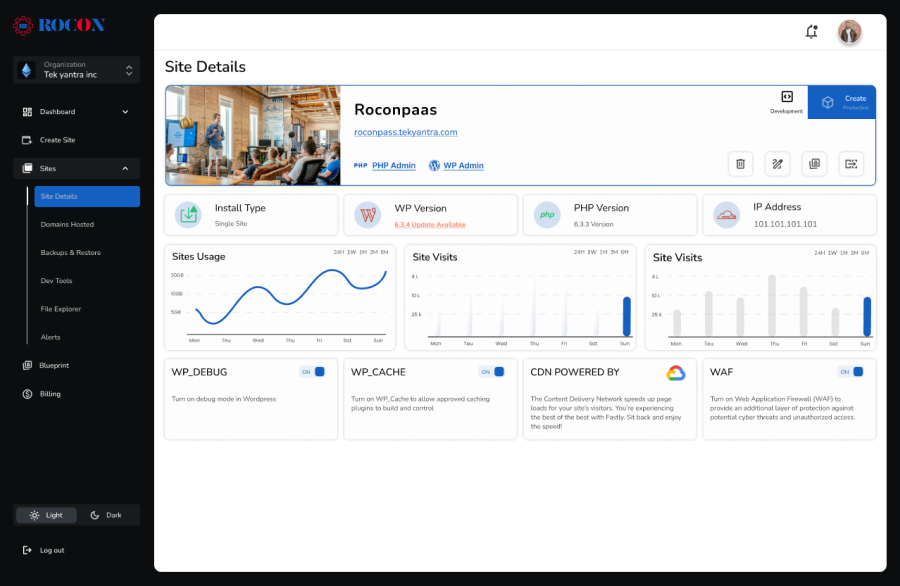
Rocon takes WordPress hosting to the next level with a container-based architecture that isolates each website. This design ensures consistent speed, stability, and security, even during sudden traffic spikes, making it an excellent choice for businesses, developers, and agencies that need reliable performance.
Unlike traditional shared hosting, where multiple sites compete for the same resources, Rocon provides each website with dedicated containers. This guarantees consistent performance, enhanced reliability, and better security for every site.
The platform combines container technology, auto-scaling, and SSD storage, all optimized for WordPress. It is designed for professionals who want high performance and automation without unnecessary complexity, offering a modern, cloud-native alternative to traditional hosting providers like GoDaddy.
| Product | Best For | Key Benefits |
|---|---|---|
| Managed WordPress Hosting | Bloggers, small businesses | Fast, secure, containerized WordPress hosting |
| Agency White-Label Hosting | Agencies, freelancers | Custom branding, client management dashboard |
| Enterprise Hosting | High-traffic sites, WooCommerce stores | Auto-scaling, dedicated resources, uptime guarantee |
| Developer Hosting | Developers, tech teams | SSH access, staging, Git integration |
Rocon starts at $1.99 per month while providing enterprise-grade performance and flexibility.
Rocon makes migrating your WordPress site from GoDaddy or any other host effortless and fully seamless. Your files, databases, and content are transferred safely with minimal downtime, ensuring your site stays live throughout. The process is smooth and stress-free, helping you leave behind slow performance, hidden costs, and limited support.
| Pros | Cons |
| Scalable container-based architecture | This is only for WordPress CMS |
| Enterprise-level performance and security | |
| Excellent uptime and strong security |

Kinsta is a high-end managed WordPress hosting for those who care about speed, automation, and reliability. Built on Google Cloud’s fastest C2 machines, Kinsta gives you exceptional uptime and lightning-fast performance for businesses, WooCommerce stores, and large websites.
It’s developer-friendly and perfect for teams that need robust tools and advanced site management. With daily backups, one-click staging, and automatic scaling, Kinsta will keep your site secure and performing even during traffic spikes.
| Pros | Cons |
| Excellent uptime and speed | Higher pricing than most alternatives |
| Robust tools for developers and agencies | Not ideal for small blogs or hobby sites |
| Daily backups and security monitoring |

WP Engine is one of the most respected names in managed WordPress hosting for businesses and brands that require performance and reliability. Built on a modern infrastructure, it has enterprise-level speed, security and scalability to make managing WordPress sites a breeze.
The Platform comes equipped with EverCache technology – that really does deliver on the promise of lightning-fast load times even when you’re in the midst of heavy traffic. And alongside features like automatic plugin updates, real-time threat detection, and daily backups WP Engine makes sure your website is always running at its best and is as secure as possible at all times.
| Pros | Cons |
| Enterprise-level performance and security | Higher cost than standard shared hosting |
| Excellent support from WordPress-certified experts | Limited flexibility compared to some cloud-based hosts |
| Ideal for agencies and eCommerce |

Hostinger stands out as a budget-friendly GoDaddy alternative, offering affordable yet reliable hosting solutions designed for beginners and small businesses. Despite its low-cost plans, Hostinger delivers impressive performance, thanks to its LiteSpeed-powered infrastructure and globally distributed data centers.
The platform combines ease of use, fast speeds, and essential security features—making it a great fit for users who want strong hosting performance without overspending. With its custom HPanel dashboard and one-click WordPress installation, even non-technical users can launch and manage websites effortlessly.
| Pros | Cons |
| Excellent value for money | Limited advanced features for developers |
| Simple setup and management | Performance may drop on the cheapest plan |
| Good speed for entry-level sites |

Bluehost is one of the most trusted names in the hosting industry and a WordPress.org-recommended provider, making it an excellent GoDaddy alternative for users who value simplicity, reliability, and affordability.
It’s designed to help beginners launch their websites effortlessly with one-click WordPress installation, a free domain for the first year, and an intuitive dashboard that streamlines website management. Whether you’re building a blog, a small eCommerce store, or a business site, Bluehost offers a smooth experience from setup to scaling.
| Pros | Cons |
| Beginner-friendly and easy to use | Performance can be inconsistent on entry-level shared plans |
| Affordable hosting plans | Limited advanced developer tools |
| Strong WordPress integration |

SiteGround has earned a reputation as one of the most reliable managed WordPress hosting providers, known for its exceptional customer support and in-house performance tools. It’s a perfect alternative to GoDaddy for users who want a hosting experience that blends speed, security, and service excellence.
Powered by Google Cloud infrastructure, SiteGround ensures remarkable uptime and fast website loading speeds across the globe. Their SG Optimizer plugin is designed to enhance WordPress performance through caching, image compression, and smart front-end optimizations.
| Pros | Cons |
| Excellent customer support | Slightly higher renewal rates |
| Reliable uptime and strong performance | Storage limits on lower plans |
| Advanced security and optimization tools |

Cloudways stands out as a powerful managed cloud hosting platform that bridges the gap between flexibility and convenience. Unlike traditional hosts like GoDaddy, Cloudways lets users choose from top-tier cloud infrastructure providers such as AWS, Google Cloud, DigitalOcean, Vultr, and Linode, giving complete control over performance and scalability.
Built with developers and tech-savvy users in mind, Cloudways offers a fully managed environment while still allowing deep customization. Users benefit from dedicated resources for every site, ensuring stable performance even under heavy workloads. Its pay-as-you-go billing model means you only pay for the resources you use—making it both cost-effective and scalable.
| Pros | Cons |
| Full cloud flexibility | Not beginner-friendly |
| Pay-as-you-go pricing | Requires some technical knowledge for advanced setups |
| Excellent performance under heavy traffic |

ScalaHosting is a powerful GoDaddy alternative that combines affordability with advanced hosting control. Known for its innovative SPanel technology, ScalaHosting eliminates expensive cPanel licensing fees while offering a faster, more efficient control panel experience. It bridges the gap between shared and VPS hosting, giving users the performance of a managed VPS at nearly shared-hosting prices.
With fully managed VPS servers, users enjoy dedicated resources, enhanced speed, and advanced security—all without needing deep technical knowledge. ScalaHosting also includes daily backups, a dedicated IP, and built-in cybersecurity tools to protect against online threats.
| Pros | Cons |
| Affordable managed VPS | VPS may be overkill for small personal blogs |
| Scalable and secure hosting | Some learning curve for new users |
| Eliminates expensive cPanel licensing fees |
Before choosing among different GoDaddy hosting alternatives, it helps to understand how hosting has evolved over-time. Earlier setups were built for simplicity and affordability, but today’s websites often demand more consistent performance and flexibility.
Many providers, including GoDaddy, rely on shared hosting where multiple websites use the same server resources. This works fine for smaller sites, but as traffic grows, performance can become less predictable since resources are shared across users.
Managed WordPress hosting is designed to simplify things by handling updates, caching, and basic optimizations for you. It offers a smoother experience compared to traditional setups and is often a better fit for websites that are starting to scale.
More recent hosting models use container-based infrastructure, where each website runs in its own isolated environment. This setup helps maintain steady performance and reduces the chances of one site affecting another. It also allows resources to adjust more smoothly as traffic changes.
| Feature | Traditional Hosting | Modern Hosting |
|---|---|---|
| Resource Usage | Shared across sites | Isolated per site |
| Performance | Can fluctuate | More stable |
| Scaling | Limited and manual | Flexible and smoother |
| Optimization | Basic setup | Built-in tools |
| Management | More manual steps | Simplified workflow |
As your website grows, the limitations of older hosting setups can become more noticeable. Choosing a platform that aligns with your future needs can help avoid performance issues later on. Some newer managed WordPress platforms, such as Rocon, follow this modern approach by focusing on stability and scalability, making them worth considering as your site evolves.
Switching from GoDaddy is not just about finding a lower price. The goal is to select a hosting platform that supports your growth, whether you run a WordPress blog, an online store, or manage multiple client sites. The right host can improve website speed, SEO, and overall user experience.
Here are the most important factors to consider when choosing a GoDaddy alternative:
Website speed affects SEO rankings, user engagement, and conversions. Modern alternatives often use advanced technologies such as container-based hosting and NVMe SSD storage to deliver consistent performance even under high traffic.
Your host should grow with your website. Look for platforms that handle traffic spikes automatically and allow seamless upgrades without downtime or complex migrations.
Strong security is essential. Many top hosts provide multi-layer protection, including malware scanning, real-time monitoring, automated backups, and isolation between sites to reduce risks.
A hosting platform should simplify site management. Features like one-click WordPress installation, an intuitive dashboard, and easy domain management make daily operations smoother.
Even brief downtime can result in lost traffic and revenue. Seek hosts that guarantee reliable uptime, ideally 99.99 percent or higher.
Reliable support is crucial. The best hosts offer round-the-clock access to WordPress experts who can resolve technical issues quickly and efficiently.
Consider the full package, not just the price. A plan that includes performance tools, security features, backups, and support can offer much better long-term value than a cheaper option.
If you manage multiple client sites or need staging environments, backups, and white-label features, check that your host provides professional tools to make workflow efficient and secure.
Choosing the right hosting provider is essential for website performance, security, and long-term growth. While GoDaddy is popular, it can fall short for users who need faster speeds, scalable infrastructure, advanced WordPress features, or reliable support.
Exploring GoDaddy alternatives ensures your hosting setup matches your website’s needs without compromising stability or performance. Modern managed WordPress platforms built on container technology can offer isolated environments, automated backups, free SSL, and consistent uptime, all of which make website management simpler and more secure.
This approach is especially useful for agencies, growing WordPress businesses, and sites handling high traffic or multiple clients. Switching to a more robust host can improve loading times, enhance security, reduce technical issues, and give you confidence that your site is always ready for visitors.
Evaluating the right GoDaddy alternative lets you focus on growing your website while ensuring it runs reliably and efficiently.
Yes. Many hosting and domain providers offer lower renewal fees and easier domain transfer options compared to GoDaddy, which is known for high renewal prices and hidden costs. Alternatives like Namecheap, Cloudflare, and Namesilo provide more transparent renewal pricing and affordable domain transfers, and you can smoothly migrate your domains and DNS settings from GoDaddy with most registrars.
A reliable alternative to GoDaddy for both domain registration and hosting includes Namecheap for domains, thanks to lower renewal rates and free WHOIS privacy, and managed WordPress hosts like Rocon, Bluehost, and SiteGround for hosting, offering better performance, scalable infrastructure, and 24/7 support.
Top web hosting alternatives to GoDaddy that deliver better performance and value include Rocon (container-based WordPress hosting with strong performance and expert support), Hostinger (affordable, fast LiteSpeed hosting), Bluehost (WordPress-recommended, beginner-friendly), SiteGround (reliable support and speed optimization), Kinsta (premium performance), and Cloudways (cloud flexibility and scalable resources).
Cloud hosting alternatives to GoDaddy include Cloudways, which lets you choose from leading cloud providers like AWS, Google Cloud, DigitalOcean, Vultr, and Linode for flexible, scalable cloud hosting, and platforms like Rocon (modern container hosting designed for WordPress). These options provide superior performance, automatic scaling, developer tools, and better price transparency compared to GoDaddy’s traditional shared/cloud offerings.
James is a WordPress hosting and cloud technology expert with years of experience helping businesses find better performance, scalability, and value beyond traditional providers. At Rocon, he writes practical guides that simplify hosting decisions, compare top alternatives, and help users optimize websites for speed, security, and cost-effectiveness.
Elevate your WordPress hosting with 30-day money-back guarantee, free migration, and 24/7 support.
Sign Up Today

Before You Go… Get 1 Month FREE on Rocon Hosting!

Experience lightning-fast speeds

No downtime or hidden fees

Dedicated 24/7 expert support


Leave a Reply