7 Best Cloudways Alternatives & Competitors in 2026
August 5, 2025 by Adam


August 5, 2025 by Adam


Cloudways alternatives are becoming a hot topic as more website owners rethink what they truly need from their hosting provider. In today’s fast-paced digital landscape, hosting isn’t just about keeping your site online—it’s about speed, reliability, scalability, and the kind of support that actually helps you grow.
Cloudways has built a strong reputation as a managed hosting solution, especially among developers, agencies, and technically inclined users. Its flexibility and cloud-based infrastructure make it a powerful option—but it’s not always the perfect fit for everyone.
As your business evolves, your hosting requirements can shift. You might find yourself asking whether your current setup is still cost-effective, easy to manage, or aligned with your long-term goals. For many users in 2026, concerns around pricing complexity, the absence of built-in email hosting, and a steeper learning curve are driving the search for better alternatives.
That’s where this guide comes in. We’ll explore the best Cloudways alternatives based on real-world performance, ease of use, features, pricing, and scalability—helping you find the right fit whether you’re a developer, agency, startup, or solo entrepreneur.
Cloudways offers a flexible and powerful hosting setup, but it isn’t the right fit for every user. As your website grows—or if you’re just getting started—you may run into a few limitations that make exploring alternatives worthwhile.
While the platform is feature-rich, its interface and settings can feel overwhelming if you’re not familiar with server management or DevOps concepts. Beginners often prefer simpler dashboards with guided setups and fewer technical decisions.
Although Cloudways uses a pay-as-you-go model, costs can rise faster than expected—particularly when using premium providers like Amazon Web Services or Google Cloud Platform. Managing multiple websites or scaling resources can further increase your monthly bill.
Cloudways is a managed platform, which means you don’t get full root access to your server. While this improves security and simplicity, it can be restrictive for advanced users who want complete control over server configurations or custom setups.
Even though your site runs on third-party cloud infrastructure, you’re still tied to the Cloudways platform for key functions like server management, backups, firewall settings, and updates. This layer of dependency can limit flexibility for advanced users who want direct control.
Cloudways support is generally responsive for basic issues, but when it comes to complex, server-level troubleshooting, the experience may not always meet expectations. Users with mission-critical applications often look for more hands-on, specialized support.
Things to Look for in a Cloudways Alternatives
When looking for other options, think about:
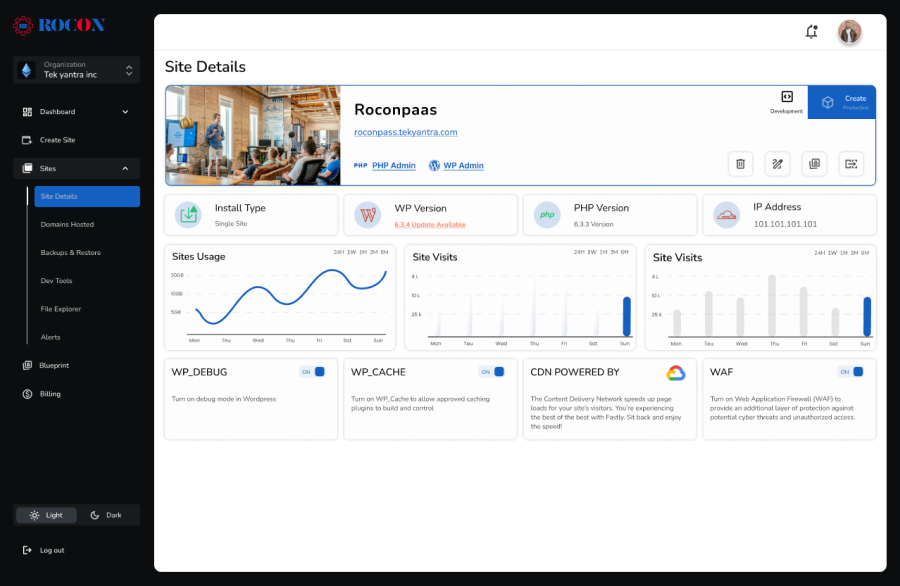
Rocon is a next-generation managed hosting platform built specifically for WordPress, WooCommerce, and modern web applications. It stands out with its container-based architecture and auto-scaling capabilities, making it an excellent choice for high-traffic websites and performance-driven projects.
Unlike traditional hosting environments, Rocon provides true isolation for every website using container technology. This means your site’s performance and security remain unaffected by other users on the same server—eliminating the common “noisy neighbor” problem. The platform also integrates powerful DevOps tools, Git-based deployment, and seamless migration options, making it ideal for teams that prioritize speed, scalability, and workflow efficiency.
Ideal for: Agencies, startups, and developers who need a high-performance hosting solution with flexibility, scalability, and modern infrastructure.
Pricing: Plans start at just $1.99/month, making it a budget-friendly option for growing websites.

Kinsta is a premium managed WordPress hosting platform built on the powerful infrastructure of Google Cloud Platform, specifically using high-performance C2 machines. It’s designed for users who prioritize speed, scalability, and security—making it a strong choice for developers, agencies, and growing businesses that demand a reliable hosting environment.
Unlike traditional shared hosting, Kinsta uses a container-based architecture that isolates each website. This ensures consistent performance, better resource allocation, and improved security. As a result, your WordPress site can handle traffic growth smoothly while maintaining excellent uptime and stability.
What truly sets Kinsta apart is its premium support and proactive approach to performance. Their 24/7 team of WordPress experts is known for fast, knowledgeable assistance, helping users with everything from optimization to troubleshooting. Combined with automatic daily backups and a hack-fix guarantee, Kinsta offers a worry-free hosting experience.
Ideal For: Enterprise-level WordPress websites, high-traffic blogs, and large eCommerce businesses that require top-tier performance and reliability.
Pricing: Plans start at $30/month, reflecting its premium infrastructure and managed services.

Rocket.net is a high-performance, edge-optimized managed WordPress hosting platform built for speed, reliability, and ease of use. Powered by Cloudflare Enterprise, it delivers your website from the nearest global data center, ensuring exceptionally fast load times and strong security—without requiring any manual configuration.
What truly sets Rocket.net apart is its simplicity. Everything is pre-configured for optimal performance, including automatic caching, a built-in CDN, real-time security, and one-click staging. You don’t need to install extra plugins or fine-tune technical settings to achieve excellent results—the platform handles it all behind the scenes.
Whether you run a content-heavy blog, a business website, or an eCommerce store, Rocket.net ensures your pages load quickly and perform consistently for every visitor. It’s an ideal choice for users who want enterprise-level performance combined with a clean, beginner-friendly experience.
Ideal For: Content-heavy websites, bloggers, and eCommerce stores that prioritize speed, security, and ease of use.
Pricing: Plans start at $30/month, offering a premium, fully optimized hosting experience.

WP Engine is a premium managed WordPress hosting platform known for its strong emphasis on performance, security, and developer-friendly workflows. It is widely trusted by agencies, enterprises, and high-traffic publishers that require a stable, scalable, and professionally managed hosting environment.
WP Engine takes care of the technical complexities behind the scenes, allowing teams to focus on building, optimizing, and scaling WordPress websites with confidence. Its infrastructure is purpose-built for WordPress, following industry best practices to ensure strong security, high uptime, and excellent Core Web Vitals performance.
One of WP Engine’s biggest advantages is its agency-focused ecosystem. With advanced development tools, structured workflows, and reliable support, it simplifies the process of managing multiple client websites efficiently.
Ideal For: Agencies managing multiple WordPress clients, enterprise websites, and businesses that need reliable performance at scale.
Pricing: Plans start at $30/month, offering a premium hosting experience tailored for professional and agency use.

SiteGround is a well-established hosting provider that offers managed cloud hosting built on the infrastructure of Google Cloud Platform. Known for its reliability, consistent performance, and responsive customer support, SiteGround has become a trusted choice for small to mid-sized businesses and growing digital agencies.
The platform is designed to simplify server management while still delivering strong performance and scalability. SiteGround places a clear focus on speed optimization, security, and ease of use—making it a practical solution for users who want a balance between power and simplicity. Its managed environment reduces technical complexity while still giving enough flexibility to scale WordPress sites and web applications as needed.
Ideal For: Small to mid-sized businesses, startups, and agencies looking for a reliable hosting solution that balances simplicity, performance, and flexibility.
Pricing: Cloud hosting plans start at $100/month, while shared hosting plans begin at just $2.99/month, making it accessible for users with different budget levels.

GridPane is a high-performance WordPress hosting control panel designed for developers, server administrators, and technical agencies who need full control over their infrastructure. Unlike traditional managed hosting providers, GridPane does not provide hosting directly. Instead, it enables users to build and manage their own WordPress-optimized VPS environments on cloud providers such as Linode, Vultr, and DigitalOcean.
This approach offers unmatched flexibility, performance optimization, and customization but requires solid technical expertise. GridPane follows modern DevOps practices and supports advanced workflows for WordPress security, scalability, and automation. It is especially popular among professionals managing high-traffic sites or complex WordPress infrastructures.
Ideal For: Developers, server administrators, and technical agencies who require maximum control over their WordPress infrastructure.
Pricing: Plans start at $50/month for the control panel alone, giving you the flexibility to choose your preferred VPS provider separately.

DigitalOcean App Platform is a fully managed Platform-as-a-Service (PaaS) tailored for developers who build and deploy modern web applications beyond traditional WordPress websites.
It allows teams to launch, scale, and manage applications without worrying about server management or infrastructure setup. The platform supports popular frameworks and runtimes such as React, Node.js, Python, and Docker, making it ideal for modern development workflows.
Designed for simplicity, scalability, and reliability, DigitalOcean App Platform enables startups and development teams to deploy applications quickly while ensuring predictable performance, strong security, and operational stability. It is particularly well-suited for projects that require custom applications or multi-framework solutions.
Ideal For: Developers building custom applications, startups, and teams that require a scalable and managed PaaS environment.
Pricing: Plans start at $5/month for static apps and $12/month for dynamic applications, offering cost-effective options for projects of any size.
| Provider | Starting Price | Ideal For | Highlights |
| Rocon | $1.99/mo | Agencies, DevOps teams | Auto-scaling, Docker, Git, Email |
| Kinsta | $35/mo | Enterprises | Google Cloud C2, APM, Support |
| Rocket.net | $30/mo | Content & eCommerce | Edge speed, security, simplicity |
| WP Engine | $30/mo | Agencies | Dev tools, Genesis, support |
| SiteGround | $2.99–$100/mo | SMBs | UI, support, email, caching |
| GridPane | $50/mo+ | Developers | Root access, VPS management |
| DO App Platform | $5–12/mo | Devs beyond WordPress | Multi-stack, Docker, Git deploy |
Choosing the right Cloudways alternatives depends on your website needs, technical skills, and budget. Each hosting platform has its strengths and is designed for different types of users. By understanding the key differences, you can select a solution that fits your workflow and long-term goals.
If you are a developer, system administrator, or run an agency managing multiple websites, platforms like Rocon and GridPane offer advanced control and flexibility. These solutions provide container-based hosting, root-level server access, Git integration, and DevOps tools that make managing complex or high-traffic sites easier. They are ideal for teams that need full customization and are comfortable with technical setups.
Users who prioritize fast load times and a beginner-friendly interface may prefer Rocket.net or DigitalOcean App Platform. Rocket.net delivers edge-optimized hosting with automatic caching, built-in CDN, and real-time security, while DigitalOcean App Platform supports modern web applications beyond WordPress. Both platforms focus on simplicity and performance, reducing the need for manual server management.
Businesses or agencies managing large WordPress sites can consider Kinsta or WP Engine. These providers offer enterprise-grade infrastructure, dedicated staging environments, automated backups, and expert support. They are designed to handle high traffic, ensure security, and maintain optimal performance, making them suitable for growing companies and professional agencies.
For startups, small businesses, or anyone looking for an affordable but reliable solution, SiteGround provides managed cloud hosting with strong performance, built-in caching, free SSL, and a user-friendly control panel. Its pricing is competitive, and it offers a balance of simplicity, security, and scalability without requiring advanced technical skills.
Ultimately, the best Cloudways alternatives depend on what matters most to you—whether it’s full server control, ease of use, enterprise-level support, speed, or budget-friendliness. By assessing your requirements and comparing features like scalability, performance, security, and support, you can select a hosting solution that aligns with your current and future website needs.
Cloudways continues to be a reliable option in the managed hosting space, offering strong performance, security, and flexibility for WordPress and web applications. However, as website needs evolve, users are increasingly seeking solutions that provide simpler onboarding, integrated tools such as CDN, backups, and email, seamless scaling without technical complications, and clear, predictable pricing.
Modern hosting in 2026 focuses not only on raw performance but also on ease of use, reliability, and the ability to adapt to growing traffic or complex workflows. Exploring Cloudways alternatives can help businesses and developers find hosting that aligns better with their workflow, technical expertise, and long-term goals, ensuring that websites remain fast, secure, and scalable as demands increase.
Many businesses explore Cloudways alternative to gain better cost control, simpler pricing, or more built-in features. While Cloudways offers flexibility, it often requires managing multiple add-ons for backups, security, and performance. Some users also prefer platforms that offer native auto-scaling, container isolation, or WordPress-focused optimization, without relying heavily on third-party cloud providers.
Rocon stands out as one of the most cost-effective alternatives, with plans starting at $1.99 per month. Unlike many managed hosts, Rocon includes essential features such as container-based isolation, performance optimization, and WordPress management tools without unexpected renewal hikes, making it suitable for startups and growing businesses.
For agencies, the best choice depends on workflow needs. Rocon is ideal for agencies that manage multiple WordPress sites and require container-based scalability, isolated environments, and a centralized dashboard. WP Engine may suit agencies focused on enterprise-level client management and premium support, but it comes at a significantly higher cost.
Developers often prefer platforms that provide flexibility and control. Rocon, GridPane, and DigitalOcean are strong options for developers who need access beyond standard WordPress hosting. Rocon offers a balance between developer control and managed infrastructure, especially for teams working with scalable WordPress projects.
Yes. Many alternatives, especially container-based platforms like Rocon, are designed to handle high traffic efficiently. Auto-scaling and isolated resources ensure performance remains stable during traffic spikes, making them suitable for e-commerce, media, and SaaS-style WordPress sites.
Most reputable alternatives offer strong security features such as SSL, firewalls, malware protection, and isolated environments. Container-based hosts provide additional protection by preventing cross-site vulnerabilities common in shared hosting setups.
Adam is a WordPress hosting expert with over 6 years of experience in managed hosting, server infrastructure, and performance optimization. At Rocon, he focuses on simplifying complex hosting concepts, helping businesses choose the right solutions, and ensuring websites run faster, safer, and smarter.
Elevate your WordPress hosting with 30-day money-back guarantee, free migration, and 24/7 support.
Sign Up Today

Before You Go… Get 1 Month FREE on Rocon Hosting!

Experience lightning-fast speeds

No downtime or hidden fees

Dedicated 24/7 expert support


Leave a Reply