GoDaddy Website Builder vs WordPress: Which One Wins 2026?
June 25, 2026 Written by Maria


June 25, 2026 Written by Maria


Choosing between GoDaddy Website Builder vs WordPress depends on how quickly you want to launch, how much control you need, and how far you expect the website to grow. GoDaddy Website Builder is designed for speed and simplicity. It gives beginners an all-in-one setup with hosting, templates, and a drag-and-drop editor, which makes it useful for getting a basic business website online without much technical work.
WordPress takes a different approach. It gives you far more flexibility over design, functionality, SEO, and long-term scalability, which is why it’s often the better option for businesses, bloggers, and online stores that need room to grow. In this guide, we’ll compare GoDaddy website builder vs WordPress across ease of use, customization, pricing, SEO, eCommerce, and overall website control so you can choose the platform that fits your goals best.
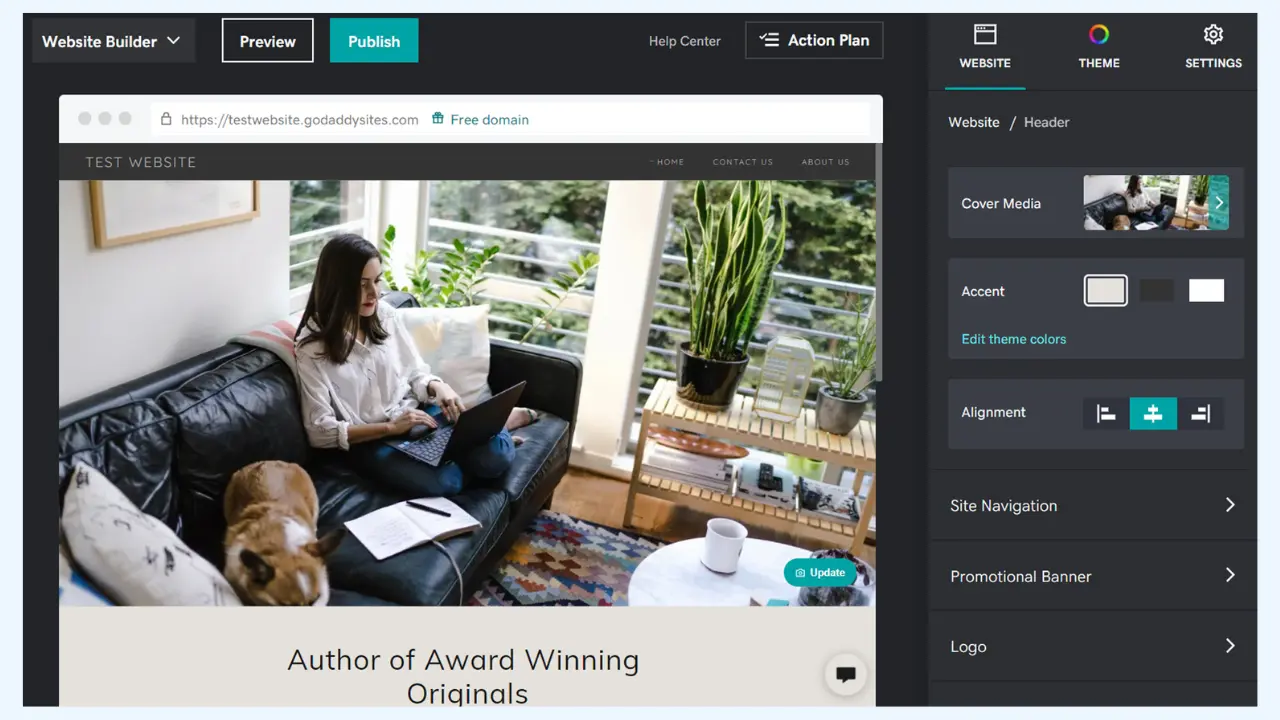
GoDaddy Website Builder is a drag-and-drop website builder designed for beginners and small businesses that want to get a website online quickly without dealing with technical setup. It comes with pre-built templates, built-in hosting, and an easy-to-use editor, making it a convenient option for users who want a simple all-in-one platform for portfolios, local business sites, and service-based websites.
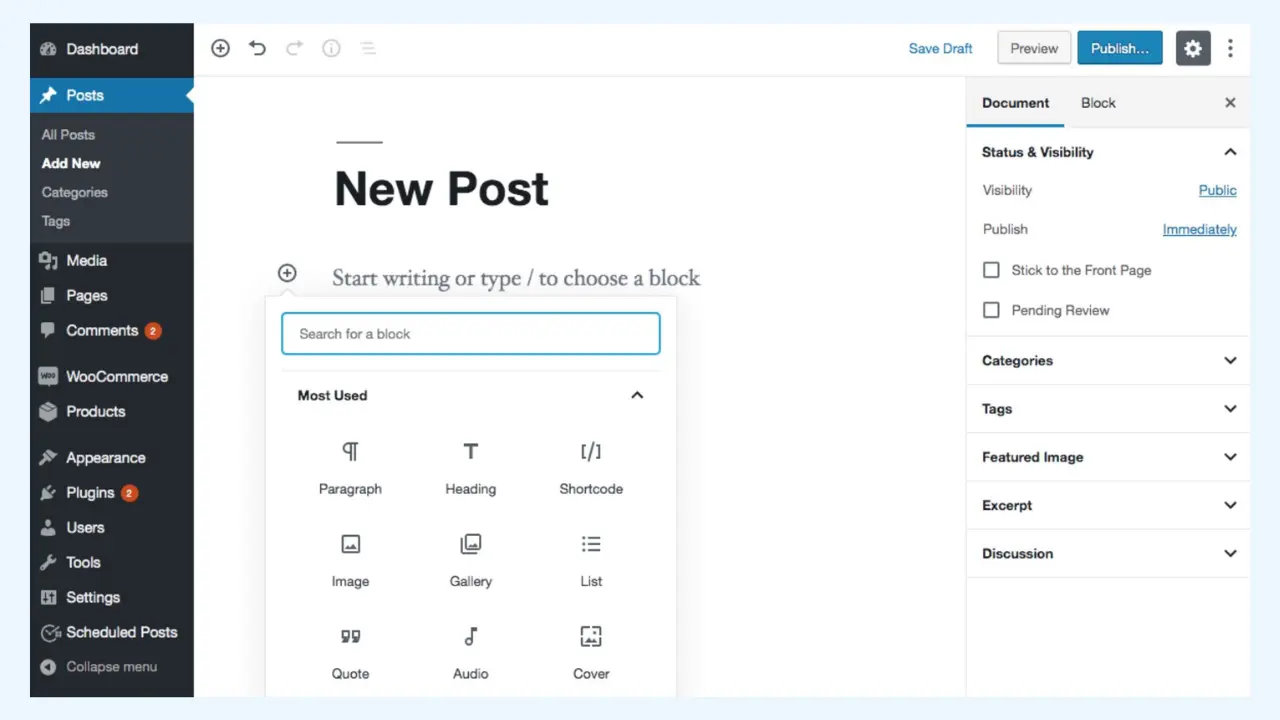
WordPress is an open-source content management system (CMS) known for its flexibility, scalability, and broad use across the web. It can power blogs, business websites, portfolios, membership platforms, and full eCommerce stores, while giving users far more control over design, content structure, plugins, and long-term site growth than most website builders.
GoDaddy Website Builder is designed for non-technical users who want to create a website quickly without dealing with setup, hosting, or coding. Its drag-and-drop builder makes it easy to add sections, edit text, upload images, and customize pages with very little learning required.
WordPress has more of a learning curve, but it gives users far more control over how a website looks and works. Beginners can still make it easier to use by installing page builders such as Elementor or WPBakery, which add drag-and-drop editing on top of WordPress’s core functionality.
GoDaddy Website Builder comes with pre-made templates that help users launch a site quickly, but the customization options are fairly limited. In most cases, you can adjust things like colors, fonts, images, and basic layout sections, but you don’t get deep control over how the site works. You also can’t install third-party plugins or advanced custom features, which makes it less flexible if your website needs grow over time.
WordPress offers far more customization and flexibility. You can choose from thousands of themes and plugins, change layouts, add advanced features, and tailor the website to match your exact needs. If needed, developers can also edit code, customize CSS, and build custom functionality, which makes WordPress a much better fit for websites that need room to expand or require a more unique design.
Winner: WordPress, it’s the stronger option if customization, flexibility, and long-term scalability matter to you.
| Feature | GoDaddy Website Builder | WordPress |
| Basic Plan | $9.99/month | $1.99/month (Hosting costs extra) |
| Standard Plan | $14.99/month | Hosting from $5-$25/month |
| E-commerce Plan | $19.99/month | WooCommerce (Free, but extensions may cost) |
| Hosting Included | ✅ Yes | ❌ No (Self-hosted) |
| Domain Included | ✅ Yes | ❌ No (Depends on hosting) |
GoDaddy Website Builder includes basic SEO tools that are enough for simple websites and local business pages. You can edit things like page titles, meta descriptions, and some keyword-related settings, which helps your site show up in search results. However, it doesn’t offer the same level of control or advanced optimization options that larger websites often need for long-term SEO growth.
WordPress is generally much stronger for SEO and performance optimization because it gives you more control over both your content and technical setup. With plugins such as Yoast SEO and Rank Math, you can manage keyword optimization, XML sitemaps, schema markup, redirects, meta settings, and content analysis much more deeply. WordPress also gives you more flexibility to improve site speed with caching, image optimization, and performance-focused hosting or plugins.
Winner: WordPress for advanced SEO control.
GoDaddy Website Builder includes an e-commerce plan that works well for basic online stores, especially if you want to start selling quickly without dealing with too many setup steps. You can add products, accept payments, and manage a simple storefront from one dashboard. However, the platform is more limited when it comes to advanced store customization, complex product setups, third-party integrations, and long-term scalability.
WordPress becomes much more powerful for online selling when paired with WooCommerce, a free and widely used eCommerce plugin. WooCommerce gives you far more control over your store, including product pages, payment gateways, shipping options, tax settings, checkout customization, and store extensions. It’s also easier to scale as your business grows, whether you’re selling a few products or running a large online store with custom functionality.
Winner: WordPress for powerful e-commerce features.
GoDaddy offers 24/7 customer support, which is helpful if you want direct assistance when something goes wrong or you need help setting up your site. The tradeoff is that its community resources, tutorials, and third-party ecosystem are more limited compared to larger open platforms.
WordPress does not come with official 24/7 support in the same way a hosted website builder does, but it makes up for that with a huge global community, detailed documentation, tutorials, forums, and support from hosting providers, developers, and plugin/theme companies. In most cases, it’s easier to find answers, guides, and troubleshooting help for WordPress because so many people use it.
Winner: It’s a tie. GoDaddy Website Builder is better if you prefer direct customer support, while WordPress is stronger if you value community resources, tutorials, and a larger support ecosystem.
Winner: GoDaddy Website Builder is better if you want hassle-free security and minimal maintenance. WordPress is better if you want more control over security, backups, and how your website is managed.
The right choice in GoDaddy website builder vs WordPress really depends on what you need from your website today and where you expect it to go next. If your goal is to get a clean, functional website online quickly with minimal setup, GoDaddy Website Builder is a practical option. It’s easy to use, beginner-friendly, and works well for small business sites, portfolios, and simple online presences that don’t need much customization.
WordPress is the stronger choice if you want more control, better flexibility, and room to grow over time. It gives you access to a much larger ecosystem of themes, plugins, SEO tools, and eCommerce features, which makes it a better long-term fit for businesses, blogs, and websites that may need more advanced functionality later. In short, GoDaddy Website Builder is great for simplicity and speed, while WordPress is usually the better investment if scalability, customization, and long-term growth matter more.
GoDaddy Website Builder is better if you want the simplest possible way to launch a basic website quickly with minimal setup. WordPress is the better choice if you need more control over design, SEO, plugins, eCommerce, and long-term scalability. For a simple brochure site, GoDaddy can work well, but for growth and flexibility, WordPress is usually the stronger option.
A website builder is better for beginners who want speed, simplicity, and an all-in-one setup, while WordPress is better for users who want customization, stronger SEO control, and the ability to scale beyond a basic site. If your priority is convenience, a builder may be enough. If your priority is flexibility and long-term growth, WordPress is usually the better platform.
GoDaddy Website Builder is a tool for creating and managing a website, while GoDaddy Pro is a separate program built for freelancers, agencies, and professionals who manage multiple client websites and hosting accounts. In short, Website Builder helps you build a site, while GoDaddy Pro helps you manage client projects, products, and services inside the GoDaddy ecosystem.
GoDaddy is the main platform where customers buy domains, hosting, email, and website services. GoDaddy Pro is an added service layer designed for web professionals who manage client accounts, sites, and products more efficiently. It includes tools for client management, consolidated access, and workflow support, whereas standard GoDaddy is focused on individual website and hosting customers.
Choose GoDaddy Website Builder if you want a quick, beginner-friendly site with fewer decisions and minimal maintenance. Choose GoDaddy WordPress if you want more flexibility, better plugin support, stronger SEO options, and room to expand your website over time. For a simple small-business site, the builder may be enough, but WordPress is usually the better fit for long-term growth.
GoDaddy is a popular host but has its downsides. Many users report slower speeds than other hosts and limited customization options on lower tiers. And GoDaddy’s upselling can add up over time especially when adding features that are free with other hosts. Customer support can also be hit or miss which is why some website owners look for other hosts with transparent pricing and better performance.

Elevate your WordPress hosting with 30-day money-back guarantee, free migration, and 24/7 support.
Sign Up Today
November 6, 2026
Sreekar


Before You Go… Get 1 Month FREE on Rocon Hosting!

Experience lightning-fast speeds

No downtime or hidden fees

Dedicated 24/7 expert support

Leave a Reply