Fastest WordPress Hosting in India 2026: 6 Providers Compared
June 11, 2026 Written by Nitish Kumar


June 11, 2026 Written by Nitish Kumar



Picking the best WordPress hosting in India sounds simple until you realise that most of the big comparison articles are written for US audiences. The pricing is in dollars, the data centres are in Virginia, and fast loading speeds means nothing to a visitor on Jio in Pune.
This article is written specifically for Indian websites. We’ve looked at which providers actually have data centres in Mumbai or nearby, what the real INR pricing looks like after year one, and which ones have support that works in IST.
Here are the 6 best options in 2026, with honest pros and cons for each.
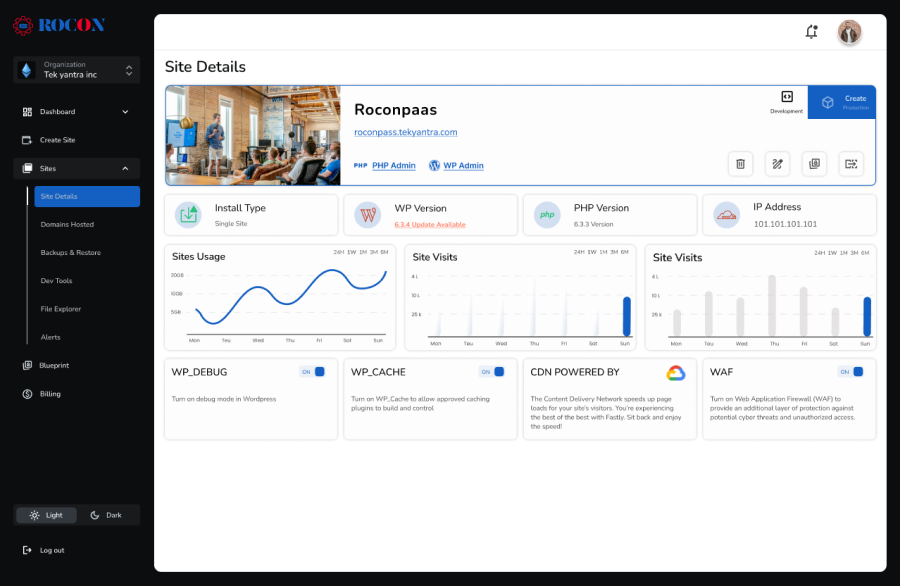
Rocon runs each WordPress site in its own container with dedicated CPU and RAM. That matters in India because most shared hosts put hundreds of sites on the same server, so when someone else gets a traffic spike, your site slows down. Rocon starts at ₹199/month with India (Mumbai) servers, no renewal price hike, and unlimited free migrations. The developer tools (SSH, Git, WP-CLI, staging) are available on every plan, not locked to higher tiers.

Cloudways manages the server for you while you choose the underlying cloud provider. For India, the DigitalOcean Mumbai option is the most popular because it’s fast for Indian visitors and starts at around ₹1,170/month. You pay as you go with no annual contracts and no renewal surprises. The catch: you need to understand concepts like server size, PHP workers, and Redis to get the most out of it. If you’ve never managed a server before, the dashboard will feel unfamiliar.

Kinsta runs on Google Cloud’s premium tier network with a Mumbai data centre. Independent testing puts Kinsta’s TTFB consistently under 200ms for Indian traffic. Pricing starts at around ₹2,500/month for 1 site and 25,000 monthly visits. Every plan includes Cloudflare Enterprise CDN, daily backups, staging, and 24/7 support from WordPress engineers. It’s expensive relative to shared hosting, but at similar long-term costs to SiteGround once you account for renewal pricing.

Rocket.net is a fully managed WordPress host built on Cloudflare’s network. Pages are served from Cloudflare’s edge, which means fast load times globally, but the closest data centre to India is Singapore rather than Mumbai. Starting price is around ₹1,660/month. It’s a strong choice if your audience is split between India and other countries. If your audience is primarily in India, Cloudways with a Mumbai server will typically post better TTFB numbers.

Hostinger is the most affordable option on this list, starting at ₹149/month with a Mumbai data centre. The WordPress Business plan at ₹649/month is the one worth considering: it adds daily backups, staging, and object caching that the cheaper plans leave out. LiteSpeed servers mean solid performance at this price point. The interface is Hostinger’s own hPanel rather than cPanel, which takes an hour to get used to but works fine once you do.

Bluehost is WordPress.org recommended and starts at ₹199/month for Indian users. The setup is genuinely beginner-friendly and the dashboard is clean. The honest downside: Bluehost’s servers are not in India, which adds latency for Indian visitors compared to hosts with Mumbai data centres. Renewal pricing also jumps significantly after year one. It’s worth considering for new sites on a tight budget where the audience is not exclusively Indian.
Here is the full feature by feature comparision for all WordPress hosting providers in India.
| Feature | Rocon | Cloudways | Kinsta | Rocket.net | Hostinger | Bluehost |
|---|---|---|---|---|---|---|
| Starting price | ₹199 | ₹1,170 | ₹2,500 | ₹1,660 | ₹149 | ₹199 |
| India data centre | Yes (Mumbai) | Yes (Mumbai) | Yes (Mumbai) | No | Yes (Mumbai) | Yes (Mumbai) |
| Hosting type | Managed WordPress | Managed cloud | Managed WordPress | Managed WordPress | Shared/Cloud | Shared/Managed |
| Container isolation | Yes | No | No | No | No | No |
| Auto-scaling | Yes | Manual resize | Yes | No | No | No |
| Free migrations | Unlimited | 1 free | Yes | Yes | 1 free | 1 free |
| Staging environment | All plans | All plans | All plans | All plans | Business plan+ | Pro plan+ |
| Git/SSH access | All plans | All plans | All plans | All plans | Business plan+ | No |
| Daily backups | All plans | Configurable | All plans | All plans | Business plan+ | Basic plan |
| Free SSL | Yes | Yes | Yes | Yes | Yes | Yes |
| Support | 24/7 (WordPress) | 24/7 live chat | 24/7 WordPress team | 24/7 live chat | 24/7 multilingual | 24/7 chat/phone |
| Renewal hike | No | No | No | No | Moderate | High |
Speed for Indian visitors comes down to 2 things: where the server is and what the server stack runs on.
For pure TTFB in India, Kinsta consistently posts under 200ms from its Mumbai data centre on Google Cloud’s premium tier network. Cloudways on DigitalOcean Mumbai runs close behind at 250-300ms in independent tests. Rocon’s container-based Mumbai infrastructure delivers sub-200ms response times because each site gets dedicated CPU rather than sharing resources with other sites on the same server.
Hostinger’s LiteSpeed stack is the fastest option under ₹500/month. LiteSpeed processes WordPress requests faster than Apache or Nginx at the same hardware specs, which is why Hostinger punches above its price point on speed tests.
The slowest option on this list for Indian traffic is Bluehost. Its servers are not in India, adding 200ms+ of baseline latency before a single byte reaches your visitor.
Fastest for Indian traffic, ranked:
Most hosting comparison articles skip this. For Indian visitors, server location has a direct impact on page load time because data travels slower over longer distances.
Mumbai is the best data centre location for Indian traffic. Rocon, Cloudways (DigitalOcean option), Kinsta, and Hostinger all have Mumbai servers. Bluehost and Rocket.net do not.
A rough benchmark: a Mumbai-hosted WordPress site typically loads 300-500ms faster for an Indian visitor than the same site hosted in Singapore, and 800ms to 1.2 seconds faster than a site hosted in the US.
On mobile networks specifically, Jio and Airtel’s 4G average latency to Mumbai servers runs around 30-50ms. To Singapore it’s typically 80-120ms. To the US, 200ms+. That difference shows up directly in your Core Web Vitals score.
If most of your visitors are in India, prioritise hosts with Mumbai data centres. If your audience is split globally, a host with a strong CDN (Kinsta’s Cloudflare Enterprise or Cloudways with add-on CDN) compensates for data centre location.
Managed WordPress hosting means the host handles WordPress updates, security patches, backups, and performance tuning. You don’t touch the server. For Indian businesses that want their site to run reliably without a developer on call, managed hosting is the practical choice.
The 3 managed WordPress options on this list with India servers:
Rocon starts at ₹199/month. Fully managed, container-based, Mumbai servers. Every plan includes staging, daily backups, and a team that handles WordPress problems, not just server problems.
Kinsta starts at ₹2,500/month. Premium managed WordPress on Google Cloud Mumbai. The most comprehensive managed offering on the list, at the highest price.
Rocket.net starts at ₹1,660/month. Fully managed on Cloudflare’s network. No Mumbai server, but strong edge caching partially compensates for the Singapore location.
Cloudways is managed cloud hosting rather than managed WordPress hosting. You still need to handle some server configuration yourself.
Before choosing the best WordPress hosting in India for small business, you need to evaluate the key factors that impact website performance, security and scalability. Here are the top considerations:
If you’re an agency or business managing multiple WordPress sites and need container-level isolation with auto-scaling: Rocon.
If you’re technical and want cloud infrastructure flexibility without managing raw servers: Cloudways on DigitalOcean Mumbai.
If performance is the only consideration and budget isn’t: Kinsta.
If you’re starting out and INR pricing matters more than advanced features: Hostinger’s Business plan at ₹649/month gives you the tools you’ll actually need.
If you want the simplest possible setup for a first site: Bluehost, knowing the limitations on India-specific speed.
One last thing: whatever host you pick, test it on staging before going live and run a speed test from an Indian IP (GTmetrix lets you choose a Mumbai test location). Numbers from an Indian server matter more than benchmarks from New York.
Best hosting depends on your needs. For high performance, Kinsta and Cloudways are good. For cheap hosting, Hostinger and Bluehost are affordable. For managed WordPress hosting, Rocon and Rocket are good.
Hosting with an Indian data center reduces latency, loads faster and improves SEO for Indian visitors. This means better user experience and lower bounce rates.
Yes, managed WordPress hosting has better performance, security, automatic updates and expert support than shared hosting. Good for businesses and high traffic websites.
Server location, uptime, performance, security features (SSL, backups, malware protection), scalability, customer support and pricing.
To choose the best WordPress hosting in India for your small business, look for fast performance, strong security, local server support, and helpful customer service. Go with a provider that’s easy to use and fits your budget—because as a small business, you need reliability without all the tech headaches.
The best WordPress hosting in 2026 depends on what you actually need. Cloudways is great for overall performance, Hostinger is the go-to if you are on a budget, Kinsta is worth it for high-traffic premium sites, and SiteGround works well for beginners. For businesses that want a fully managed WordPress experience without touching servers at all, Rocon is built exactly for that. It handles everything so you can focus on your website, not your infrastructure.
Good WordPress hosting comes down to a few basics: fast load times, automatic updates, daily backups, solid security, and support that actually helps. Providers like Kinsta, WP Engine, and Cloudways cover most of this well. Rocon covers all of it as a WordPress hosting platform, meaning your site is provisioned, managed, and scaled automatically. You never have to log into a server or worry about configuration.

Elevate your WordPress hosting with 30-day money-back guarantee, free migration, and 24/7 support.
Sign Up Today


Before You Go… Get 1 Month FREE on Rocon Hosting!

Experience lightning-fast speeds

No downtime or hidden fees

Dedicated 24/7 expert support

Leave a Reply